EasyManua.ls Logo

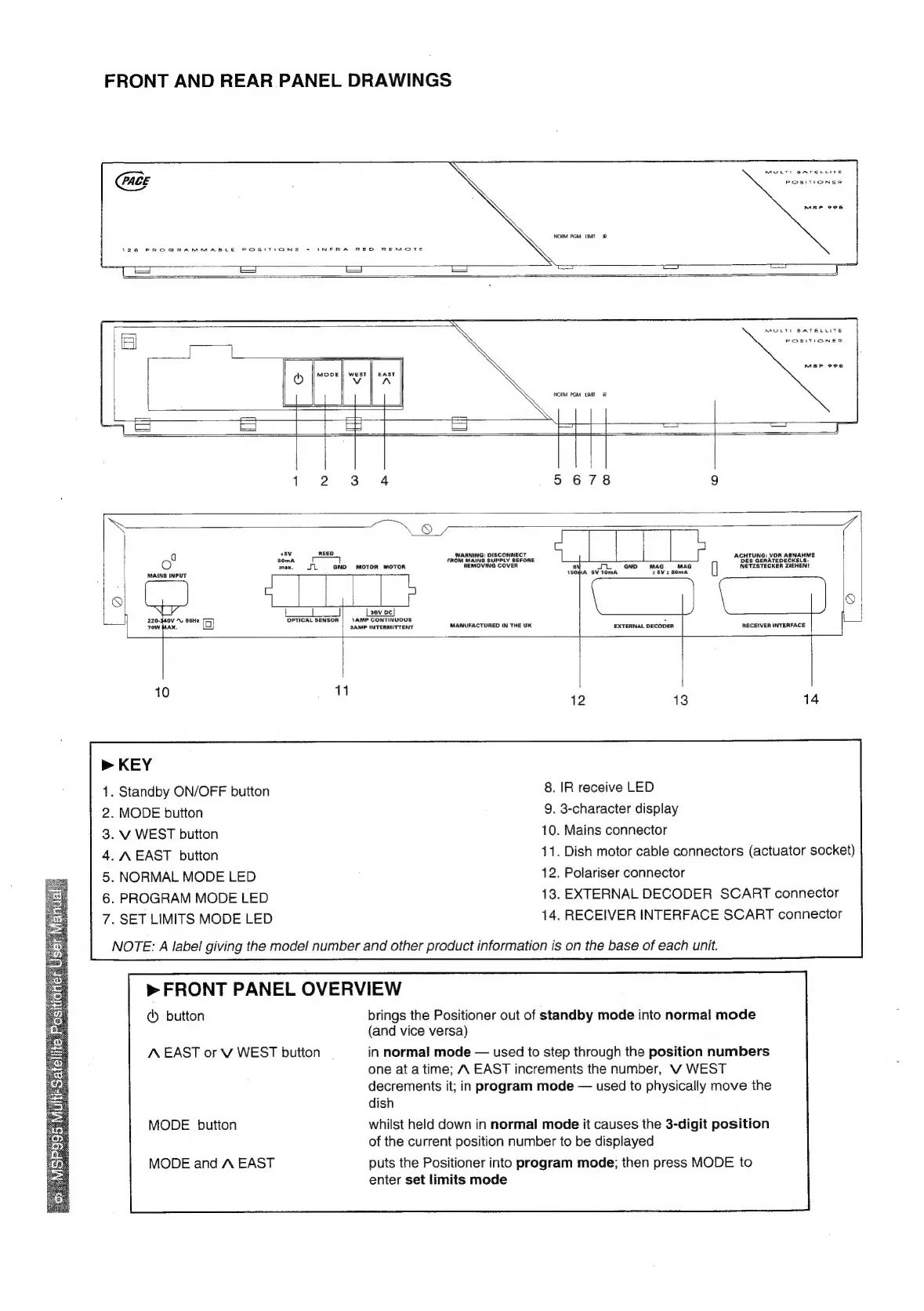
Pace MSP 995 - UNIT PANEL LAYOUT; Front and Rear Panel Drawings; Front Panel Button Functions

Default Icon
14 pages
Print Icon
To Next Page IconTo Next Page
To Previous Page IconTo Previous Page
Loading...
FRONT
AND
REAR
PANEL
DRAWINGS
1
2
3.
4
5
678
9
och
ae
Lapse
aay
heap
re
ACHTUNG:
VOR
ABNAHME
q
5OmA
FROM
MAINS
SUPPLY
SEFORE
Bis
GenATEDECKELS.
max.
JL
=
GND
MOTOR
MOTOR
REMOVING
COVER
si
Tl
GND
MAG
=
MAG
NETZSTECKER
ZIEHEN!
MAINS
INPUT
180;pA
SV
10mA
+8V2
80mA
3ev
pc
|
220-440V
“y
SoHz
OPTICAL
SENSOR
|
1AMP
CONTINUOUS
:
AX.
SAMP
INTERMITTENT
MANUFACTURED
IN
THE
UK
EXTERNAL
DECODER
RECEIVER
INTERFACE
10
11
12
13
14
>
KEY
.
Standby
ON/OFF
button
8.
IR
receive
LED
.
MODE
button
9.
3-character
display
.
V
WEST
button
10.
Mains
connector
.
A
EAST
button
41.
Dish
motor
cable
connectors
(actuator
socket)
.
NORMAL
MODE
LED
12.
Polariser
connector
.
PROGRAM
MODE
LED
13.
EXTERNAL
DECODER
SCART
connector
.
SET
LIMITS
MODE
LED
14.
RECEIVER
INTERFACE
SCART
connector
NOTE:
A
label
giving
the
model
number
and
other
product
information
is
on
the
base
of
each
unit.
>
FRONT
PANEL
OVERVIEW
@
button
brings
the
Positioner
out
of
standby
mode
into
normal
mode
(and
vice
versa)
‘EAST
or
V
WEST
button
in
normal
mode
used
to
step
through
the
position
numbers
one
at
atime;
A
EAST
increments
the
number,
V
WEST
decrements
it;
in
program
mode
used
to
physically
move
the
dish
MODE
button
whilst
held
down
in
normal
mode
it
causes
the
3-digit
position
of
the
current
position
number
to
be
displayed
MODE
and
A
EAST
puts
the
Positioner
into
program
mode;
then
press
MODE
to
enter
set
limits
mode