©2001 PACE Inc., Laurel, Maryland Page 15 of 20
All Rights Reserved
c) Press and release the Scroll Down (
) Key to decrease the stored High
Temperature Limit. Press and release the Program Key to proceed to the next
step.
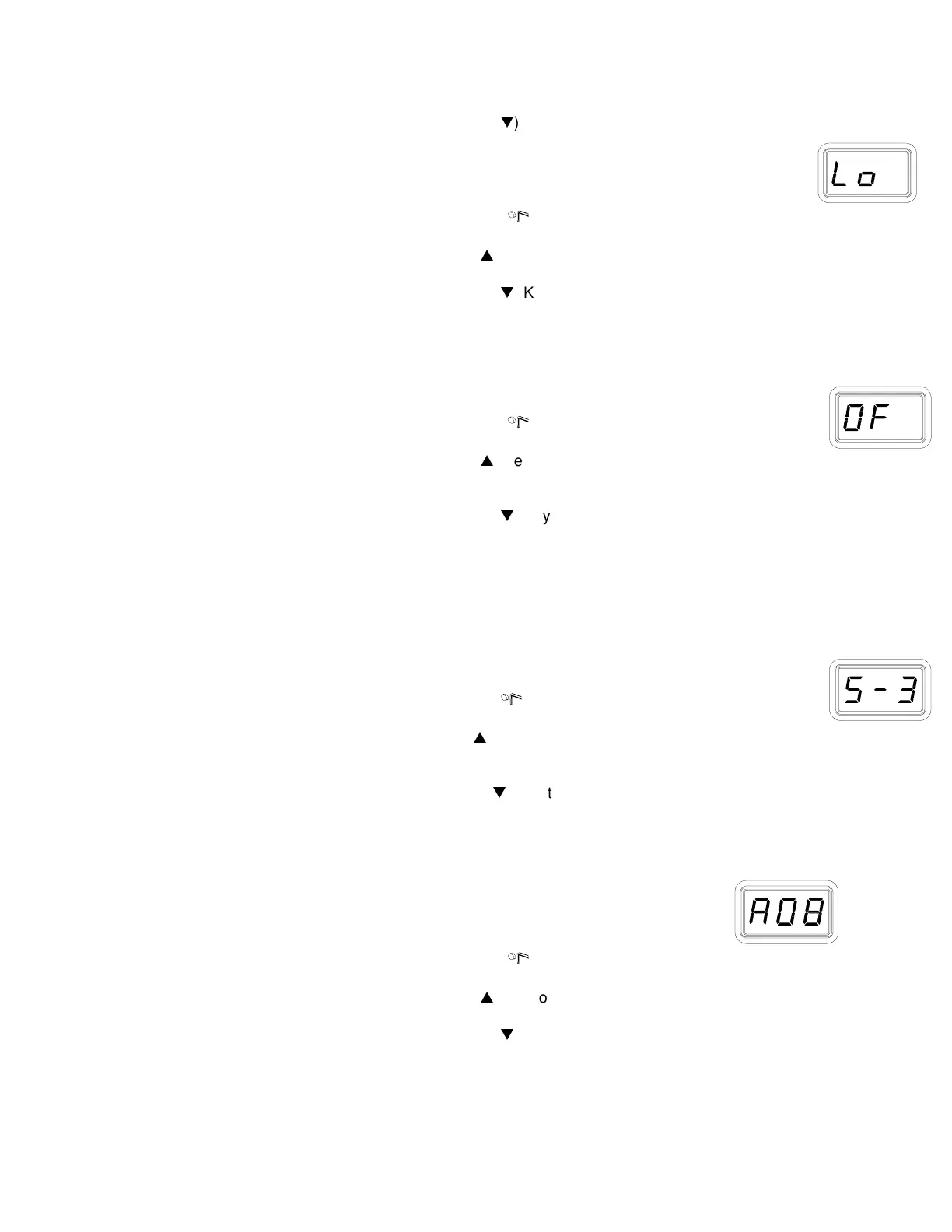
10. The LED Display now shows the stored default Low ("Lo") Temperature Limit with the
display alternating to show "Lo" and the stored limit. Choose one of the following:
a) Press and release the Program Key (
) to keep the stored Low Temperature
Limit (204°C, 400°F).
b) Press and release the Scroll Up (
) Key to increase the stored Low Temperature
Limit. Press and release the Program Key to proceed to the next step.
c) Press and release the Scroll Down (
) Key to decrease the stored Low
Temperature Limit. Press and release the Program Key to proceed to the next
step.
Offset Constant
11. The LED Display now shows the stored Offset Constant with the display alternating to
show "OF" and the stored Offset Constant. Choose one of the following:
a) Press and release the Program Key (
) to keep the currently stored Offset
Constant.
b) Press and release the Scroll Up (
) Key to increase the stored Offset Constant.
An Offset Constant of 0-133°C (0-240°F) can be stored. Press and release the
Program Key to proceed to the next step.
c) Press and release the Scroll Down (
) Key to decrease the stored Offset
Constant. Press and release the Program Key to proceed to the next step.
NOTE: If the attached handpiece is disconnected when the system is powered up, any stored
Offset Constant is reset to zero. The Offset Constant must be entered again in the Set-Up Mode.
Temperature Setback
12. The LED Display now shows the stored Temperature Setback time as "S-X" (x=0 thru 9).
Time is shown as tens of minutes (e.g., "S-3" equals 30 minutes). A display of "S- 0"
indicates that Setback is disabled. Choose one of the following:
a) Press and release the Program Key (
) to keep the currently stored
Temperature Setback time.
b) Press and release the Scroll Up (
) Key to enable and/or increase the stored
Temperature Setback time. Press and release the Program Key to proceed to the
next step.
d) Press and release the Scroll Down (
) Key to decrease or disable the stored
Temperature Setback time. Press and release the Program Key to proceed to the
next step.
Auto Off
13. The LED Display now shows the stored Auto Off time as "AOx" (x=0 thru 9).
Time is shown as tens of minutes (e.g., "AO3" equals 30 minutes). A
display of "AO0" indicates that Auto Off is disabled. Choose one of the
following:
a) Press and release the Program Key (
) to keep the currently stored Auto Off
time.
b) Press and release the Scroll Up (
) Key to enable and/or increase the Auto Off.
Press and release the Program Key to proceed to the next step.
e) Press and release the Scroll Down (
) Key to decrease or disable the stored
Auto Off time. Press and release the Program Key to proceed to the next step.
Temperature Display Impedance



 To Next Page