Getting to know your computer - 7
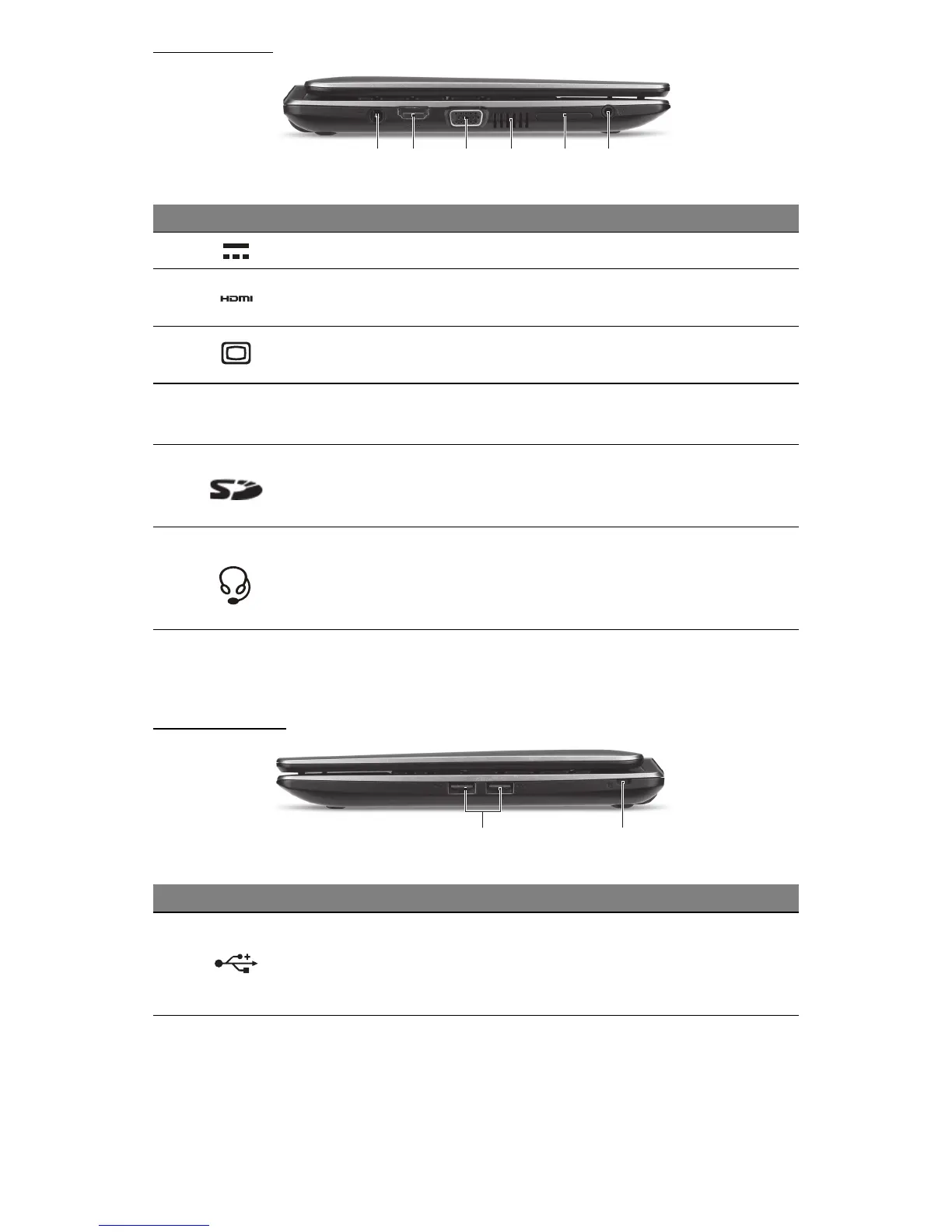
LEFT VIEW
21 3 54 6
Note: The External display (VGA) port and the HDMI port cannot be
used at the same time.
RIGHT VIEW
1 2
# Icon Item Description
1 DC-in jack Connects to your computer’s AC adapter.
2 HDMI port
Supports high-definition digital video
connections.
3
External display
(VGA) port
Connects to a display device (e.g., external
monitor, LCD projector).
4
Ventilation and
cooling fan
Allows the computer to stay cool.
- Do not cover or obstruct the openings.
5 Card reader
Accepts Secure Digital (SD) cards.
- Push to remove/install the card. Only one
card can operate at any given time.
6
Headphones /
speaker jack
Connects to audio line-out devices (e.g.,
speakers, headphones).
- Supports compatible 3.5 mm headsets with
built-in microphone.
# Icon Item Description
1 USB ports
Connects to USB devices.
- If a port is black, it is USB 2.0 compatible, if
it is blue it is also USB 3.0 compatible (see
below).










 To Next Page