8 - Quick start guide
Information on USB 3.0
• Compatible with USB 3.0 and earlier devices.
• For optimal performance, use USB 3.0-certified devices.
• Defined by the USB 3.0 specification (SuperSpeed USB).
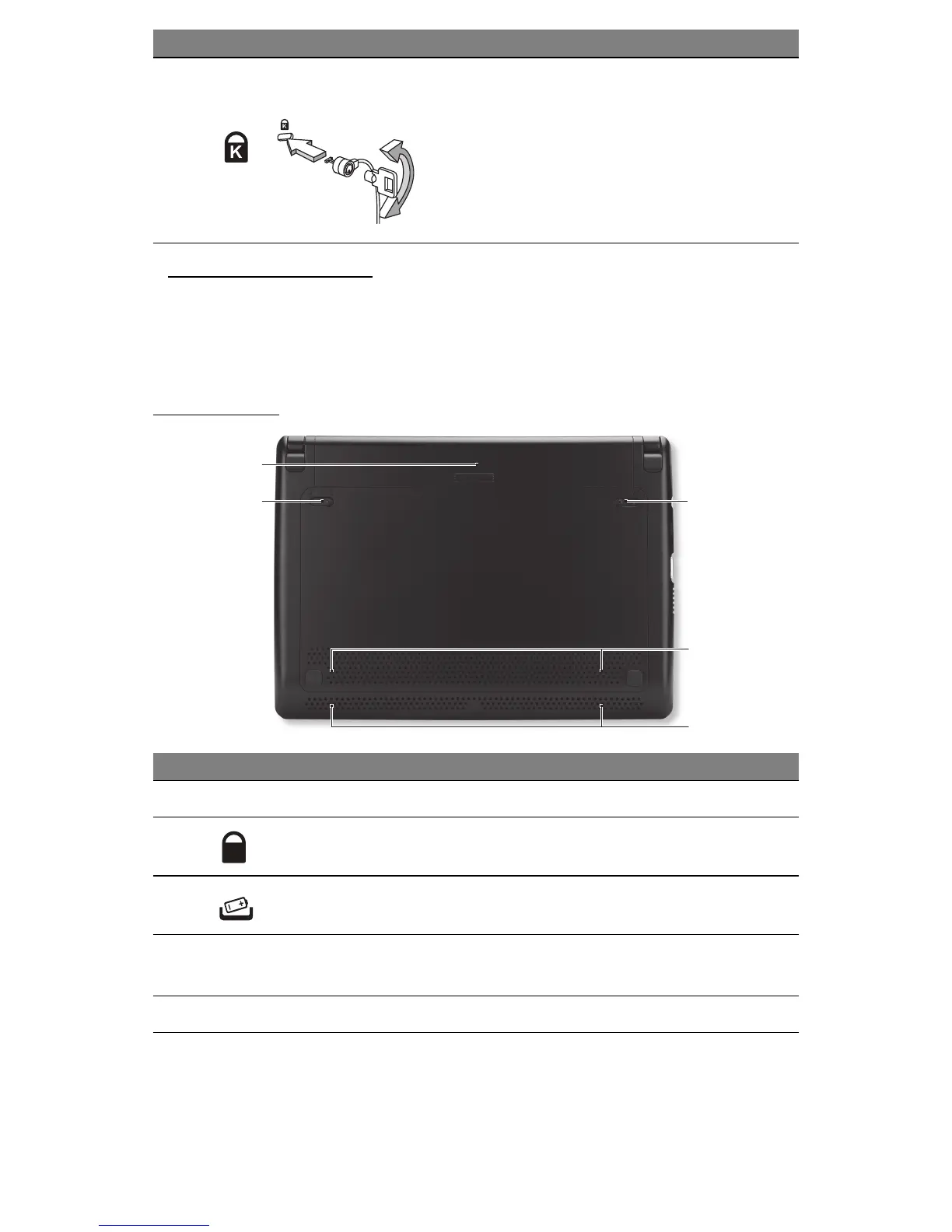
BASE VIEW
1
2
3
4
5
2
Kensington lock slot
Connects to a Kensington-compatible
computer security lock.
- Wrap the computer security lock cable
around an immovable object such as a table
or handle of a locked drawer.
Insert the lock into the notch and turn the key
to secure the lock.
Some keyless models are also available.
# Icon Item Description
1 Battery bay Houses the computer's battery pack.
2 Battery lock Locks the battery in position.
3 Battery release latch
Releases the battery for removal. Insert a
suitable tool and slide to release.
4
Ventilation and
cooling fan
Allows the computer to stay cool.
- Do not cover or obstruct the openings.
5 Speakers Deliver stereo audio output.
# Icon Item Description










 To Next Page