Section 5
LABELING UNIT
- 12 -
English
F412050100.fmIDM
version
Module 40/60/90/120
DRIVING ROLLER - COUNTER-ROLLER ADJUSTMENT
It is a good idea to check the preloading of the springs
serving the (rubber-coated) counter-roller’s flexible
bearings because:
– if the springs are too slack, the paper will not be
drawn correctly and this will result in label
positioning errors;
– if the springs are overloaded, it may become
impossible to close the driving unit and/ or the motor
may seize under the thrust from the counter-roller.
Proceed as follows.
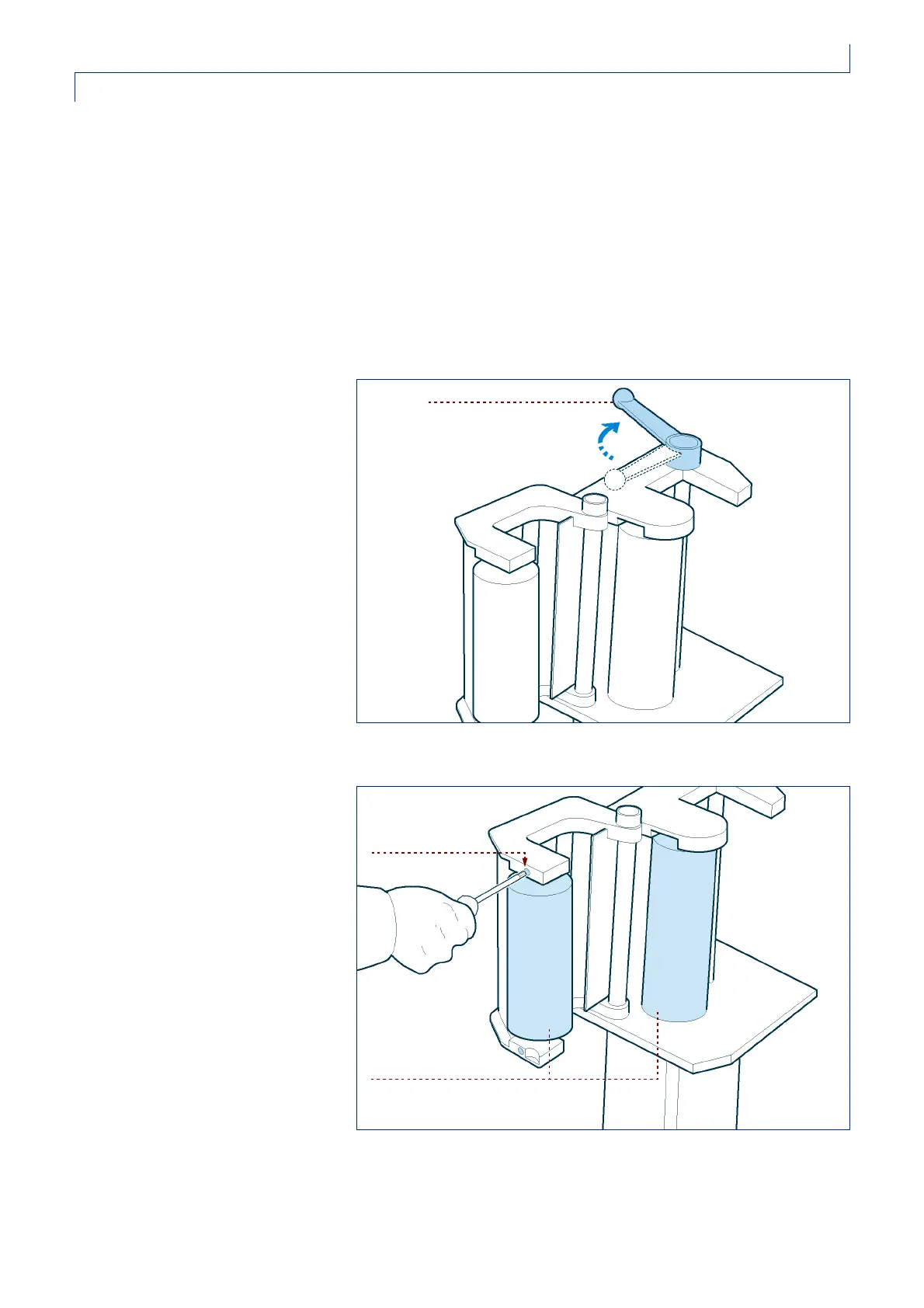
1 -open the driving unit by unlocking
the handle;
2 -tighten the adjusting screws of the
elastic supports;
3 -unscrew the adjusting screws with
the same number of turns (e.g.:
four turns) both up and down, so
that the force of the contact
between the driving roller and the
counter-roller is uniform along the
whole line of contact of the rollers
themselves.
If the driving unit hatch is difficult to
close, it may be necessary to loosen
the flexible bearing screws slightly.
IDM-41200600700.tif
handle
IDM-41200600800.tif
screw
rollers



 To Next Page