Part 2 - Getting Started
23
3
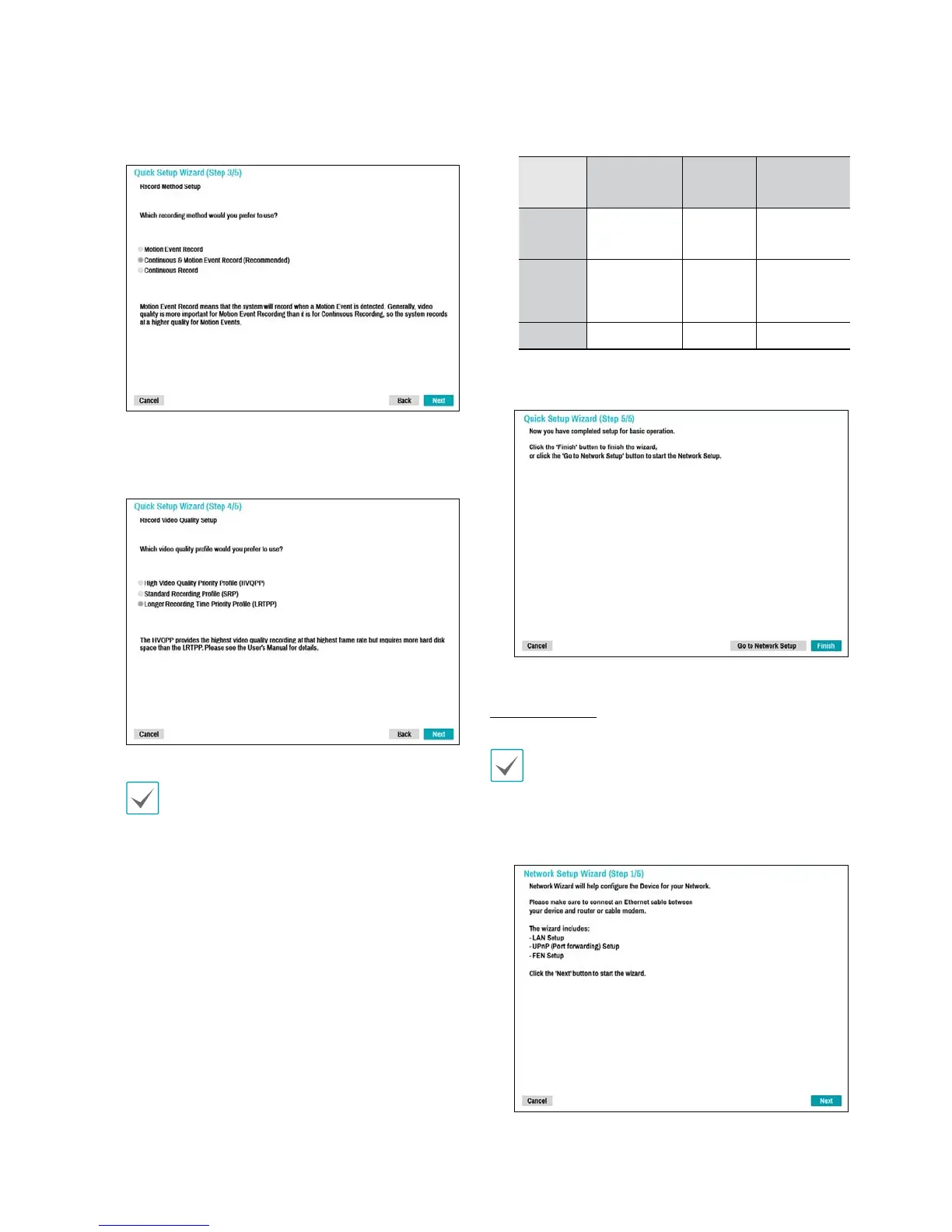
Choose the desired Recording Method and click
Next.
4
Choose the desired Recording Quality and click
Next.
t Higher recording quality uses up more disk
space.
t Recording resolution is determined based on
the selected recording quality.
– High Video Quality Priority Prole: Very
high
– Standard Recording Prole: High
– Longer Recording Time Priority Prole:
Standard
– Recording resolutions used under each recording method
and record video quality setting are as follows:
High Video
Quality Priority
Prole
Standard
Recording
Prole
Longer Recording
Time Priority
Prole
Motion
Event
Record
Very high High Standard
Continuous
& Motion
Event
Record
High (Continuous) /
Very high (Motion)
Standard
(Continuous) /
High (Motion)
Low (Continuous) /
Standard (Motion)
Continuous Very high High Low
5
Click Finish to exit Quick Wizard.
Network Wizard
After exiting from Quick Wizard, you can click Go to
Network Setup and set up the network with Network
Wizard.
1
Select Network Wizard.



 To Next Page