Part 3 - Conguration
70
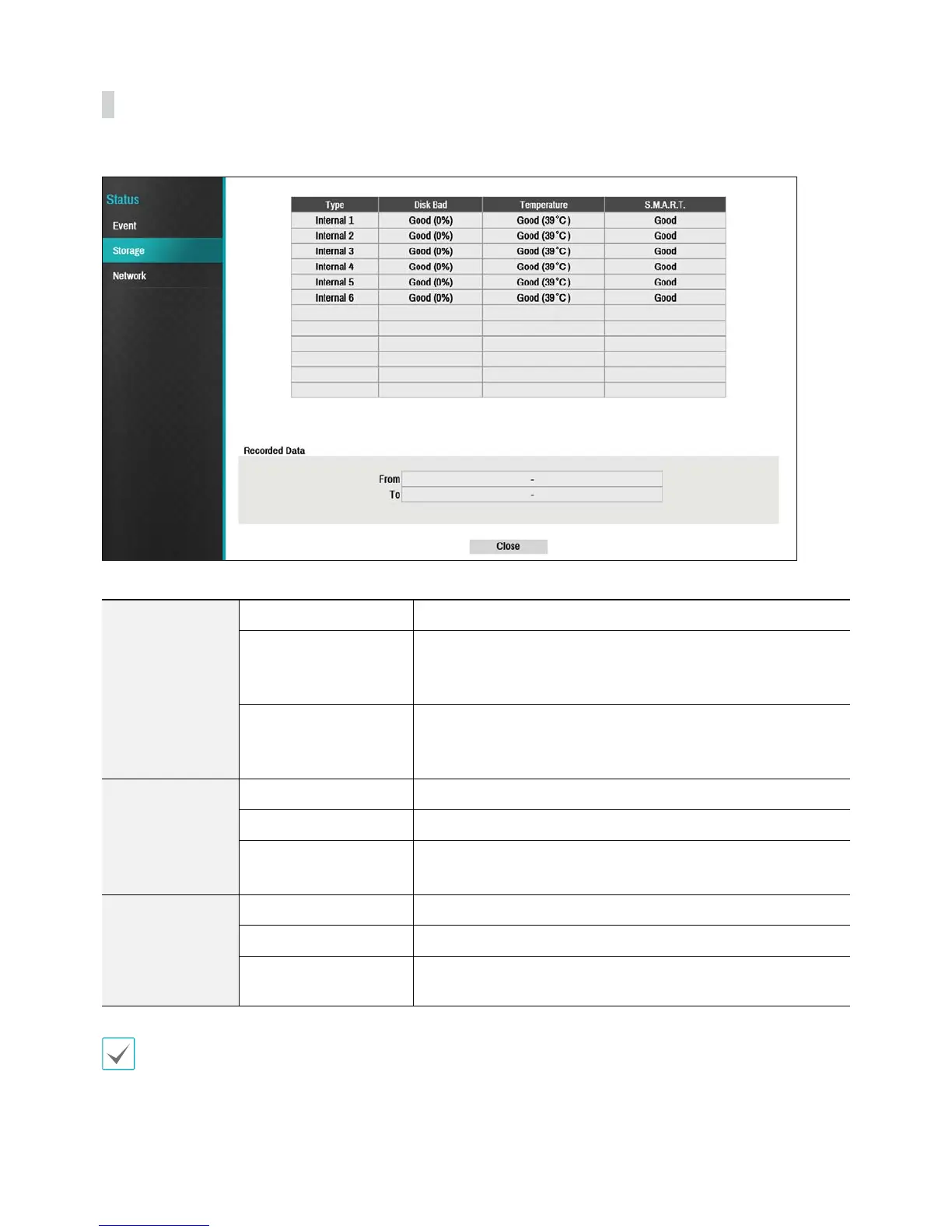
Storage
Indicates each disk's status.
Congure Disk Bad and Disk Temperature settings under Setup > System > Monitoring.
Disk Bad
Not Formatted A disk that has never been used before.
Good
t Disk performing normally.
t If the HDD is partially damaged, indicates the bad sector
percentage.
Error
t If the HDD's bad sector ratio is higher than as designated by the
user.
t Generates a system event.
Temperature
N/A Unable to detect the disk's temperature.
Good Operating within normal temperature range.
Bad
t Disk temperature higher than as designated by the user.
t Generates a system event.
S.M.A.R.T.
N/A A disk that does not support S.M.A.R.T.
Good A disk with normal S.M.A.R.T. status.
Bad
A disk with abnormal S.M.A.R.T. status. Possibility of damage within
24 hours.
Check each disk's data storage time information under Recording Data.



 To Next Page