Part 3 - Conguration
39
User
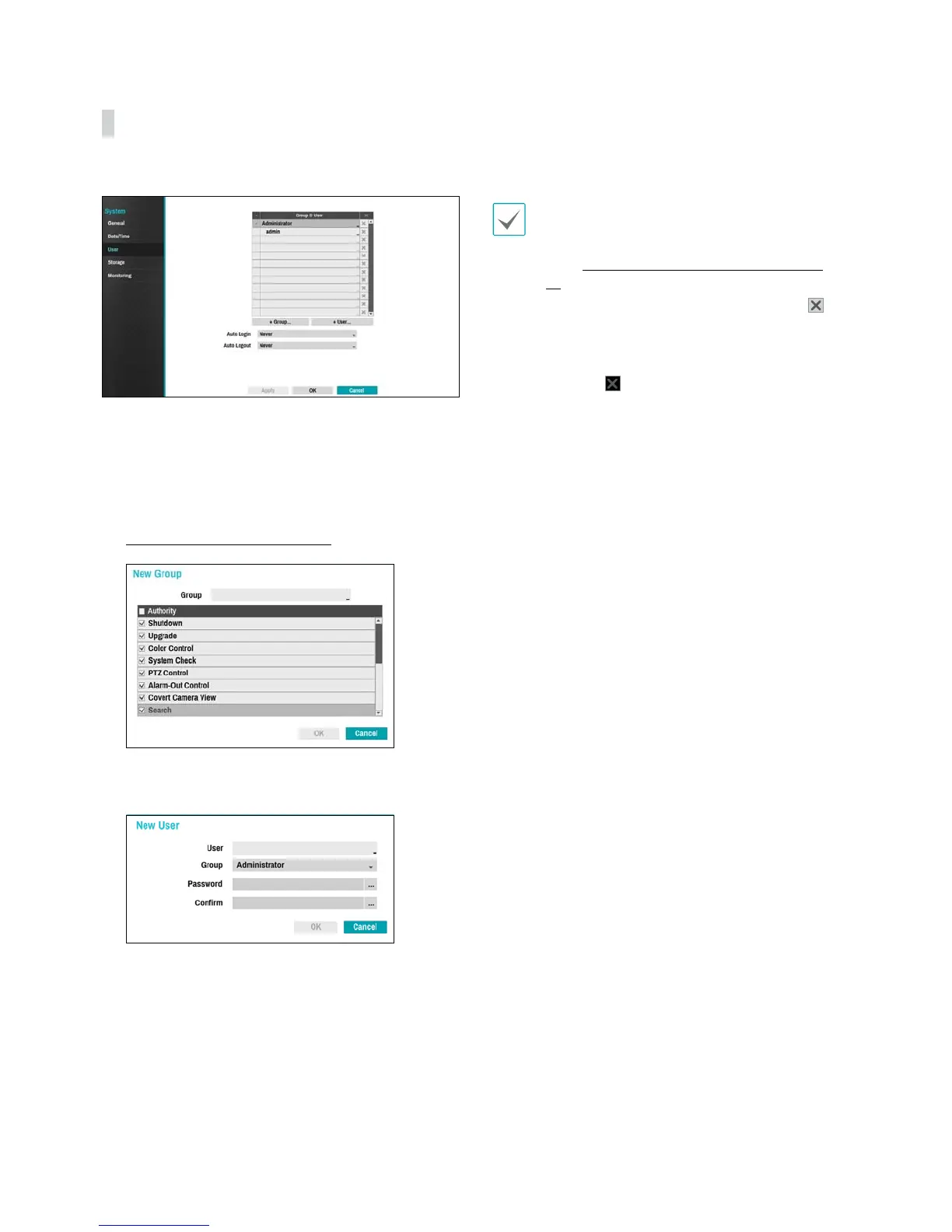
Use this option to register users and assign permissions.
1
Select + Group and enter a group name. A group
name can be up to 15 characters in length.
2
Specify the group's permission settings. For more
information on permission settings, refer to the
Group Permissions on page 40.
3
Select + User and then enter a user name.
4
Select a group for the user and then enter a
password. The password can be up to 16 characters
in length and may include letters, symbols, and
numbers.
5
Select OK.
6
Congure Auto Login and Auto Logout settings.
7
Select Apply or OK to exit.
t Group names, user names, and passwords can
be entered using the virtual keyboard. For more
information on using the virtual keyboard, refer
to the Text Input via Virtual Keyboard on page
36.
t To delete a registered user or group, select the
icon on the right of the corresponding user/group.
Group Administrator and User admin cannot be
deleted.
t Select the
icon next to Group & User on the
top of the screen to delete all groups and users
except Group Administrator and User admin
simultaneously.
t A password entry is required to edit existing groups
and users.
t Group Administrator's permissions cannot be
changed.
t With the User admin account, only the password
can be changed.
t When the system starts up, it will automatically log
into the account designated under Auto Login.
t The system will automatically log out of the account
if the duration of inactivity specied under Auto
Logout.



 To Next Page