EasyManua.ls Logo

Pakedge SX-24P - User Manual

Pakedge SX-24P
12 pages
Print Icon
To Next Page IconTo Next Page
Loading...
QUICK START GUIDE
SX-24P
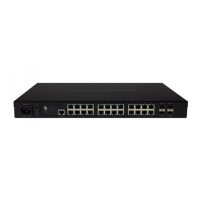
Enterprise-Class, Fully Managed Gigabit Switch with 24 PoE+ Capable Rear Facing Ports
Version 1.0
pakedgedevice&software inc
Question and Answer IconNeed help?

Do you have a question about the Pakedge SX-24P and is the answer not in the manual?

Summary

Switch Overview

Installation

Preparing to Install the Switch

Describes the process and tools needed for switch installation.

Logging Into the Switch

Changing the IP Address of the Switch

Pakedge Zone & VLAN Setup

Pakedge Zone Wizard

Guides users through configuring switch ports with specific VLAN settings.

Pakedge Zone Template

Offers quick setup using pre-defined Pakedge Zone port configurations.
Manually Configuring VLANs

Console Into the Switch

Resetting IP address through the console

Factory defaulting through the console

Technical Support

Summary

Switch Overview

Installation

Preparing to Install the Switch

Describes the process and tools needed for switch installation.

Logging Into the Switch

Changing the IP Address of the Switch

Pakedge Zone & VLAN Setup

Pakedge Zone Wizard

Guides users through configuring switch ports with specific VLAN settings.

Pakedge Zone Template

Offers quick setup using pre-defined Pakedge Zone port configurations.

Manually Configuring VLANs

Console Into the Switch

Resetting IP address through the console

Factory defaulting through the console

Technical Support

Pakedge SX-24P Specifications

General IconGeneral
BrandPakedge
ModelSX-24P
CategorySwitch
LanguageEnglish

Related product manuals