17
6
Analysing Samples
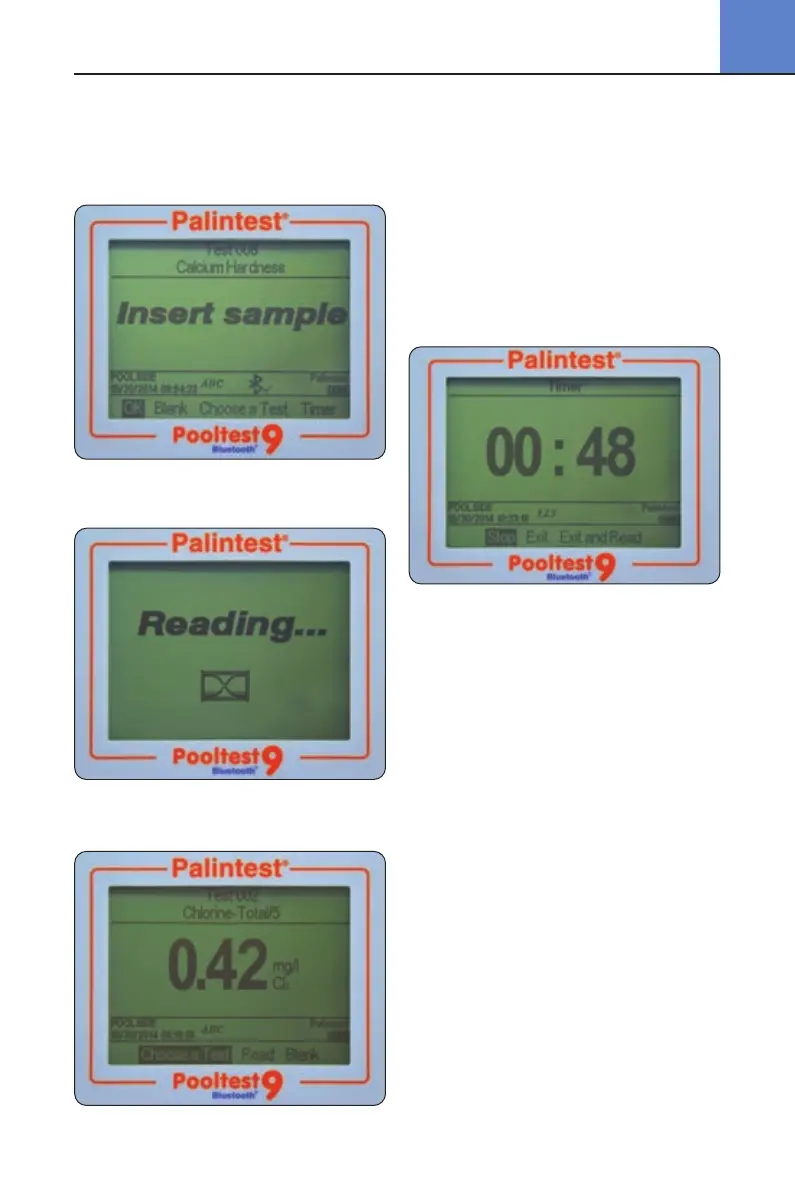
Select Read at the base of the screen and press OK.
At the Insert sample prompt, insert the sample
cuvette ensuring it is clean and dry and oriented
correctly using the location mark.
Press OK to begin the measurement process.
The screen will display Reading...
At the completion of the measurement process
the result is displayed on screen.
6.5 Timer
Many photometric methods require a reaction time
to develop, the recommended time period being
documented in the Palintest Phot
Book and included
as part of the method parameters
programmed into
the Pooltest 9 Bluetooth.
Tests requiring a reaction time will have the option
to select an automatic timer to count down the
reaction time required. While in the Insert sample
screen use the right key to move the cursor to
highlight Timer.
The programmed reaction time will be displayed.
Press OK to Start the countdown.
Three options will be displayed:
Stop cancel the countdown timer
Exit exits the countdown screen and
returns to the Insert sample
screen. The countdown will
continue and the current time can
be seen by selecting Timer.At the
end of the countdown an audible
alarm will sound to indicate the
sample is ready to read. Select
OK to read the sample manually.
Exit and Read exits the countdown screen and
automatically reads the sample
at the completion of the allocated
time period.
6.6 Changing Result Units of Expression
Many chemical species have a number of
alternative units that can be used for reporting
results e.g. Phosphate can be expressed as PO
4
or P for example.
Pooltest9Bluetooth_ZI INST 7009B EN 29/7/15 12:03 Page 17


 To Next Page