23
8
Calibration/Validation
8.0 Calibration/Validation
Your Pooltest 9 Bluetooth is delivered with a
calibration certificate validating the performance
of the instrument as it leaves Palintest.
We recommend annual service and calibration
of all photometric instruments in normal use.
The Pooltest 9 Bluetooth also includes an
automatic routine to validate analytical performance
using certified Palintest Check Standards.Accessed
via the Mode menu, the Check Standard Mode
provides a field method of ensuring your instrument
is operating within defined specifications and also
a troubleshooting method for unexpected results.
Every Palintest Check Standards set is
supplied with certified values expressed as %T
(Transmission), derived from traceable reference
materials. Acceptable tolerances are defined on
the certificate and are automatically specified
within the Pooltest 9 Bluetooth.
8.1 Check Standard Mode
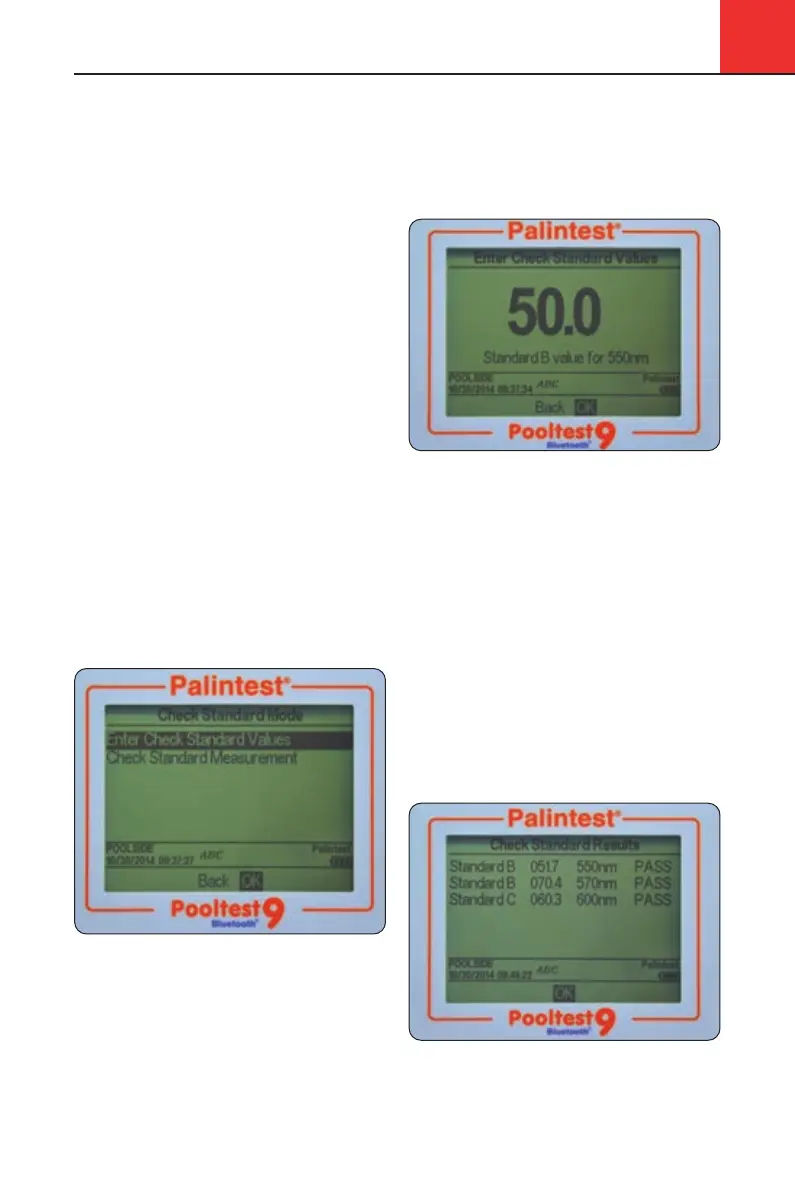
Access Check Standard Mode from the Mode screen.
Highlight Check Standard Mode and press OK.
Two choices are offered:
Enter Check use the up/down keys to
Standard Values adjust the displayed values
to match the certificate
Check Standard insert the Check Standards
Measurement in the defined order to
generate a validation report
8.2 Enter Check Standard Values
Each standard has two values assigned, for two
individual wavelengths.
Use the up/down keys to adjust the values to match
the certificate, following the order defined on the
display. Press OK when the correct value is shown
and the prompt will forward to the next value.
Upon completion the message Check Standard
Values assigned successfully will be displayed.
Press OK to return to the Check Standard Mode menu.
8.3 Check Standard Measurement
Follow the on-screen prompts to insert the Check
Standards in the defined order. The Pooltest
9 Bluetooth will automatically measure the
Transmittance at the required wavelength.
Upon completion of the sequence the results
are displayed on screen with pass or fail status.
If the Check Standard Mode reports a failure,
see Appendix 2 Troubleshooting for guidance
or contact your local Palintest supplier.
Pooltest9Bluetooth_ZI INST 7009B EN 29/7/15 12:03 Page 23


 To Next Page