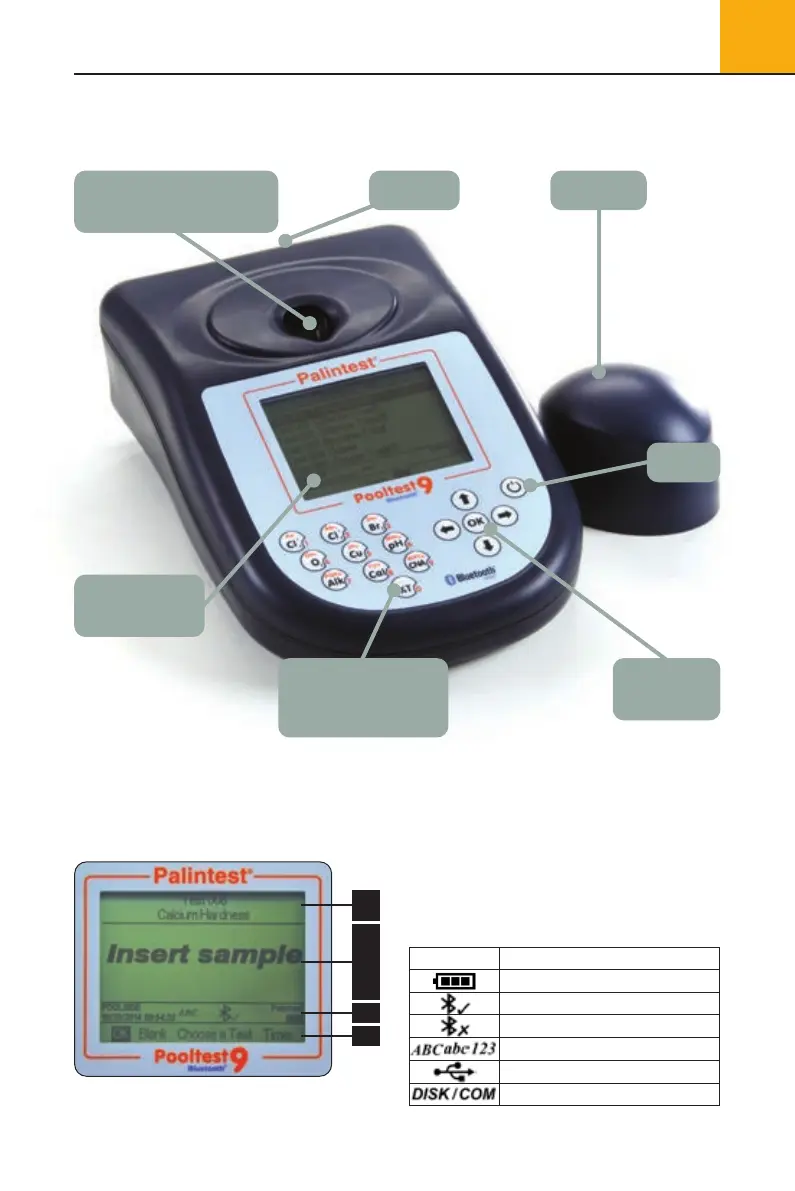
Numerical keys
for test selection
and text entry
Navigation
Keys
LCD screen
with backlight
On/Off
Light CapUSB Port
Adaptive Cuvette Holder
(do not insert finger!)
5
2
Quick Start
2.0 Quick Start
2.1 Pooltest 9 Bluetooth Layout
2.2 Pooltest 9 Interface
The LCD screen features a selectable backlight
with the screen separated into four clear, easy
to read zones.
1 Mode or Test Identification.
2 Dialogue screen - prompts and choices will be
displayed as a list. Select using up/down arrows.
3 Info Panel - displays status icons, date/time
and Sample/Operator ID.
4 Action select - choices are displayed as a row.
Use left/right arrows to select.
2.3 Info Panel Icons
1
2
3
4
Description
Battery status
Bluetooth connected
Bluetooth on, not connected
Upper/lower case text/number entry
USB connected
Hard Drive/COM port mode
Icons
Pooltest9Bluetooth_ZI INST 7009B EN 29/7/15 12:03 Page 5


 To Next Page