10
Appendix 2 - Troubleshooting
Bluetooth Error Messages
The Pooltest 9 Bluetooth communicates seamlessly
with the Palintest Aqua Pal app. In the event of
any errors the Pooltest 9 Bluetooth will display
either of the following messages:
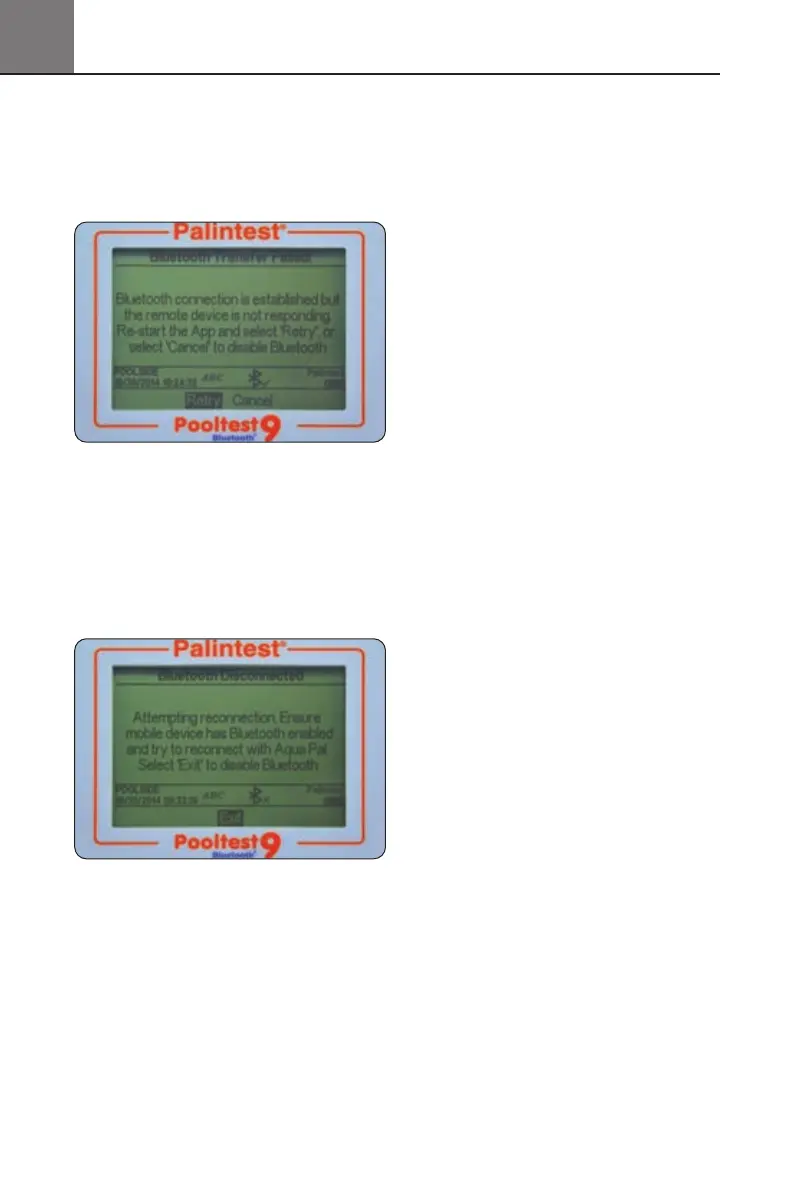
The Pooltest 9 Bluetooth is not receiving a
response from the Palintest Aqua Pal app but the
remote device is connected. This will appear 10s
after a result transmission has started and no
valid response has been received.
Re-start the Aqua Pal app and select Retry.
When the Bluetooth connection to the remote
device is lost the following message is shown:
Check the Bluetooth has not been inadvertently
deactivated in the mobile device settings.
Note: the photometer will not appear as a ‘paired
device’ in the settings of a Bluetooth SMART device.
Battery/Power Issues
My batteries are running out too quickly
Use good quality batteries and always replace the
batteries completely when indicated on the Info Panel.
The battery compartment is located underneath the
Pooltest 9 Bluetooth and secured by four screws.
Remove the battery cover and replace batteries
as a set.
Refit the battery cover ensuring the cover is tight
enough to prevent water ingress. Do not overtighten
as this will damage the screw housings.
The Pooltest 9 Bluetooth has a number of
power-saving features such as auto-dim of the
backlight and automatic power down after
inactivity (See Section 6).Activating these features
will prevent power being used unnecessarily.
Bluetooth can also be de-activated if not required.
Using the USB port to provide power will
automatically prevent battery power being consumed
when mains or external power is available.
My photometer will not switch on
The Info Panel provides an ongoing indication
of power available from the battery supply.
When the voltage falls below 3.0V the Pooltest 9
Bluetooth will not switch on as the available
power will not be sufficient to provide effective
photometric testing.
Use the USB cable to provide an alternative
power supply. If the photometer still fails to
switch on, contact your local Palintest partner
for service support.
My USB power supply is not working
Ensure your PC is not operating in power save
mode or the mains supply is not isolated.
Replace the cable with an alternative to ensure
the cable is not faulty.
26
Pooltest9Bluetooth_ZI INST 7009B EN 29/7/15 12:03 Page 26


 To Next Page