13
Basic Operation
Turning the TV On and Off
The First Time Installation
²
illuminated red indicating the TV has power.
²Press the POWER button on the remote control or the TV set. The TV's indicator
light will be illuminated green indicating the TV is turned ON.
²Press the POWER button again to turn the TV off. A front mounted indicator light
will be illuminated red indicating the TV is off.
Connect the power adaptor to wall AC Outlet. A front mounted indicator light will be
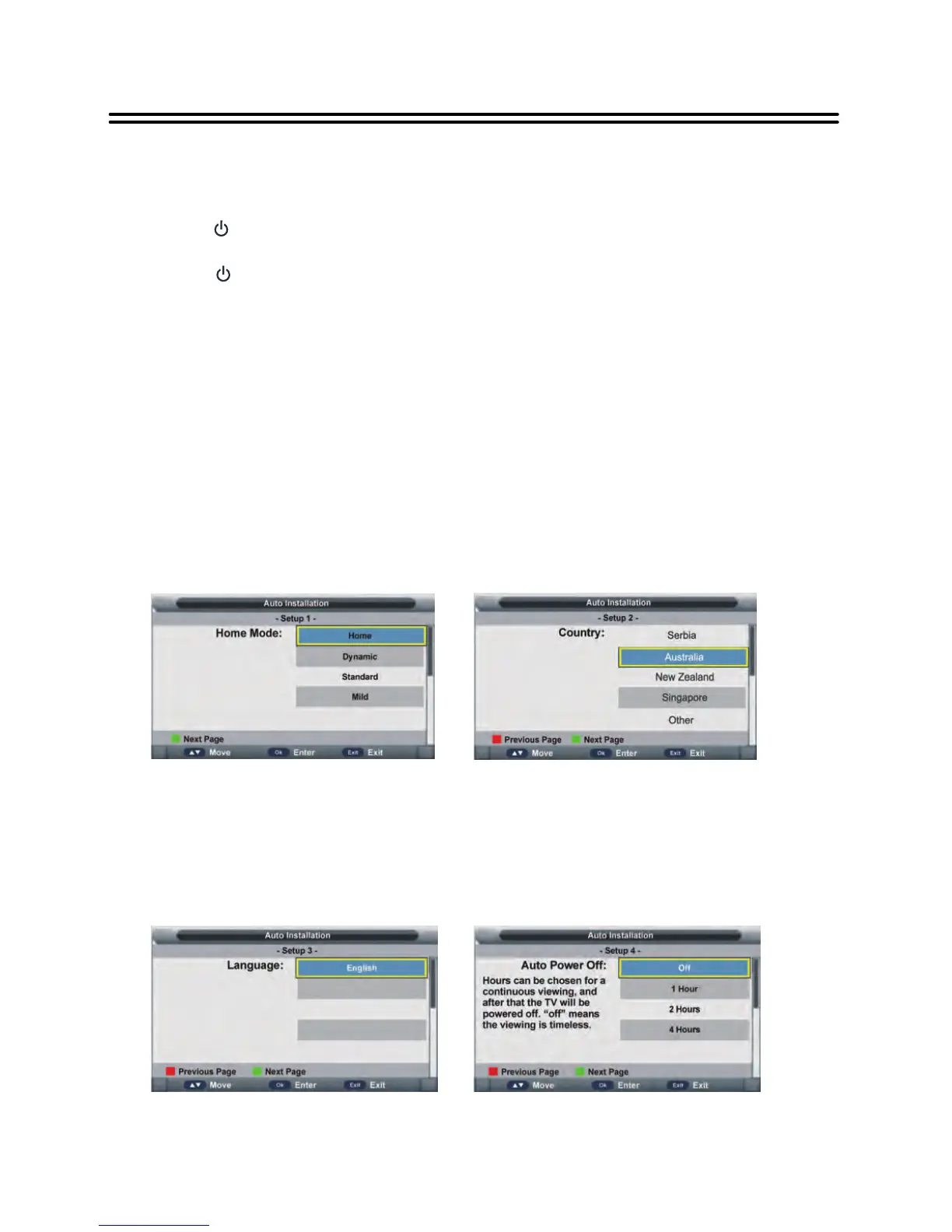
Connect to power source and turn on the TV, the below installation menu page will display on
the screen:
Setup1
• Press button to select Home mode, sets the overall brilliance of the screen.
• Press OK button to call out a dialog box. Select OK to confirm selection and turn to next
page; select Cancel to dismiss the dialog box.
▲/▼
Setup 2
• Press button to select the country that you are living in.
• Press OK button to confirm selection and turn to next page.
▲/▼
Setup 3
• Press button to select desired menu language.
• Press OK button to confirm selection and turn to next page.
▲/▼
Setup 4
• Press button to select desired auto power off time.
• Press OK button to confirm selection and turn to next page.
▲/▼


 To Next Page