14
Basic Operation
1.
2.
3.
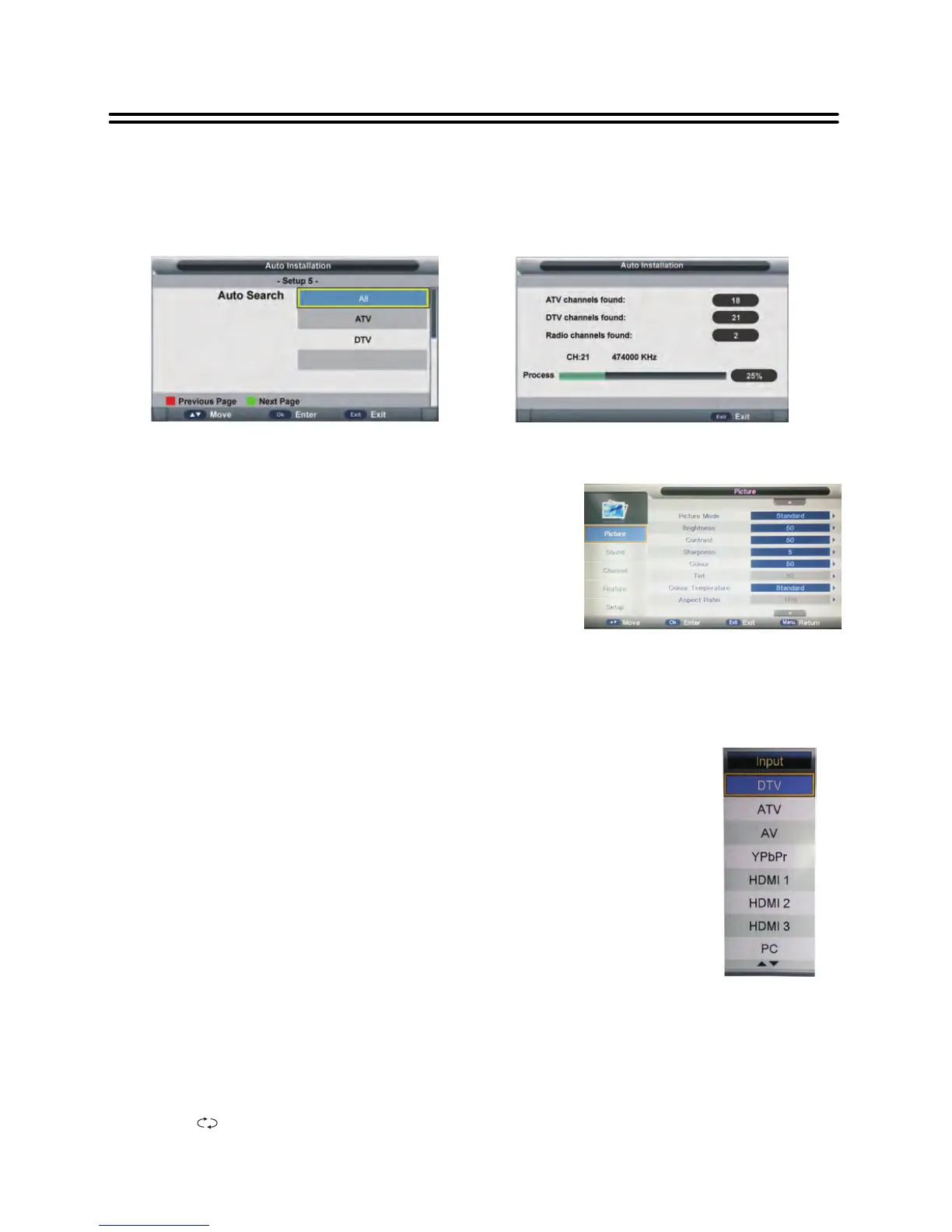
Press INPUT button.
Press 6or 5to select the input source. Options include:
! DTV — Watch the DTV signal.
! ATV — Watch the ATV signal.
! AV — Watch the signal from the COMPOSITE input terminals.
! YPbPr — Watch the signal from the COMPONENT input terminals.
! HDMI 1/2/3— Watch the signal from the HDMI 1/2/3 input terminal.
! PC — Watch the signal from the VGA input terminal.
! Media — Watch the media source from the USB.
! DVD — Watch the media source from the DVD.
Note: TFTV4055FL/TFTV4255FL has no DVD function.
Press OK button to confirm the selection.
Source selecting
Channel Selection
1. Using CH+/- button
2. Use the CH.LIST button to display the channel list and press the ▲▼ button to select
channel.
3. You have also quick access to the different TV channels by using the numeric buttons.
4. Using button on the remote control to view the last channel you were watching.
²
includes different categories, such as Picture, Sound,
Channel, Feature and Setup.
² You can change the category using the ▲▼ buttons
and press OK button or the ►button to enter it.
² Using the ▲▼ buttons and press OK or ►button to
enter the submenu of each option in the category.
Press the MENU button to exit the submenu and
return to the previous menu.
² To leave the system settings, press the EXIT button.
Press the MENU button to display the setup menu. It
Setup 5
• Press button to select desired searching type.
• Press OK button to confirm selection, this will then search programs automatically.
▲/▼
Using the OSD (on-screen display) menu
Note: To exit tuning, press EXIT button on remote control to call out a dialog box,
and select OK to exit tuning; select Cancel to dismiss the dialog box.


 To Next Page