17
TV Operation and System Setup
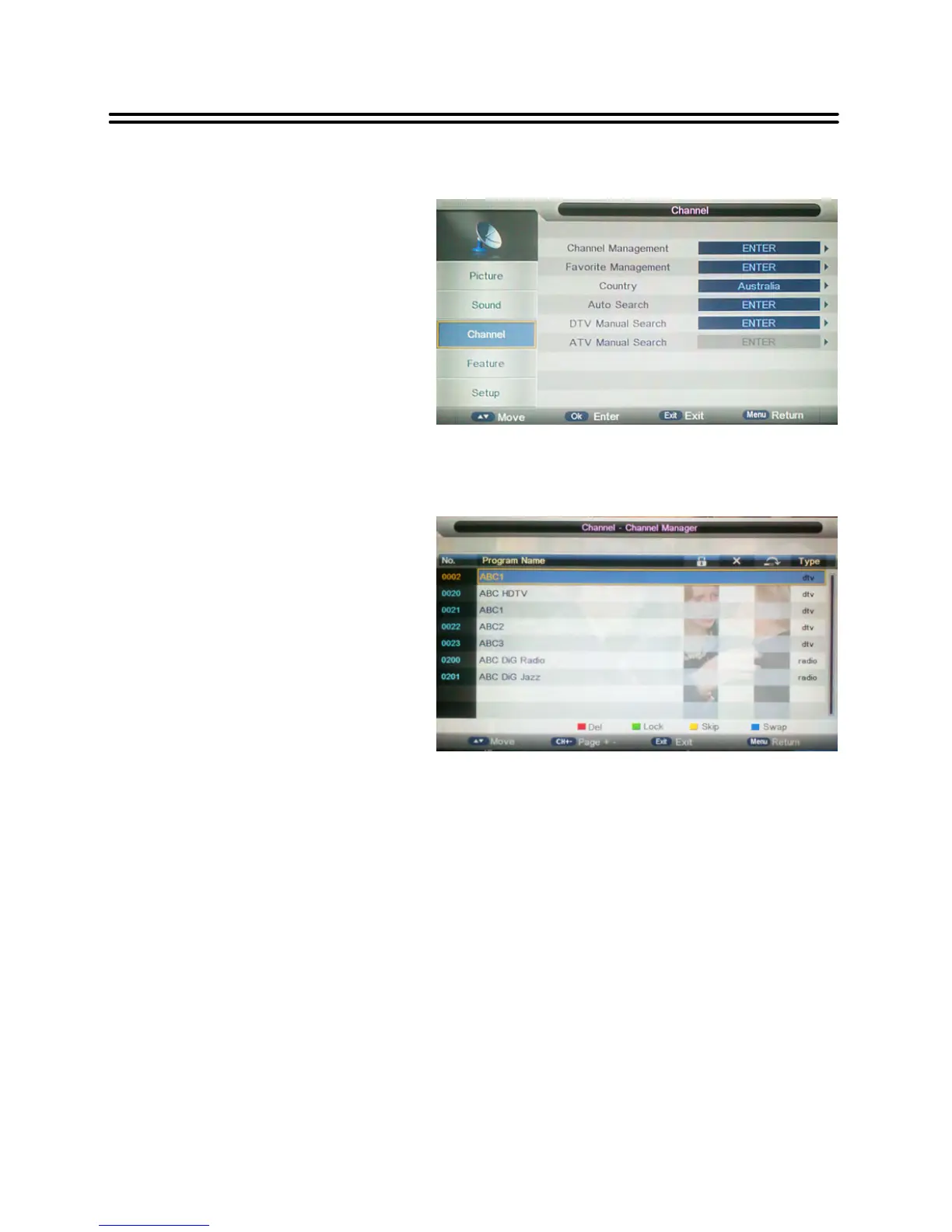
Channel
NOTE:
The Channel category is only active in
DTV and ATV mode.
When in DTV mode, the ATV Manual
Search is not available; and when in
ATV mode, the DTV Manual Search is
not available.
Channel Management
The option “Channel Management”
includes Delete, Lock, Skip and Swap.
Deleteaprogram:
1.
With the ▲▼ buttons you can
choose a channel, which shall
be deleted.
2. Press the red coloured button
to delete it.
Lock a program
1.
With the ▲▼ buttons you can choose a channel, which shall be locked.
2. Press the green coloured button to lock it.
Swap programs
1.
With the ▲▼ button you can select a channel, which shall be moved.
2.
Press the blue coloured button.
3.
Move the channel with the ▲▼ button on the position which you like.
4.
Press OK button again to finish the moving.
Skip a program:
1.
With the ▲▼ buttons you can select a channel, which shall be skipped.
2.
Press the yellow coloured button.
3.
Press the yellow coloured button again to cancel.
NOTE: A skipped program is skipped when using the CH+/- buttons to browse the
programs but can be watched by selecting in the channel list or using the number buttons.
CHANNEL includes Channel
Management, Favorite Management,
Country, Auto Search, DTV Manual
Search and ATV Manual Search.


 To Next Page