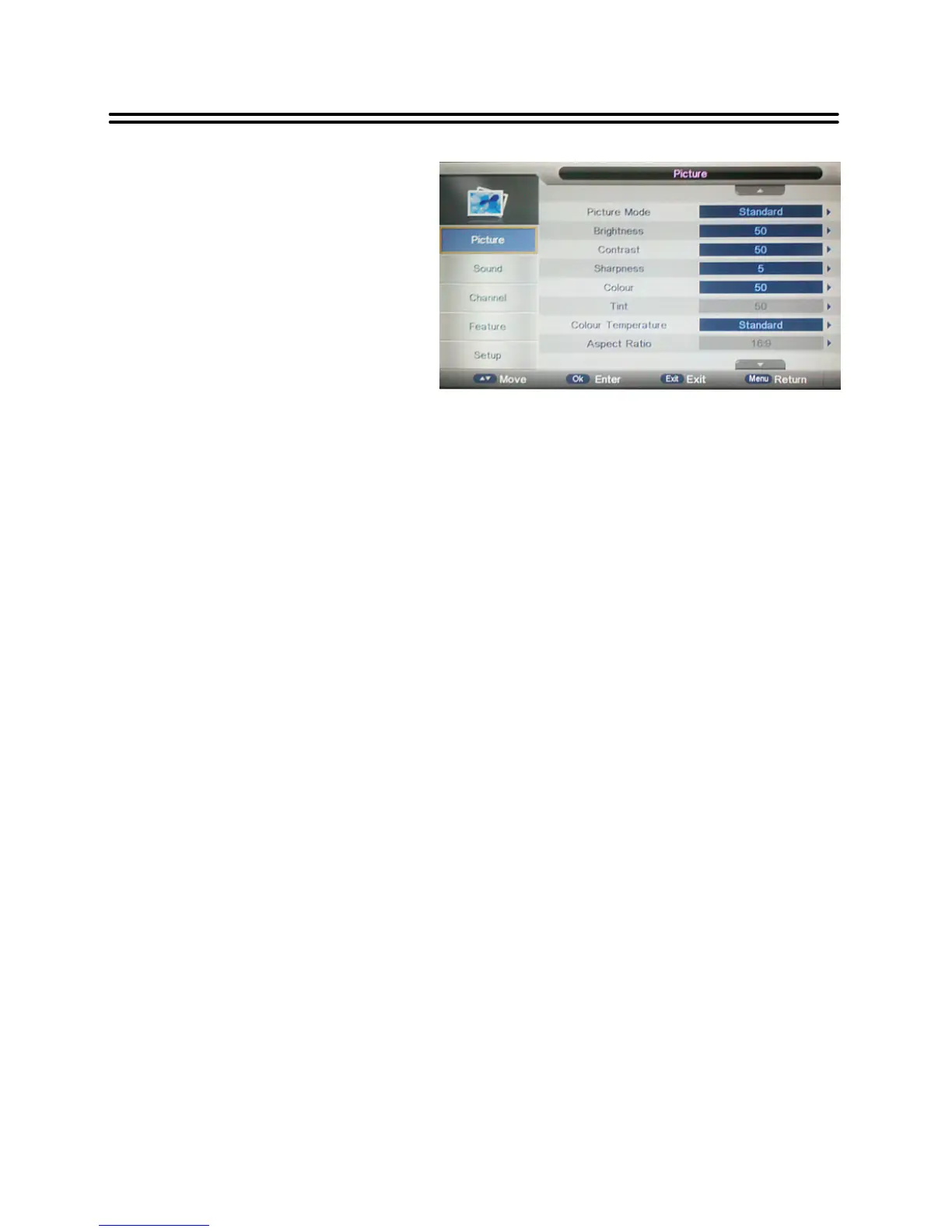
PICTURE setting includes Picture Mode,
Brightness, Contrast, Sharpness, Colou
Tint, Colour Temperature and Aspect
Ratio.
Picture Mode
Press the ▲▼ buttons to select Picture Mode and then press OK or ►button, the available
picture modes will be listed on the screen.
With the ▲▼ buttons you can select Dynamic, Standard, Mild or User.
If you select User, you can set the level of the Brightness/ Contrast/ Sharpness/ Colour/
Tin as you desired.
Brightness/ Contrast/ Sharpness/ Colour/ Tint
Press the ▲▼ button t o select Brightness/ Contrast/ Sharpness/ Colour/ Tin and press OK
or ►button to enter the adjusting bar, then press the ◄► button to adjust the level.
Color Temperature
Press the ▲▼ buttons to select Color Temperature and then press OK or ►, the available
Colour Temperature will be listed on the screen.
With the ▲▼buttons you can select Standard, Cool or Warm.
Aspect Ratio
Press the ▲▼ buttons to select Aspect Ratio, then press OK or ► to enter it. With the
▲▼buttons you can select your desired aspect ratio.
Note: In different input source, the available aspect ratios may vary.
Noise Reduction
Press the ▲▼ buttons to select Noise Reduction, then press OK or ► to enter it. With the
▲▼ buttons you can select Off, Low, Middle or High.


 To Next Page