30
VQT3Q78
Basic
Recording/
Playback
2
Recording motion
pictures
≥ Remove the lens cap before turning on the unit. (l 16)
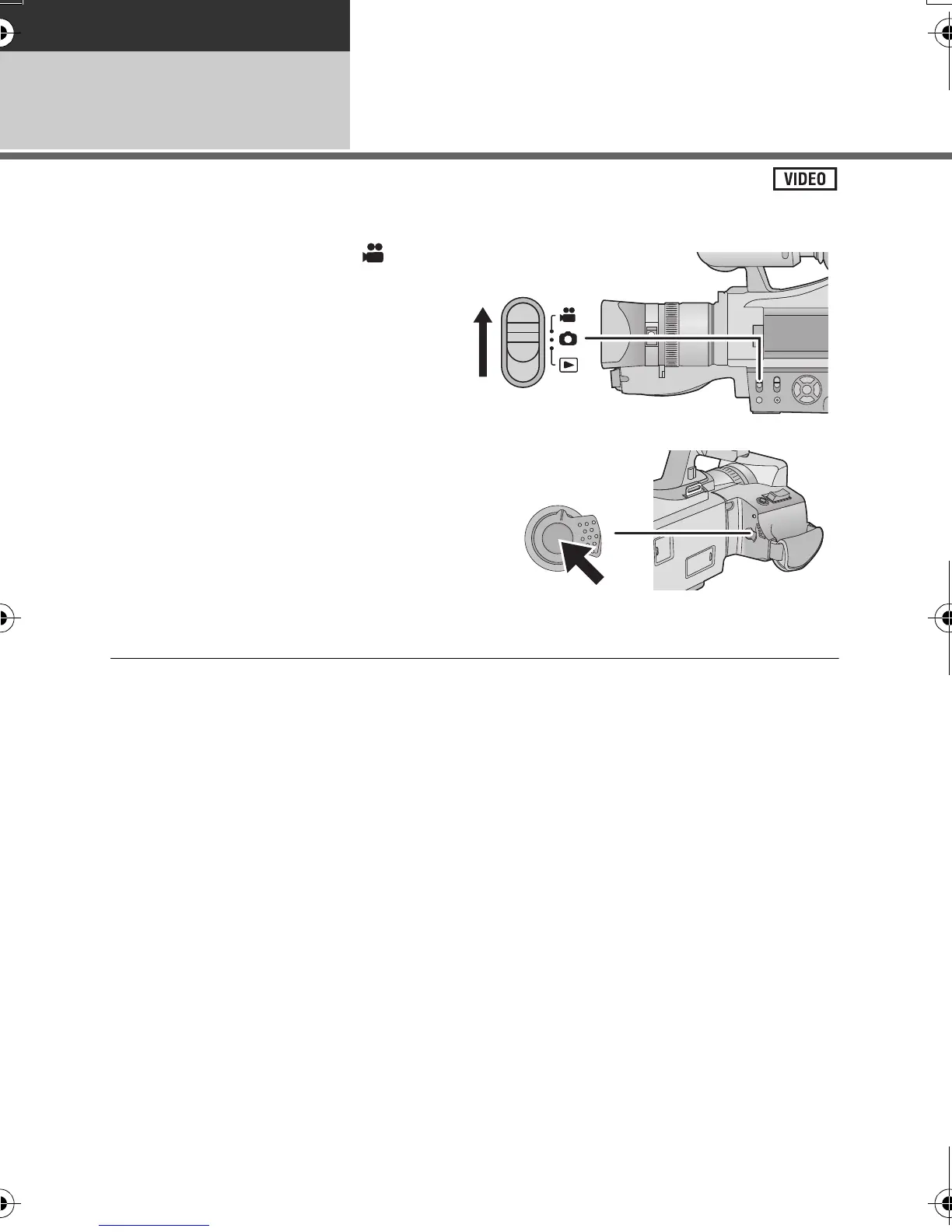
1 Change the mode to .
2 Press the recording start/stop
button to start recording.
≥ When you begin recording, ; changes to ¥ on
the screen.
3 Press the recording start/stop
button again to pause recording.
≥ Still pictures can be recorded while recording the motion picture. (l 33)
≥ The images recorded between pressing the recording start/stop button to start recording
and pressing it again to pause recording become one scene.
≥ Maximum number of recordable scenes: Approx. 3900
Maximum number of different dates: Approx. 200 (l 71)
When either of them reaches to the maximum limit, more scenes cannot be recorded.
(In the case of SD cards it is the maximum number of recordable scenes per card.)
≥ Put the unit in pause mode when connecting or disconnecting an external microphone with
the EXT MIC terminal.
AG-AC7P-VQT3Q78_mst.book 30 ページ 2011年5月18日 水曜日 午後1時40分





 To Next Page