76
VQT3Q78
To delete an unnecessary portion of a scene, first divide the scene and then delete the
unnecessary portion.
≥ Change the mode to .
≥ Select the play mode select icon and press the button in the center to select [VIDEO]
(l 36)
1 Select the menu.
2 Select the scene to be divided and press the button in the center.
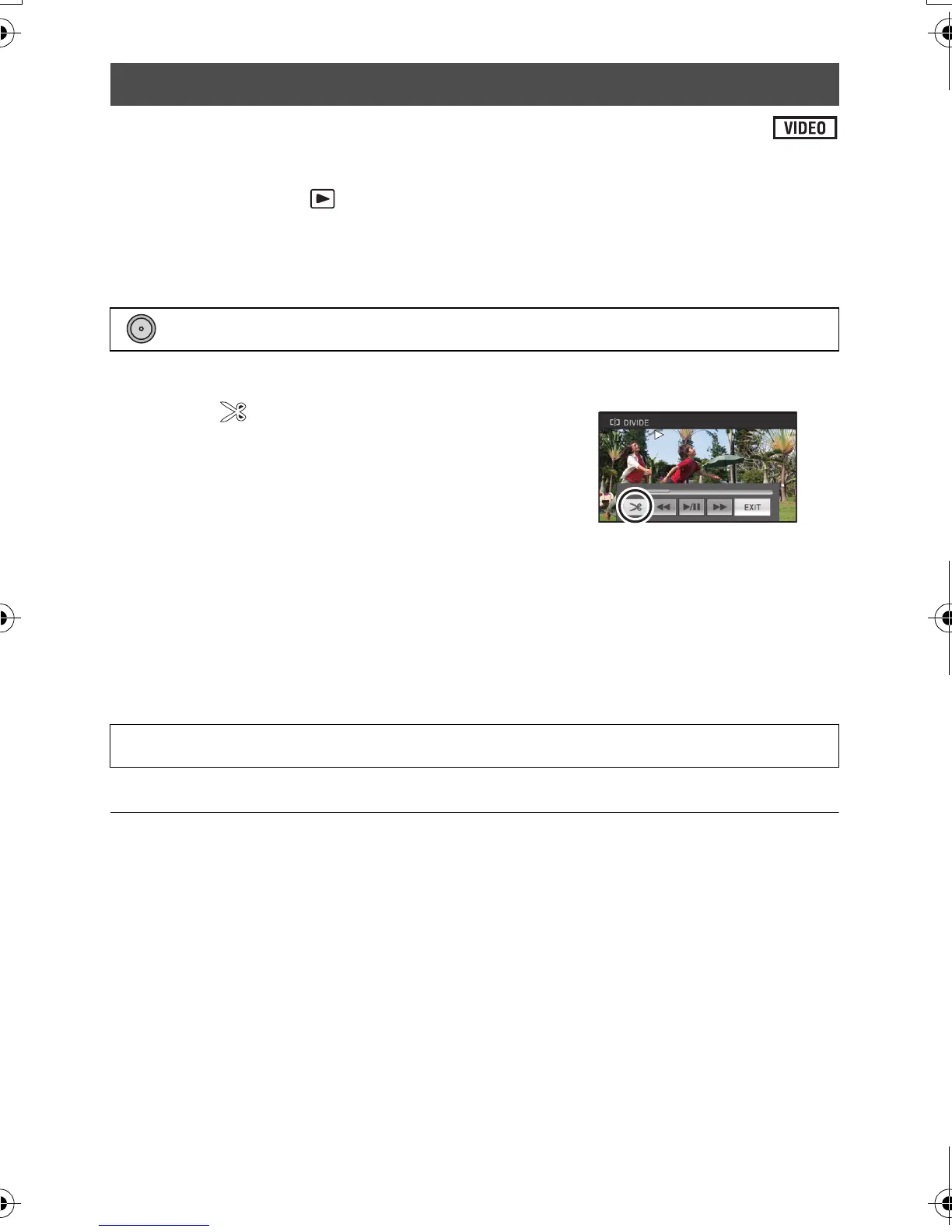
3 Select and press the button in the
center to set the dividing point.
≥ Using slow-motion playback or frame-by-frame
playback makes it easy to search for the point where
you want to divide the scene. (l 67)
≥ Select [YES] and press the button in the center to
continue dividing the same scene. To continue dividing other scenes, select [NO] and
press the button in the center and repeat steps 2-3.
4 Press the MENU button to complete dividing.
5 Delete the unnecessary scene. (l 74)
To delete all the divided points
≥ The scenes that were deleted after division cannot be recovered.
≥ You cannot divide a scene if the number of scenes of a given date would exceed
99 scenes.
≥ It may not be possible to divide scenes with a short recording time.
≥ Data that has been recorded or edited on another device cannot be divided and the divided
points cannot be deleted.
Dividing a scene to partially delete
: [EDIT SCENE] # [DIVIDE] # [SET]
[DIVIDE] # [CANCEL ALL]
AG-AC7P-VQT3Q78_mst.book 76 ページ 2011年5月18日 水曜日 午後1時40分







 To Next Page