47
VQT3Q78
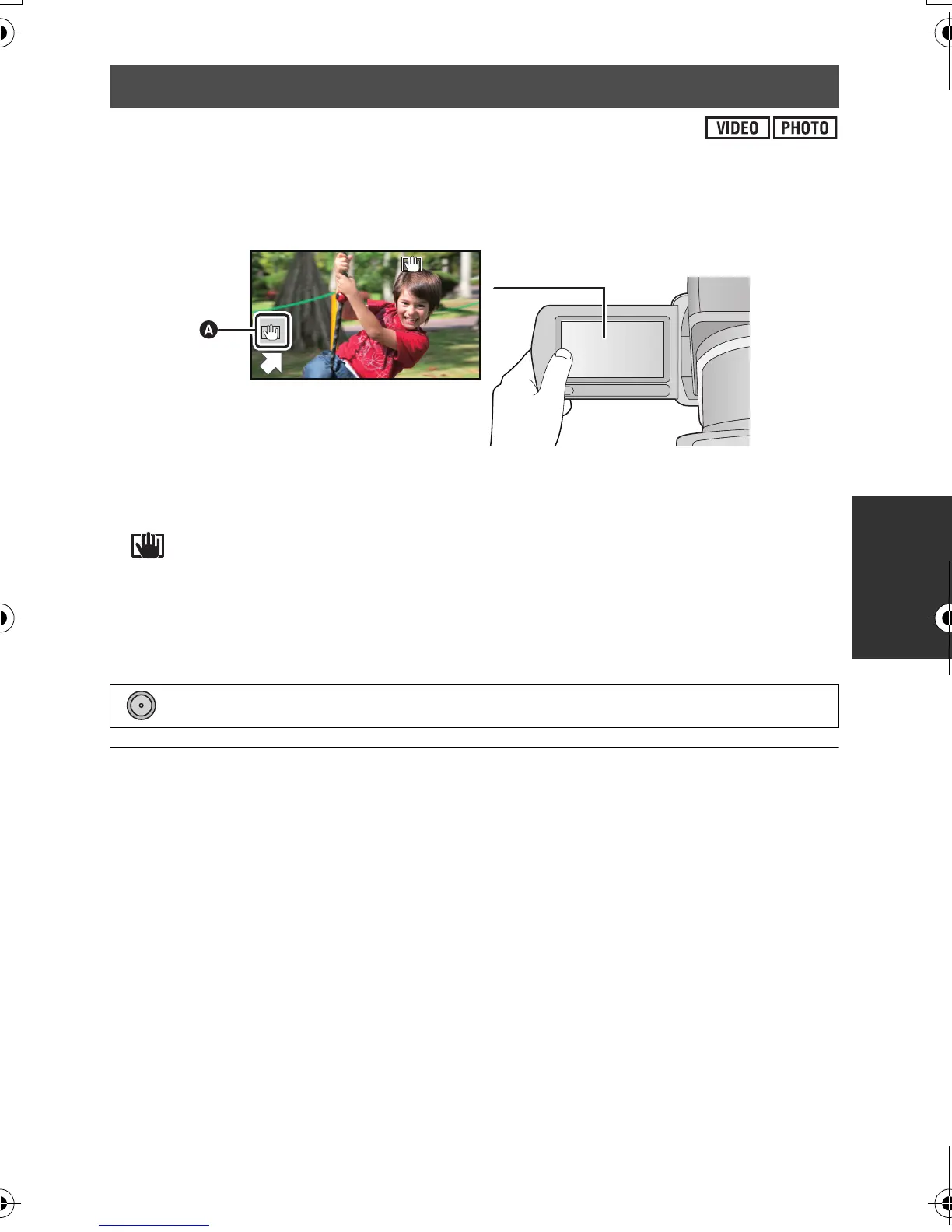
In motion picture recording mode, you can further improve optical image stabilization by
touching and holding O.I.S. LOCK icon. With this function, you can further reduce the effects
of the shake that tends to occur when using zoom.
≥ This function can be performed only by touch operation.
A O.I.S. LOCK icon
≥ Open the LCD monitor before using this function.
≥ Set [O.I.S.] to [ON] to switch the image stabilizer to ON.
≥ is displayed while you are touching icon.
≥ Optical image stabilizer lock is released when you remove your finger from the icon.
≥ Operation icon will disappear when no function is performed for a specific period of time if
[DISPLAY] is set to [OFF]. Touch the screen to display it again.
∫ Setting to display/not-display the O.I.S. LOCK icon
≥ Stabilization may not be possible under strong shaking conditions.
≥ To record while moving the unit quickly, release optical image stabilizer lock.
Optical image stabilizer lock
: [RECORD SETUP] # [O.I.S. LOCK DISPLAY] # [ON] or [OFF]
AG-AC7P-VQT3Q78_mst.book 47 ページ 2011年5月18日 水曜日 午後1時40分






 To Next Page