32
VQT3Q78
Basic
Recording/
Playback
3
Recording still pictures
≥ Remove the lens cap before turning on the unit. (l 16)
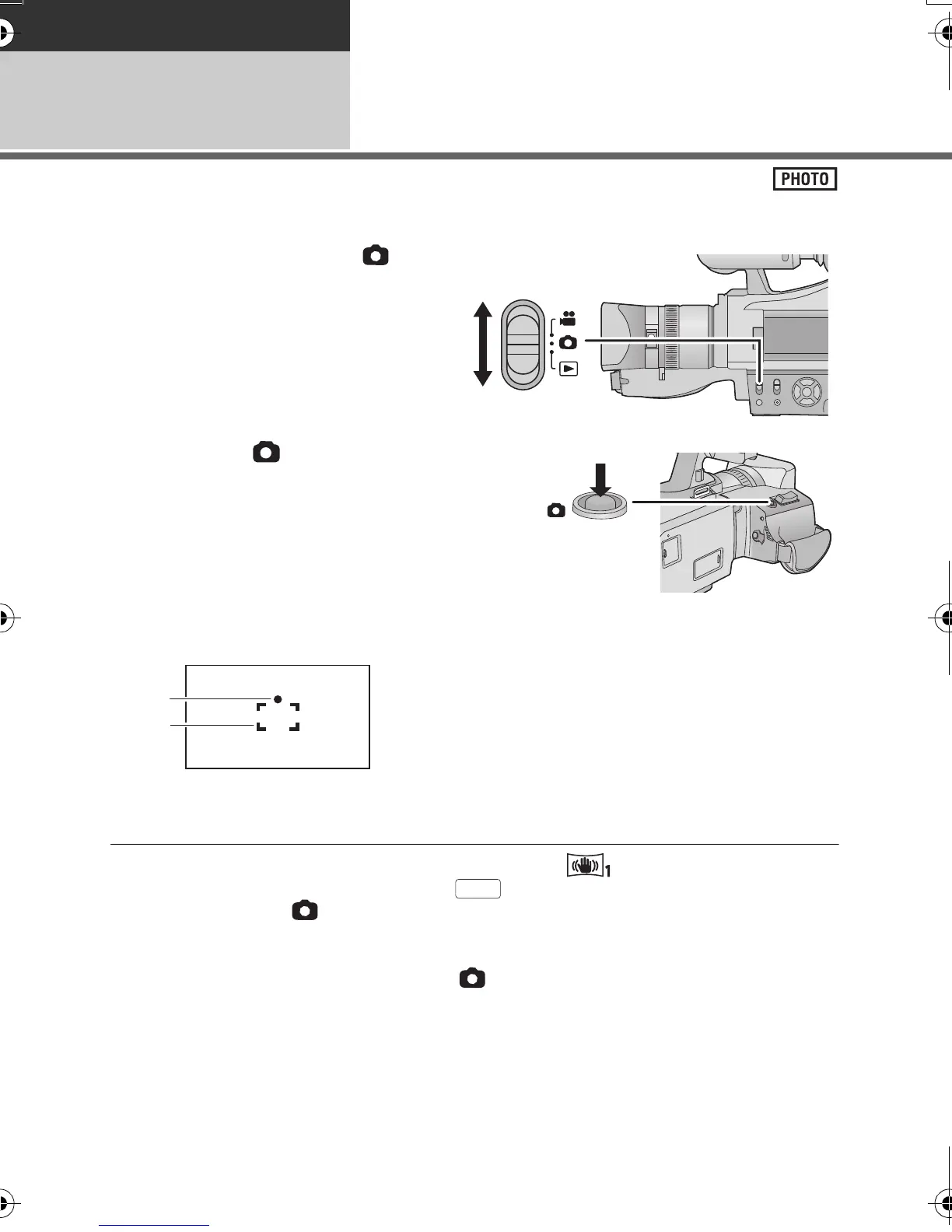
1 Change the mode to .
2 Press the button.
Focus indication:
≥ If you set the optical image stabilizer function (l 46) to (MODE1), then the image
stabilizer function will be more effective. ( (MEGA optical image stabilizer) will be
displayed when the button is pressed.)
≥ It is recommended using a tripod when recording still pictures in dark places because the
shutter speed becomes slow.
≥ The screen will become darker when the button is pressed if the shutter speed is
1/30 or slower.
≥ To print a picture, print using a PC or a printer.
A Focus indication
± (The white lamp flashes.):
Focusing
¥ (The green lamp lights up.):
When in focus
No mark:
When focusing is unsuccessful.
B Focus area (area inside brackets)
AG-AC7P-VQT3Q78_mst.book 32 ページ 2011年5月18日 水曜日 午後1時40分





 To Next Page