CAUTION:
O This unit will operate on 110/120/220/240V
AC. An AC plug adapter may be required
for voltages other than 120V AC.
If a conversion plug is required, consult
with your dealer as to which one is to be
purchased.
O The rating plate is on the underside of the
AC Adapter.
O Disconnect the AC mains plug from the AC
22
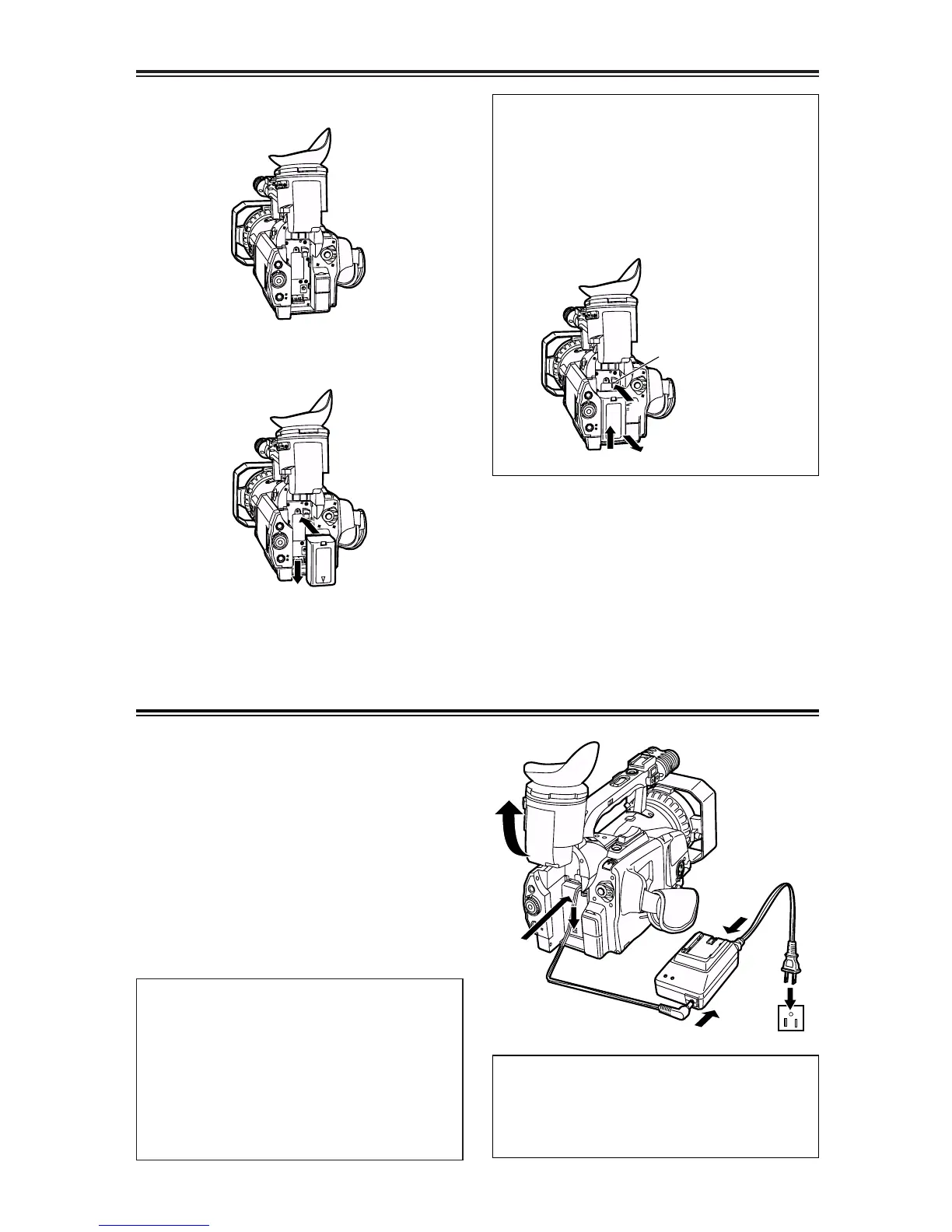
Mounting the battery
1
Raise the viewfinder.
2
Push the battery straight in, and slide it
downward until it clicks into position.
3
Return the viewfinder to its original
position.
5
Return the viewfinder to its original
position.
Supplying power from the AC adapter
1
Raise the viewfinder.
2
Push the battery-type connector on the
DC cable straight in, and slide it
downward until it clicks into position.
3
Connect the DC cable to the AC adapter.
4
Connect the AC cable to the power outlet.
Removing the battery
While pressing the battery eject button, slide
the battery upward to remove.
O Set the POWER switch to OFF, and check
that the CAMERA/VCR lamp has gone off
before removing the battery.
O Support the battery with your hand to
ensure that it will not drop.













 To Next Page