26
Menu operations
Basic setting menu operations
Displaying the menus
User menu
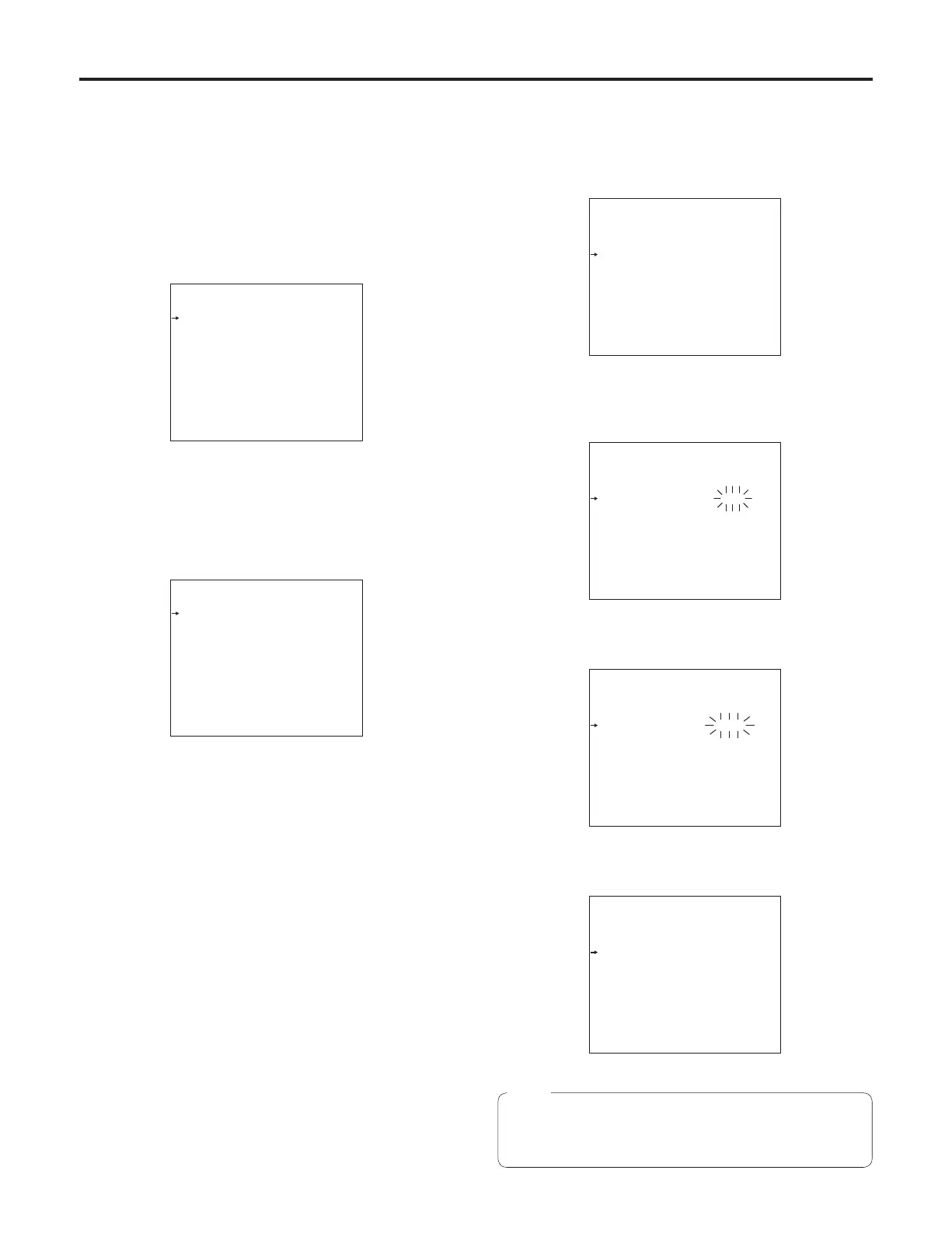
1 Press the MENU switch.
The camera’s USER menu screen now appears on the
viewfinder or monitor.
USE R M EN U
Ope r at io n
Pai n ti ng
Mai n te na n ce
2 Turn the JOG dial to select the menu item.
3 After having selected the item, press the JOG dial to
access that item’s menu.
Ope r at io n
VF S et ti n g1 IN C OM S et . 1
VF S et ti n g2 IN C OM S et . 2
Cur s or MI C G ai n
VF D is pl a y1
VF D is pl a y2
Set t in g1
Set t in g2
Set t in g3
Set t in g4
!LE D
7”V F
Entering the menu data
After accessing the item menus, enter the respective
data.
1 Turn the JOG dial to select the menu item to be set.
VF S et ti n g1
Sid e M od u S W OF F
Sid e M od u L VL 1 5
Zon e M ar k 4 :3
Saf e ty M a rk 1 16 :9
Saf e ty A r ea 1 93 %
Saf e ty M a rk 2 4 :3
Saf e ty A r ea 2 93 %
Cen t er M a rk OF F
Cen t er M a rk S EL 3
Lin e W id t h 3
Mar k er L e ve l 10 0%
2 When the JOG dial is pressed, the setting of the item
indicated by the arrow flashes.
VF S et ti n g1
Sid e M od u S W OF F
Sid e M od u L VL 1 5
Zon e M ar k 4 :3
Saf e ty M a rk 1 16 :9
Saf e ty A r ea 1 93 %
Saf e ty M a rk 2 4 :3
Saf e ty A r ea 2 93 %
Cen t er M a rk OF F
Cen t er M a rk S EL 3
Lin e W id t h 3
Mar k er L e ve l 10 0%
3 Turn the JOG dial to change the setting.
VF S et ti n g1
Sid e M od u S W OF F
Sid e M od u L VL 1 5
Zon e M ar k 13 :9
Saf e ty M a rk 1 16 :9
Saf e ty A r ea 1 93 %
Saf e ty M a rk 2 4 :3
Saf e ty A r ea 2 93 %
Cen t er M a rk OF F
Cen t er M a rk S EL 3
Lin e W id t h 3
Mar k er L e ve l 10 0%
4 When the JOG dial is pressed, the data is entered.
VF S et ti n g1
Sid e M od u S W OF F
Sid e M od u L VL 1 5
Zon e M ar k 13 :9
Saf e ty M a rk 1 16 :9
Saf e ty A r ea 1 93 %
Saf e ty M a rk 2 4 :3
Saf e ty A r ea 2 93 %
Cen t er M a rk OF F
Cen t er M a rk S EL 3
Lin e W id t h 3
Mar k er L e ve l 10 0%
Note
Bear in mind that if, in step 3, the MENU switch is set to
OFF while the setting is flashing, the setting prior to the
flashing will remain unchanged.










 To Next Page