EasyManua.ls Logo

Panasonic CQ-VX100U - Connection with VCR or Camcorder

Panasonic CQ-VX100U
113 pages
Print Icon
To Next Page IconTo Next Page
To Previous Page IconTo Previous Page
Loading...
.c
en
.-
-
="
C
N~:
W
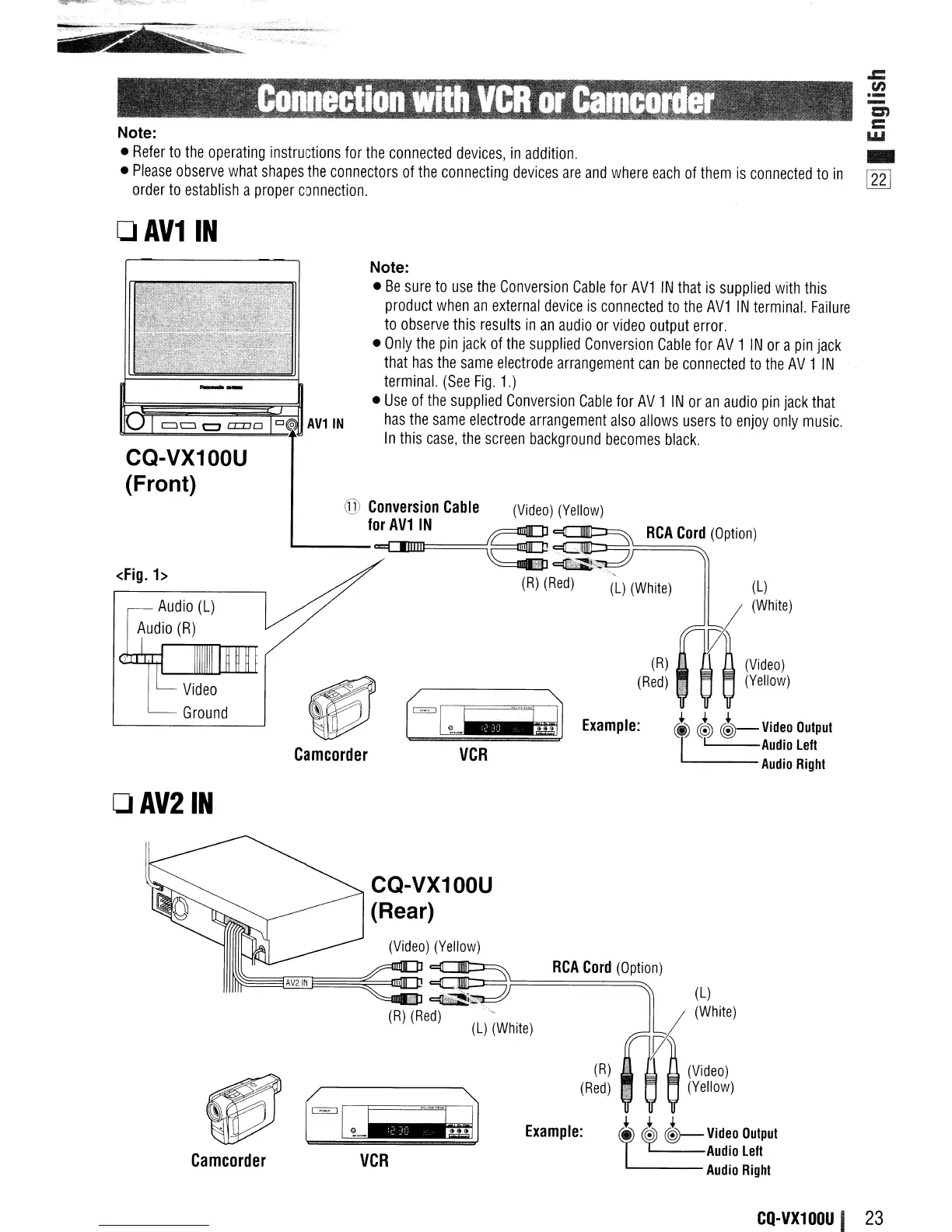
Refer
to
the
operating
instructions
for
the
connected
devices,
in
addition.
_
Please
observe
what
shapes
the
connectors
of
the
connecting
devices
are
and
where
each
of
them
is
connected
to
in
lnJ
order
to
establish
a
proper
connection.
o
AV11N
(l)
(White)
RCA
Cord
(Option)
(R)
(Red)
Example:
foGX--~
VCR
Note:
Be
sure
to
use
the
Conversion
Cable
for
AV1
IN
that
is
supplied
with
this
product
when
an
external
device
is
connected
to
the
AV1
IN
terminal.
Failure
to
observe
this
results
in
an
audio
or
video
output
error.
Only
the
pin
jack
of
the
supplied
Conversion
Cable
for
AV
1
IN
or
a
pin
jack
that
has
the
same
electrode
arrangement
can
be
connected
to
the
AV
1
IN
terminal.
(See
Fig.
1.)
Use
of
the
supplied
Conversion
Cable
for
AV
1
IN
or
an
audio
pin
jack
that
has
the
same
electrode
arrangement
also
allows
users
to
enjoy
only
music.
In
this
case,
the
screen
background
becomes
black.
Camcorder
@ Conversion
Cable
(Video)
(Yellow)
.......
f=N
e~
(R)
(Red)
(l)
(White)
Audio
(L)
Audio
(R)
CQ-VX100U
(Front)
<Fig.
1>
DAV21N
(l)
(White)
(l)
M
(Wh;te)
A
(Video)
Q
(Yellow)
~ ~
~
V;deo
Oulpul
L
L..---Audio
left
---
Audio
Right
RCA
Cord
(Option)
(R)
(Red)
Example:
(Video)
(Yellow)
CQ-VX100U
(Rear)
VCR
Camcorder
CQ-VX100U
I
23