92
13.14.1.2 Information Log
• The signal from Infrared sensors will be log to human activity database for further analysis.
13.14.1.3 Human Position Analysis
• According to Area of Living, frequency of activity, the system will analyze the human position away from the
indoor unit.
13.14.1.4 Human Activity Level Judgment
• Human Activity Level is judged based on the frequency of pulses detected by the infrared sensors within a
timeframe. The activity level will be categorized into High, Normal, Low level.
• When a pulse is detected within this timeframe, the status of human presence is judged.
• When there is no signal detection continues for 40 minutes or more, the status of human absence is judged.
13.14.1.5 Determination of Presence or Absence
• Human presence status shall be determined based on the human presence status of each area.
• When all area has been detected absent for more than 40 minutes then it will judge as absence.
13.14.1.6 Area of Living Classification Judgment
• The system is able to judge area of living according to human activity database, classified as following:
o (Zone I) Living Area – In front of television, dining table, etc.
o (Zone II) Walkway – Human detection is relatively less.
o (Zone III) Non-Living Area – Near windows, wall, etc.
13.14.1.7 Target Area and Position Judgment
• By default, the system will judge the indoor unit installation position according to human activities and will reset
the louver center position::
o Non-Living Area at Position A – Indoor unit installed at left side of the room.
o Non-Living Area at Position C – Indoor unit installed at right side of the room.
o Other than above – Indoor unit installed at center of the room.
• Every 4 hours, the Judgment will restart.
• Target area is judged according to human position analysis result.
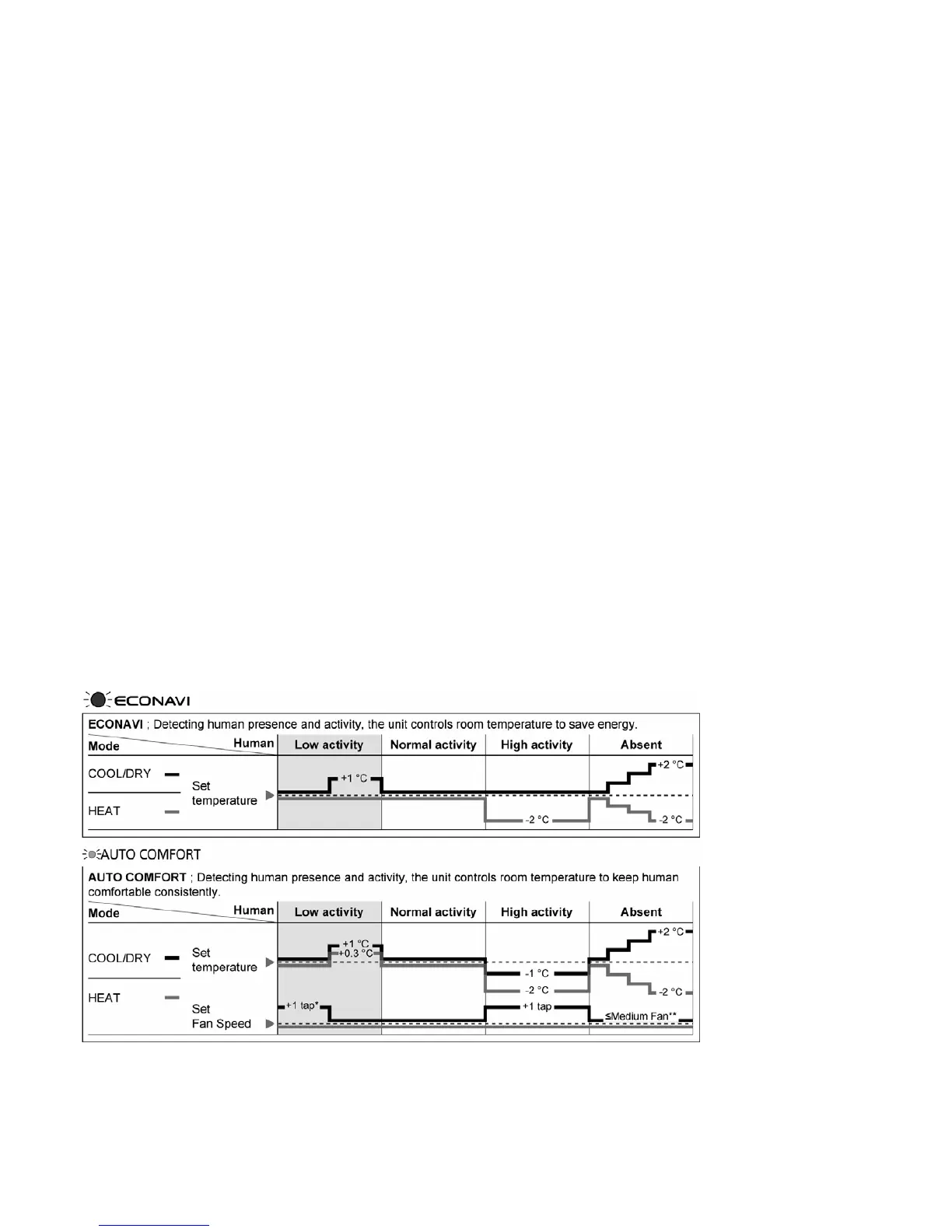
13.14.1.8 Setting Temperature and Fan Speed Shift
* During low activity, fan speed 1 tap up for first 15 minutes or until set temperature is reached.
** During human absence, maximum fan speed for COOL/DRY mode is medium fan.






 To Next Page