58
15. Servicing Mode
15.1 Cooling Only Operation
Setting of Cooling only operation.
The equipment can be set to cooling only operation by setting the JP line on the outdoor unit display circuit board.
[Setting method]
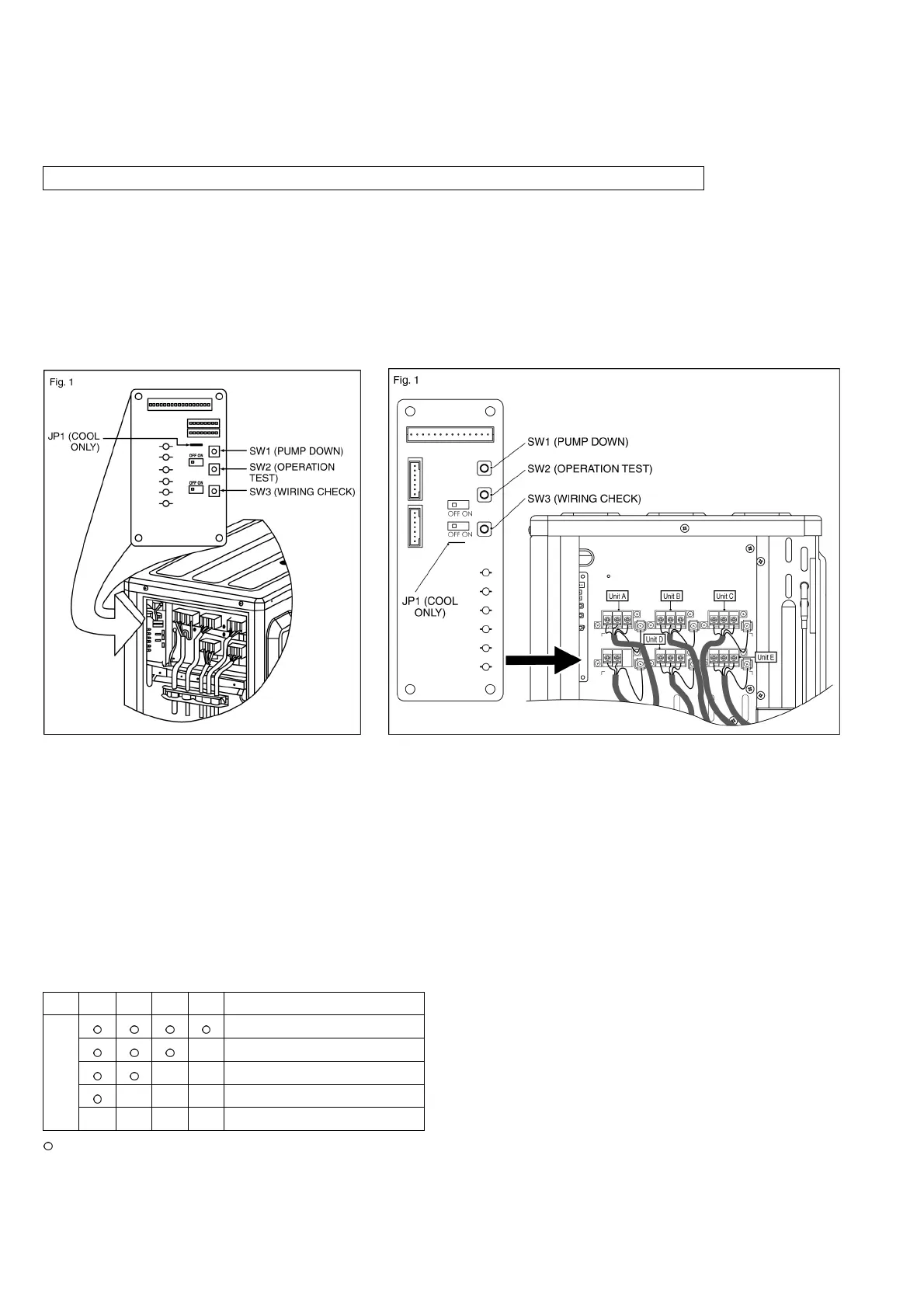
Switch off power supply to the outdoor unit, cut JPN1 (COOL ONLY) as shown in Figure 1.
After cut off the wire, switch ON the equipment power.
When setting the cooling only operation, Heating operation is disable.
ODOUR WASH operation is disabled. (Odour cut operation is still enabled.)
To revert back the setting to heat pump operation, switch OFF the equipment power, reconnect JP1 (COOL ONLY)
back to short circuit condition and switch ON the equipment power.
CU-4E23QBR CU-4E27QBR 5E34QBR
15.1.1 Pump Down Operation
Operate the pump down according to the following procedures.
1. Confirm the valve on the liquid side and gas side is open.
2. Press PUMP DOWN switch (SW1) on the display printed circuit board for more than 5 seconds. Pump down
(cooling) operation is performed for 15 minutes.
3. Set the liquid side 3 way valve to close position and wait until the pressure gauge indicates 0.01MPa
(0.1kg/cm
2
G).
4. Immediate set the gas side valve to close position and then press the PUMP DOWN switch (SW1) to stop the
pump down operation.
NOTE: Pump down operation will stop automatically after 15 minutes if PUMP DOWN switch (SW1) is not pressed
again. Pump down operation is not started within 3 minutes after compressor is stopped.
LED 2 3 4 5 Message
Pump down operation in progress
3 minutes before operation end
2 minutes before operation end
1 minute before operation end
Status
Pump down operation end
: Flashing






 To Next Page