Before Use
- 12 -
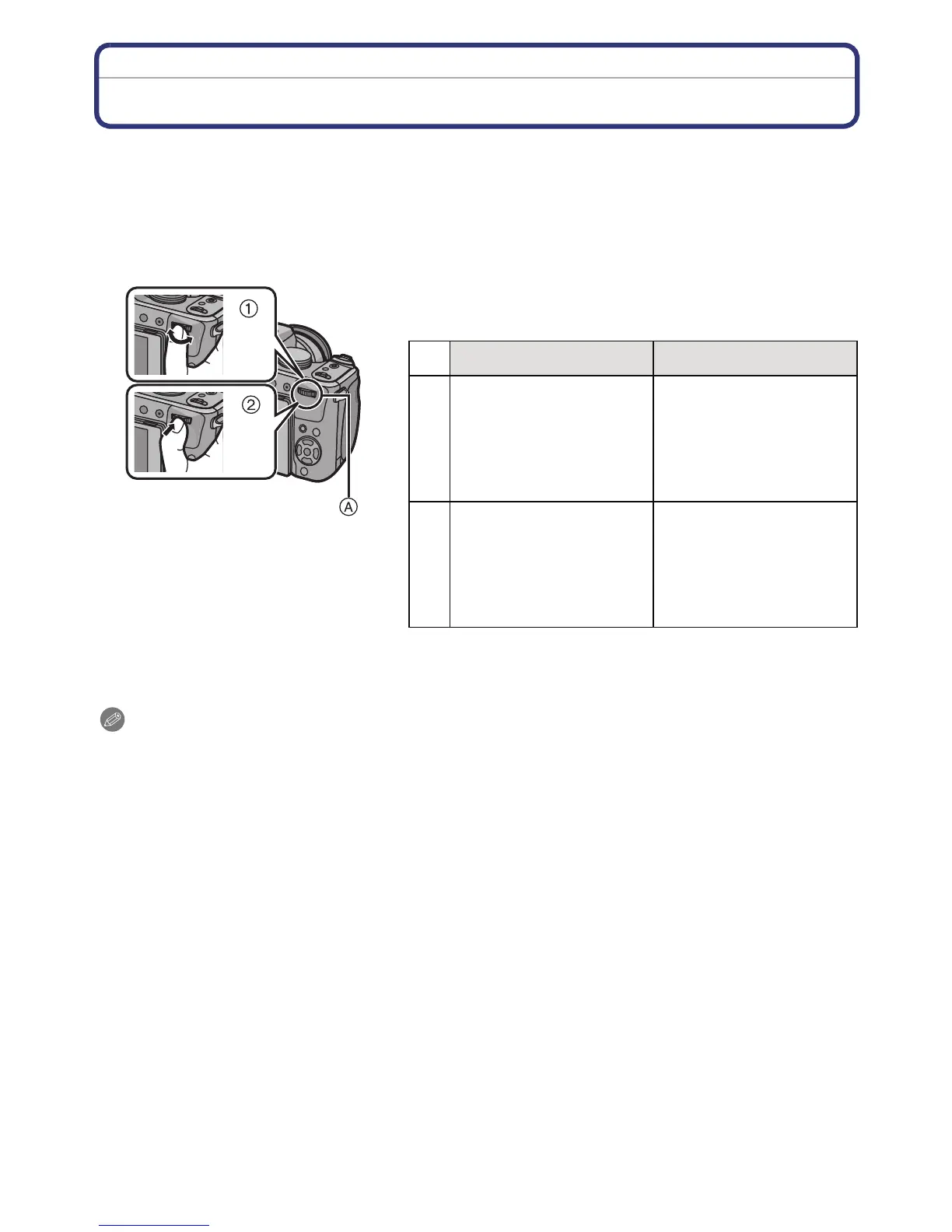
Operating the Rear Dial
There are 2 ways to operate the rear dial, rotating left or right, and by pressing.
Rotating:
Selection of items or setting of values is performed during the various settings.
Pressing:
Operations that are the same as [MENU/SET] button, such as selection of settings
and exiting the menu, are performed during the various settings.
A Rear dial
¢1 Recording
¢2 Playback
Note
•
The sound of the rear dial operation may be recorded when operated during motion picture
recording.
Example of operation during recording/playback
screen
1 “Rotating” 2 “Pressing”
¢
1
Adjusting of Programme
Shift (P56), Manual
Focus (P75), Aperture
(P85), Shutter Speed
(P85), selection of items
when burst is set, etc.
Switching to
Compensating the
Exposure (P78) etc.
¢
2
Forwarding/rewinding of
pictures during 1 Screen
Playback (P60),
Multi-playback/Calendar
Search (P61), Playback
Zoom (P62)
Picture selection during
Multi-Playback and
Calendar Search






 To Next Page