Preparation
- 28 -
This section describes how to select the Programme AE Mode (P53), and the same
setting can be used for the [MOTION PICTURE] mode menu, [PLAYBACK] menu and
[SETUP] menu as well.
Example:To change the [AF MODE] from [
Ø] (1-area-focusing) to [š] (Face Detection) in
Programme AE Mode with the focus selector switch set to [AF].
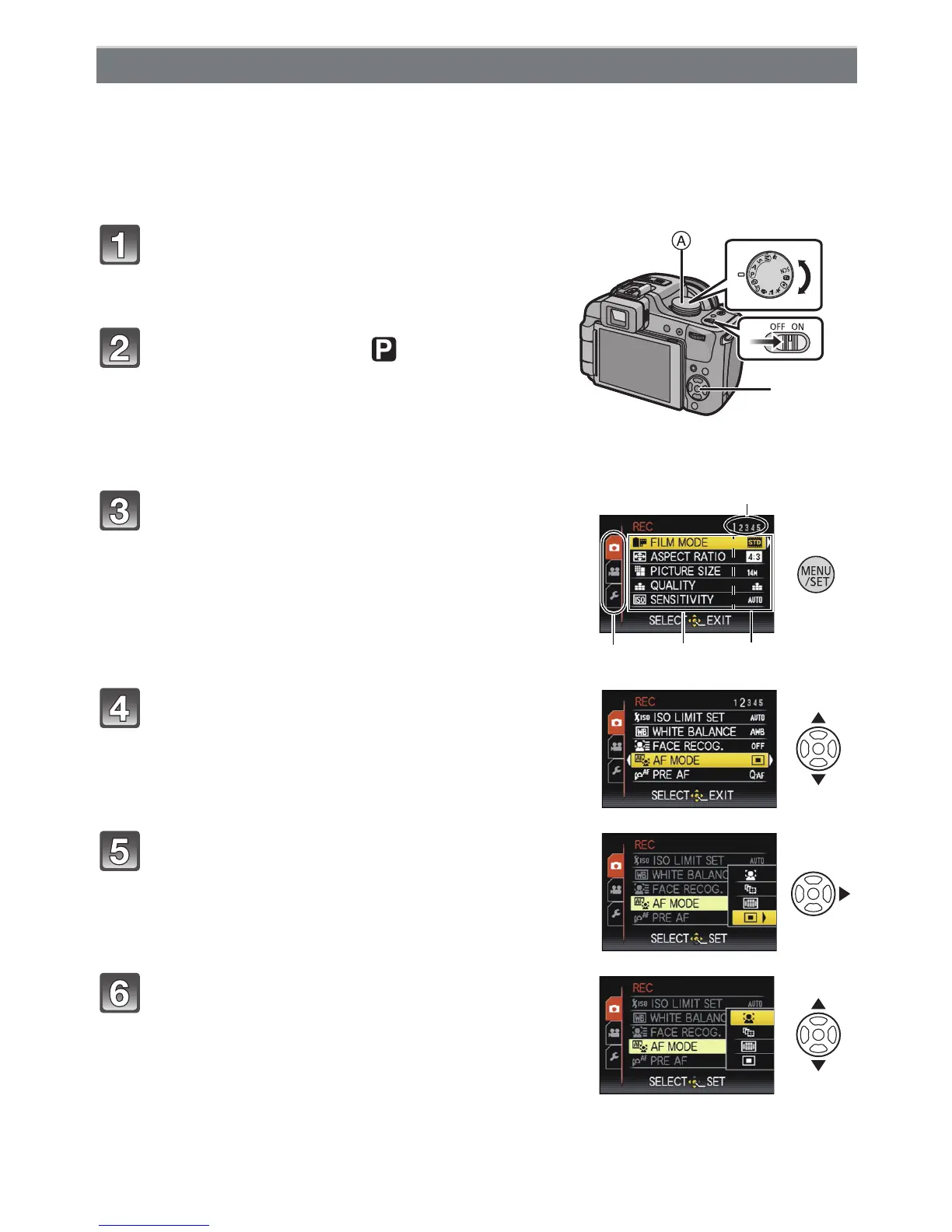
Turn the camera on.
A Mode dial
B [MENU/SET] button
• The lens barrel extends.
Set the mode dial to [ ].
• To set the playback menu, proceed to step 3 by
pressing the [(].
Setting menu items
Press [MENU/SET] to display the menu.
C Menu toggle icon
D Menu item
E Settings
F Menu screen page
• You can easily switch menu screen pages by rotating
the zoom lever.
Press 3/4 to select [AF MODE].
• Select the item at the very bottom, and press 4 to
move to the second screen.
Press 1.
• Depending on the item, its setting may not appear or it
may be displayed in a different way.
Press 3/4 to select [š].





 To Next Page