Others
- 202 -
Others
Using the Conversion Lens (optional)
With the optional conversion lenses, you can record even more faraway pictures and take
close-up pictures of smaller subjects.
Refer to P149 for details.
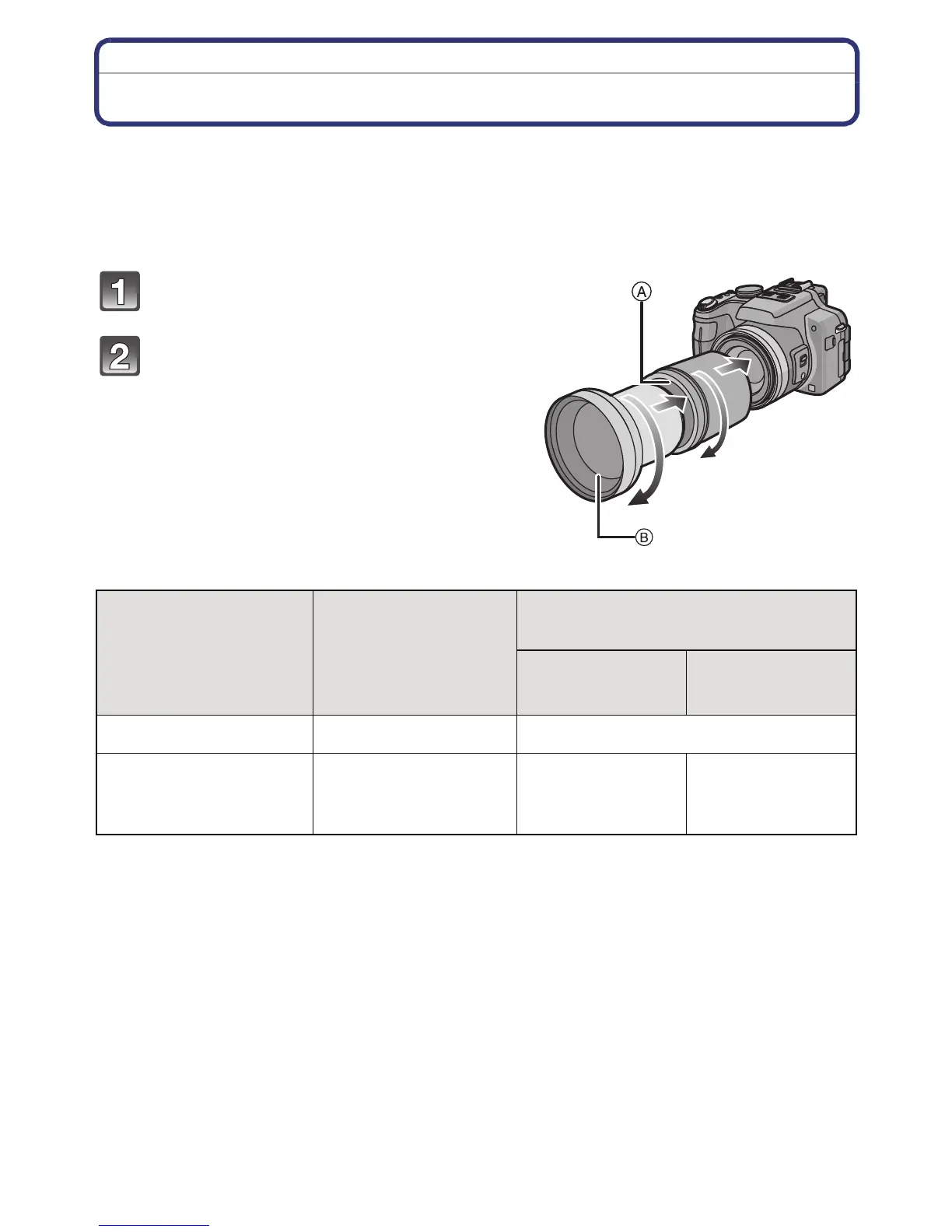
Preparations: Remove the lens cap and lens hood.
Attach the lens adapter.
• Rotate the lens adapter slowly and carefully.
Attach the tele conversion lens.
A Lens adapter (DMW-LA5; optional)
B Tele conversion lens (DMW-LT55; optional)
• Close-up lens (DMW-LC55; optional) can be
attached in a similar manner.
¢ The actual magnification when the zoom is used will be 1.7 times the display.
Zoom magnification
when a lens is
attached
(Max. number of
pixels)
Recordable range when using a
conversion lens
Wide Te l e
Tele conversion lens 12k-24k
¢
5.5 m (18.0 feet) to 
Close-up lens 4k-24k
18 cm (0.59 feet)
to
50 cm (1.64 feet)
33 cm (1.09 feet)
to
50 cm (1.64 feet)




 To Next Page