EasyManua.ls Logo

Panasonic HC-VXF11 - User Manual

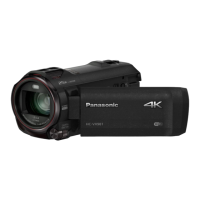
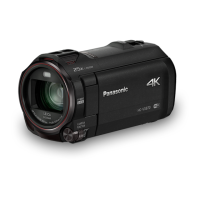
Panasonic HC-VXF11
288 pages
Print Icon
To Next Page IconTo Next Page
Loading...
Operating Instructions
High Definition Video Camera 4K Video Camera
Model No.
HC-V800
Model No.
HC-WXF1
HC-V808 HC-WXF1M
HC-VXF1
HC-VXF11
HC-VX1
HC-VX11
Please read these instructions carefully before using this product, and save this manual for future
use.
DVQP1585ZA
F0218SQ0
until
2018/03/30
HC-WXF1-VXF1-VX1-V800EBEP-DVQP1585_eng.book 1 ージ 018年2月22日 木曜日 午後12時30

Table of Contents

Other manuals for Panasonic HC-VXF11

Questions and Answers

  • J
    justin94Aug 18, 2025
    How to fix a Panasonic HC-VXF11 Camcorder that won't operate?
    • J
      jjuarezAug 18, 2025
      If your Panasonic Camcorder is not operating correctly or is unresponsive even when turned on, try removing the battery or AC adapter, waiting about a minute, and then reconnecting it. Wait another minute before turning the unit on again. If the problem persists, disconnect the power and consult the dealer from whom you purchased the camcorder.
  • J
    James ArroyoAug 20, 2025
    What to do if my Panasonic HC-VXF11 cannot be turned on?
    • S
      Sonya CannonAug 21, 2025
      If your Panasonic Camcorder won't turn on, ensure the battery is adequately charged. If it still fails to power on, remove the battery or AC adapter, wait approximately one minute, then reconnect it and try turning the unit on again. If normal operation is still not restored, detach the power connected, and consult the dealer who you purchased this unit from.
  • C
    Connie WheelerAug 23, 2025
    Why does my Panasonic HC-VXF11 Camcorder battery drain so fast?
    • L
      lisakaiserAug 23, 2025
      To address the issue of your Panasonic Camcorder not turning on, not staying on long enough, or the battery draining quickly, ensure the battery is fully charged. If you are in a cold environment, be aware that battery life is reduced in cold places. If the operating time remains short even after a full charge, the battery may be worn out and require replacement.
  • R
    Raymond MilesAug 26, 2025
    What to do if my Panasonic Camcorder displays 'Error occurred'?
    • L
      Luis MurphyAug 26, 2025
      If your Panasonic Camcorder displays the message “ERROR OCCURRED. PLEASE TURN UNIT OFF, THEN TURN ON AGAIN,” the unit has detected an error. Try restarting the unit by turning it off and then on again. If the error message continues to appear after restarting, the unit may require repair. Disconnect the power and consult the dealer from whom you purchased the camcorder. Do not attempt to repair the unit yourself.
  • J
    Joel MartinAug 28, 2025
    Why is there no sound or picture when connecting my Panasonic HC-VXF11 to the TV?
    • M
      Melissa BoyleAug 28, 2025
      If images or sounds are not output even when your Panasonic Camcorder is correctly connected to a TV, read the operating instructions of your TV and select the channel that matches the input used for the connection. Note that the audio during playback mode is not output from this unit when connected to a TV. Sound levels cannot be adjusted using this unit, so adjust the sound on the TV.
  • J
    Joshua SinghAug 30, 2025
    Why can't I copy files from my Panasonic HC-VXF11 SD card via USB?
    • Z
      zwuAug 30, 2025
      If you cannot copy scenes on the SD card by connecting your Panasonic Camcorder to other equipment with the USB cable, the other equipment might not have recognized the SD card. Try unplugging the USB cable and reconnecting it.
  • I
    isaiah14Sep 1, 2025
    Why won't my computer recognize my Panasonic HC-VXF11 Camcorder via USB?
    • M
      Miguel BlairSep 1, 2025
      If your Panasonic Camcorder is not detected by the PC when connected by the USB cable, re-insert the SD card into the unit and reconnect the supplied USB cable. Try selecting another USB terminal on the PC. Check the operating environment. Connect the supplied USB cable again after restarting the PC and turning on this unit again.
  • M
    Matthew TaylorSep 3, 2025
    Why does my Panasonic HC-VXF11 Camcorder battery run down so quickly?
    • M
      Megan LoveSep 4, 2025
      If your Panasonic Camcorder battery is running down quickly, try these steps: First, fully charge the battery, keeping in mind that cold environments can shorten battery life. If the operating time remains short after a full charge, the battery may be worn out and require replacement. If charging doesn't solve the issue, remove the battery or AC adapter, wait about a minute, reconnect, and then turn the unit on again. If the issue persists, disconnect the power and consult the dealer from whom you purchased the unit.
  • G
    George SimmonsSep 6, 2025
    Why is the battery indicator wrong on my Panasonic HC-VXF11 Camcorder?
    • D
      David ReyesSep 6, 2025
      If the remaining battery indication on your Panasonic Camcorder is not displaying correctly, fully charge the battery, discharge it completely, and then charge it again. Keep in mind that the remaining battery capacity indication is only an approximation.
  • P
    Pamela NovakSep 8, 2025
    Why does my Panasonic Camcorder keep stopping recording?
    • J
      Jennifer NunezSep 8, 2025
      If your Panasonic Camcorder is arbitrarily stopping recording, ensure you are using an SD card suitable for motion picture recording. If the data writing speed has deteriorated, or after repeated recording and deletion, format the SD card or the built-in memory using the unit. Also, if [AGS] is [ON], record in the normal horizontal position or set [AGS] to [OFF].

Summary

Preparation

Names and Functions of Main Parts

Identifies and describes the main physical components and controls of the camera.

Basic

Recording Motion Pictures

Details the process of starting, pausing, and stopping motion picture recording.

Recording Still Pictures

Explains how to take still pictures, including focus indication and Fn button settings.

Motion Picture;Still Picture Playback

Guides users on how to play back recorded motion pictures and still pictures.

Advanced (Recording)

Recording with the Sub Camera (Twin Camera)

Explains how to use the sub camera simultaneously with the main camera for dual-angle recording.

Changing the Recording Mode

Outlines the different recording modes available, such as Intelligent Auto, HDR Movie, and Manual.

Manual Recording

Covers manual adjustments for zoom, focus, white balance, shutter speed, and iris/gain.

Advanced (Playback)

Playback Operations

Explains basic playback controls like skip, slow-motion, frame-by-frame, and direct playback.

Deleting Scenes;Still Pictures

Explains how to delete unwanted scenes or still pictures from the media.

Wi-Fi

Wi-Fi Function

Provides essential information about using the camera as a wireless LAN device and its limitations.

Remote Control via Smartphone

Covers using the "Image App" for remote control, including direct and access point connections.

Wireless Twin;Multi-Camera

Connecting a Smartphone as a Wireless Sub Camera

Guides on connecting a smartphone for the first time as a wireless sub camera.

Others

Troubleshooting

Provides solutions for common problems related to power, object warping, and unit operation.

Cautions for Use

Covers important safety precautions and guidelines for using the unit.

Panasonic HC-VXF11 Specifications

General IconGeneral
Sensor typeMOS BSI
Total megapixels8.57 MP
Optical sensor size1/2.5 \
Effective megapixels (movie)8.29 MP
Filter size62 mm
Digital zoom1500 x
Optical zoom24 x
Image stabilizerYes
Focal length range4.12 - 98.9 mm
Interchangeable lensNo
Image stabilizer typeOptical Image Stabilization (OIS)
Maximum aperture number1.8
Focal length (35mm film equivalent)25 - 734 mm
Maximum focal length (35mm film equiv)734 mm
Minimum focal length (35mm film equiv)25 mm
Camcorder media typeMemory card
Compatible memory cardsSD, SDHC, SDXC
Maximum memory card size- GB
Internal storage capacity0 GB
Focus adjustmentAuto/Manual
Camera shutter speed1/8000 - 1/2 s
Display diagonal3 \
Display resolution (numeric)460800 pixels
Viewfinder resolution1550000 pixels
Viewfinder screen size0.24 \
Camcorder typeHandheld camcorder
Product colorBlack
Video resolutions3840 x 2160, 1920 x 1080, 1280 x 720 pixels
Supported video modes720p, 1080p, 2160p
Video formats supportedAVCHD, MP4
Maximum video resolution3840 x 2160 pixels
Cables includedUSB
Image formats supportedJPEG
Maximum image resolution6784 x 3816 pixels
Still image resolution(s)[16: 9] 25.9 megapixels (6, 784 x 3, 816), 14 megapixels (4, 992 x 2, 808), 2.1 megapixels (1, 920 x 1, 080) [4: 3] 20.4 megapixels (5, 216 x 3, 912), 10.9 Megapixels (3, 808 x 2, 856), 0.3 Megapixels (640 x 480)
PictBridge-
USB 2.0 ports quantity1
USB 3.2 Gen 1 (3.1 Gen 1) Type-A ports quantity0
Battery capacity1940 mAh
Video recording time- h
Wi-Fi standards802.11b, 802.11g, Wi-Fi 4 (802.11n)
Weight and Dimensions IconWeight and Dimensions
Depth167 mm
Width69 mm
Height77 mm
Weight450 g

Related product manuals