Basic
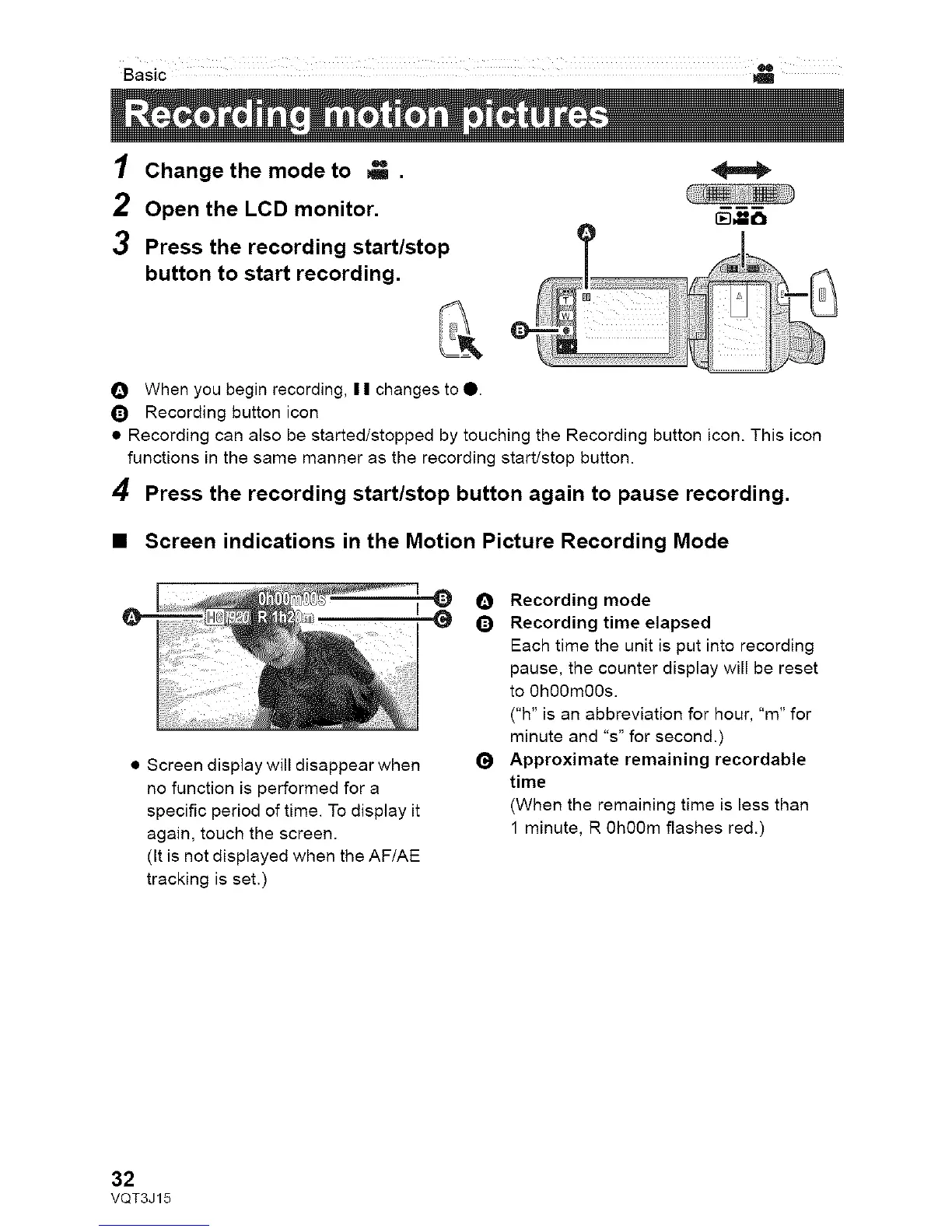
1
2
3
Change the mode to _ .
Open the LCD monitor.
Press the recording start/stop
button to start recording.
_mm
O When you begin recording, I I changes to 0.
Q Recording button icon
• Recording can also be started/stopped by touching the Recording button icon. This icon
functions in the same manner as the recording start/stop button.
4 Press the recording start/stop button again to pause recording.
• Screen indications in the Motion Picture Recording Mode
• Screen display will disappear when
no function is performed for a
specific period of time. To display it
again, touch the screen.
(It is not displayed when the AF/AE
tracking is set.)
O Recording mode
Q Recording time elapsed
Each time the unit is put into recording
pause, the counter display will be reset
to 0h00m00s.
("h" is an abbreviation for hour, "m" for
minute and "s" for second.)
Approximate remaining recordable
time
(When the remaining time is less than
1 minute, R 0h00m flashes red.)
32
VQT3J15



 To Next Page