Advanced(Recording)
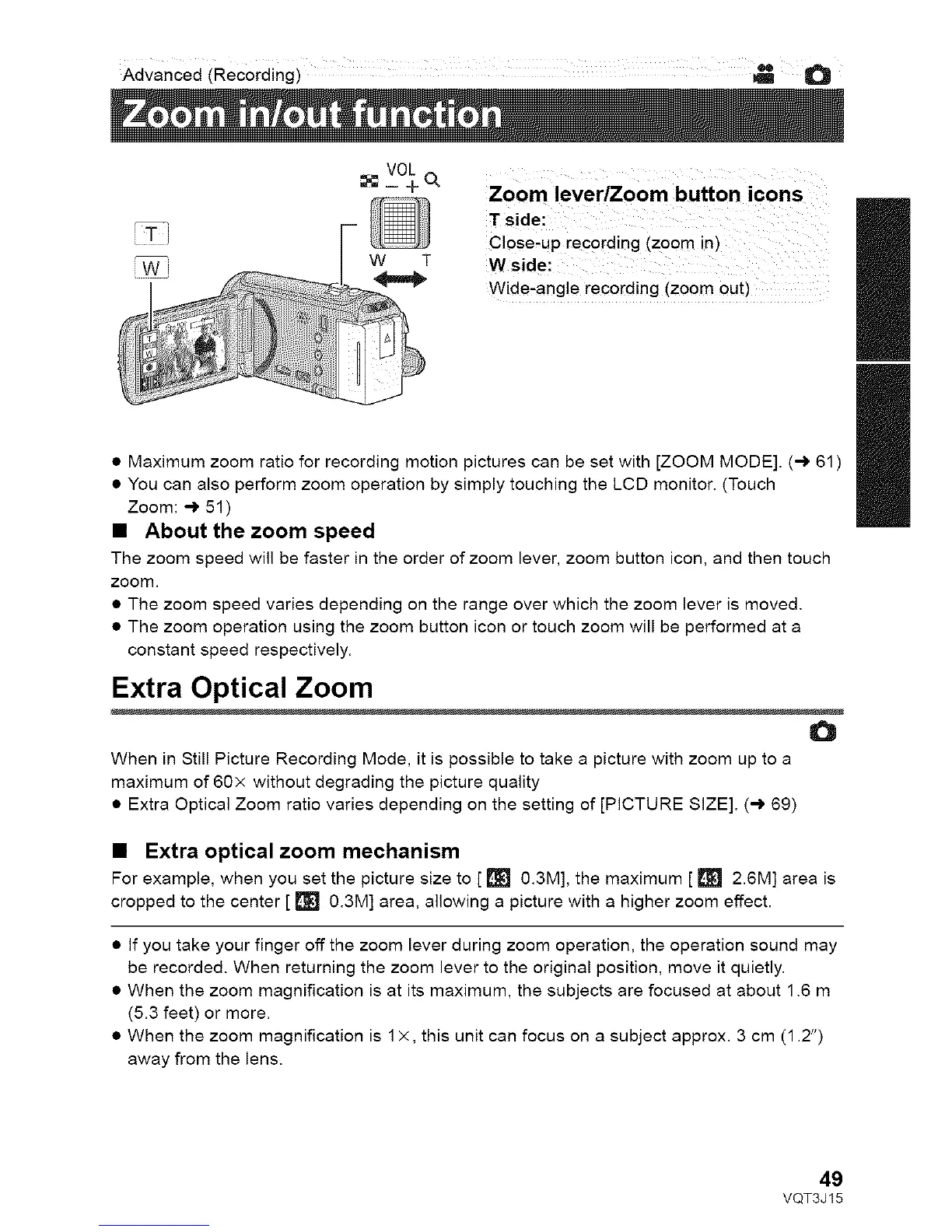
w T
Close-uprecording(zoomin)
Wside:
Wide,anglerecording(zoomout)
• Maximum zoom ratio for recording motion pictures can be set with [ZOOM MODE]. (-) 61 )
• You can also perform zoom operation by simply touching the LCD monitor. (Touch
Zoom: -) 51)
• About the zoom speed
The zoom speed will be faster in the order of zoom lever, zoom button icon, and then touch
zoom,
• The zoom speed varies depending on the range over which the zoom lever is moved.
• The zoom operation using the zoom button icon or touch zoom will be performed at a
constant speed respectively.
Extra Optical Zoom
o
When in Still Picture Recording Mode, it is possible to take a picture with zoom up to a
maximum of 60x without degrading the picture quality
• Extra Optical Zoom ratio varies depending on the setting of [PICTURE SIZE]. (,-) 69)
• Extra optical zoom mechanism
For example, when you set the picture size to [ [] 0.3M], the maximum [ [] 2.6M] area is
cropped to the center [ [] 0.3M] area, allowing a picture with a higher zoom effect.
• If you take your finger off the zoom lever during zoom operation, the operation sound may
be recorded. When returning the zoom lever to the original position, move it quietly.
• When the zoom magnification is at its maximum, the subjects are focused at about 1.6 m
(5.3 feet) or more.
• When the zoom magnification is 1x, this unit can focus on a subject approx. 3 cm (1.2")
away from the lens.
II
II
49
VQT3J15



 To Next Page