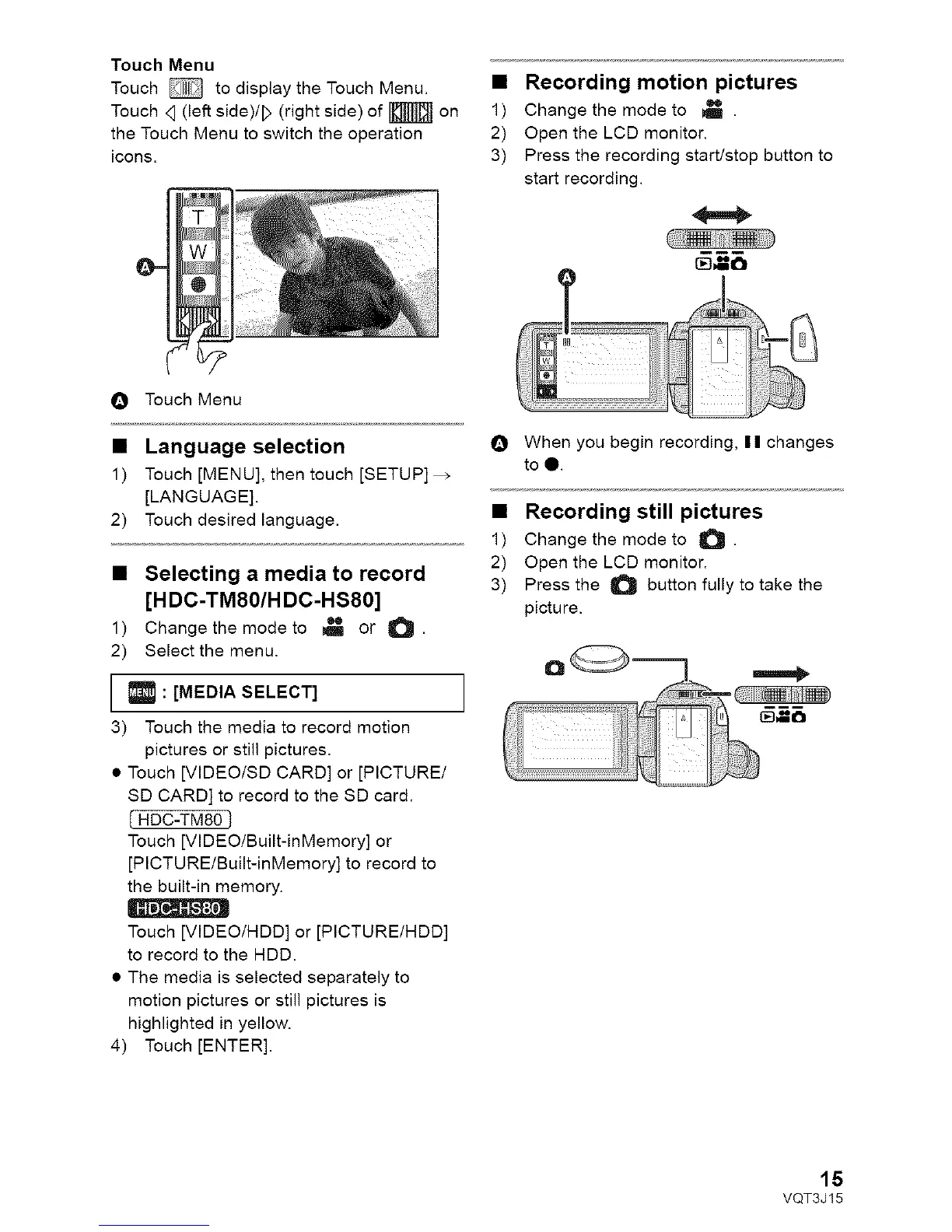
TouchMenu
Touch_ todisplaytheTouchMenu.
Touch<1(leftside)/D(rightside)of_ on
theTouchMenutoswitchtheoperation
icons.
• Recording motion pictures
1) Change the mode to _ .
2) Open the LCD monitor.
3) Press the recording start/stop button to
start recording.
O Touch Menu
• Language selection
1) Touch [MENU], then touch [SETUP]_
[LANGUAGE].
2) Touch desired language.
• Selecting a media to record
[HDC-TM80/H DC-HS80]
1) Change the mode to _!_ or O.
2) Select the menu.
: [MEDIA SELECT]
3) Touch the media to record motion
pictures or still pictures.
• Touch [VIDEO/SD CARD] or [PICTURE/
SD CARD] to record to the SD card.
( HDC-TM80 ]
Touch [VIDEO/Built-inMemory] or
[PICTURE/Built-inMemory] to record to
the built-in memory.
Touch [VIDEO/HDD] or [PICTURE/HDD]
to record to the HDD.
• The media is selected separately to
motion pictures or still pictures is
highlighted in yellow.
4) Touch [ENTER].
O When you begin recording, I I changes
to l.
• Recording still pictures
1) Change the mode to O .
2) Open the LCD monitor.
3) Press the _ button fully to take the
picture.
]
15
VQT3J15



 To Next Page