EasyManua.ls Logo

Panasonic KX-TDA0141 - PS Registration Steps for Various Models

Panasonic KX-TDA0141
62 pages
Print Icon
To Next Page IconTo Next Page
To Previous Page IconTo Previous Page
Loading...
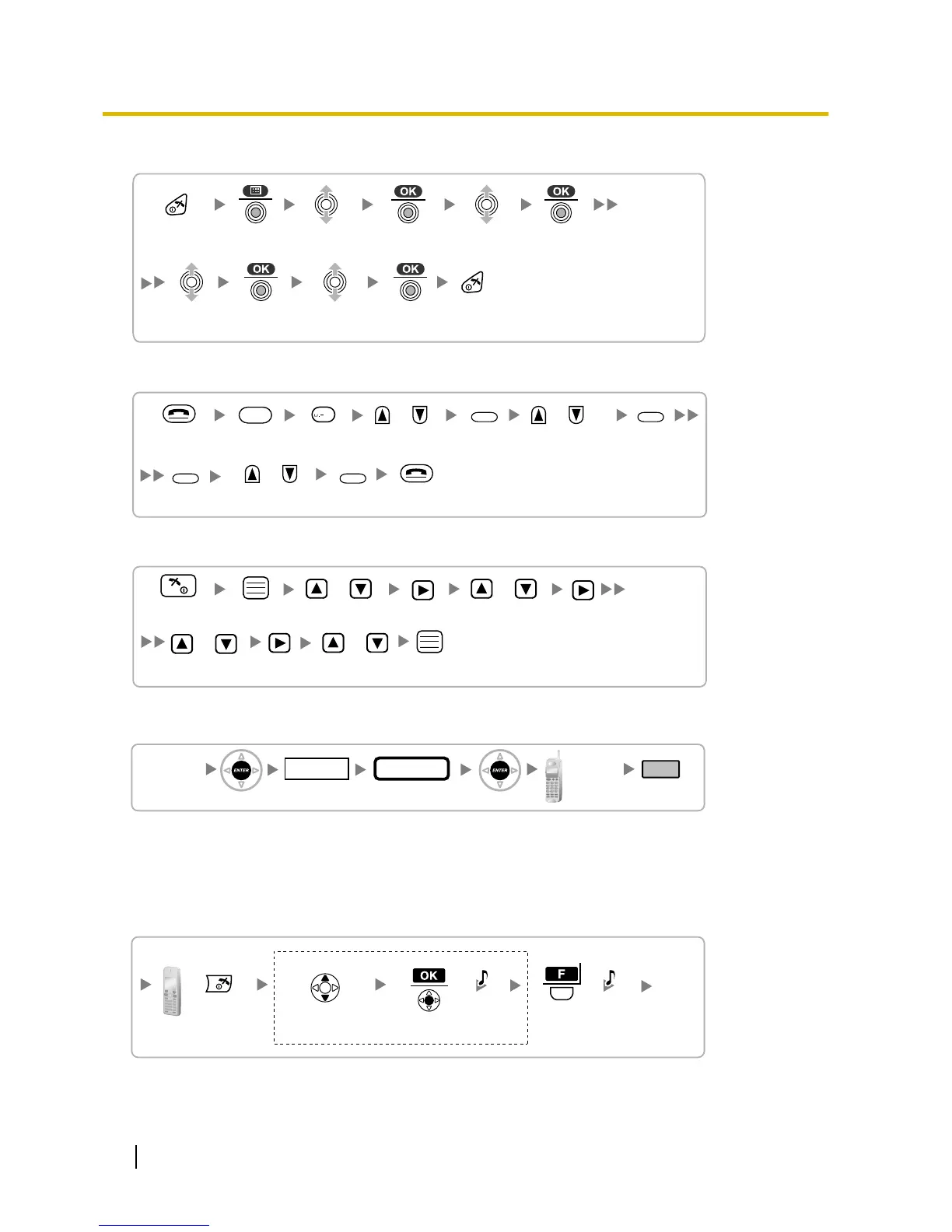
Using the KX-TCA155/KX-TCA255/KX-TCA256/KX-TCA355
Select
"Setting Handset".
Select
"
Select Language
".
Select
"Display Option".
Select the desired
language
.
Press POWER
for 2 seconds.
Using the KX-TD7590
/
Select
"DISPLAY SETTING".
Select the desired
language.
Select
"LANGUAGE".
Press POWER
for 5 seconds.
F
/
/
SELECT
SELECT
SELECT
0
SELECT
Using the KX-TD7580
/
Select
"Setting Handset".
Select "Select
Language".
Select
"Display Option".
Select the desired
language.
Press POWER
for 2 seconds.
/
/
/
PS Registration
[690]
001 to max. no.
of PSs (3 digits)
PS No.
1 to 5 digits
END
(HOLD)
ENTER ENTER
To the PS
operation
below
Extn. No.
Using the KX-TCA175/KX-TCA275
When the PS has not been registered yet
When
registering the PS for the first time, it is possible to select the desired language for the display. (You do
not need to enter the PS system programming mode when registering for the first time.)
Press
POWER for
2 seconds.
Select the desired
language
.
Press "F"
for 2
seconds.
C.Tone C.Tone
If required
When the PS has already been registered to another PBX
50 Quick Installation Guide
7 Connecting a Cell Station to the PBX