EasyManua.ls Logo

Panasonic KX-TDA0141 - First-Time PS Registration; Re-registering a PS; Setting System Lock for PS; PS Registration for KX-TD7580

Panasonic KX-TDA0141
62 pages
Print Icon
To Next Page IconTo Next Page
To Previous Page IconTo Previous Page
Loading...
CAUTION
To avoid unauthorised access and possible abuse of the PBX, we strongly recommend:
a. Keeping the password secret.
b. Changing your password regularly.
c. Selecting a complex, random password that cannot be easily guessed.
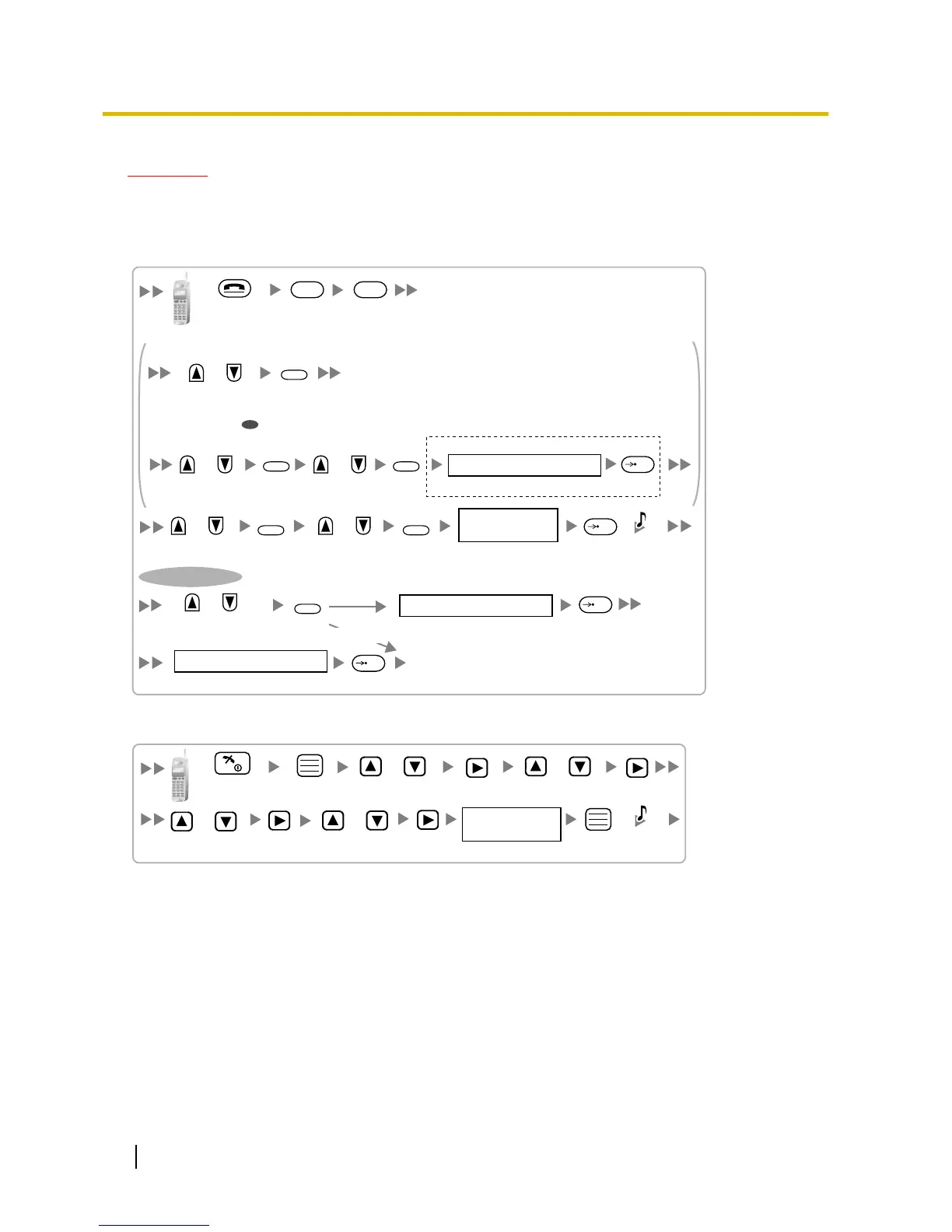
Select
"DECT-SYS1-4"
4 digits
Choose
"ENABLE/DISABLE".
PIN for
PS Registration
System Lock Password
Press POWER
for 5 seconds.
4 digits
4 digits
ENABLE
F
/
/
SELECT
SELECT
SELECT
/OK
/OK
/OK
C.Tone
To set system lock
F
DISABLE
OR
To register for the first time
To re-register
/
Select
"INITIAL SETTING".
SELECT
/
Select
"PS-PROGRAM".
SELECT
/
Select "DECT-
SYS SETTING".
SELECT
4 digits
If required
/OK
System Lock Password
Select
"REGISTRATION".
/
Using the KX-TD7580
/
Select
"Setting Handset".
Select
"Register H/set".
Select
"Registration".
Select
"Base 1–4".
Press POWER
for 2 seconds.
/
/
/
C.Tone
4 digits
PIN for
PS Registration
PS Termination
Confirm the following before cancelling the PS registration:
The PS is turned on.
52 Quick Installation Guide
7 Connecting a Cell Station to the PBX