EasyManua.ls Logo

Panasonic KX-TDA0141 - Deleting PS Registration Data

Panasonic KX-TDA0141
62 pages
Print Icon
To Next Page IconTo Next Page
To Previous Page IconTo Previous Page
Loading...
The PS is within range.
[691]
001 to max. no.
of PSs (3 digits)
PS No.
ENTER ENTER
END
(HOLD)
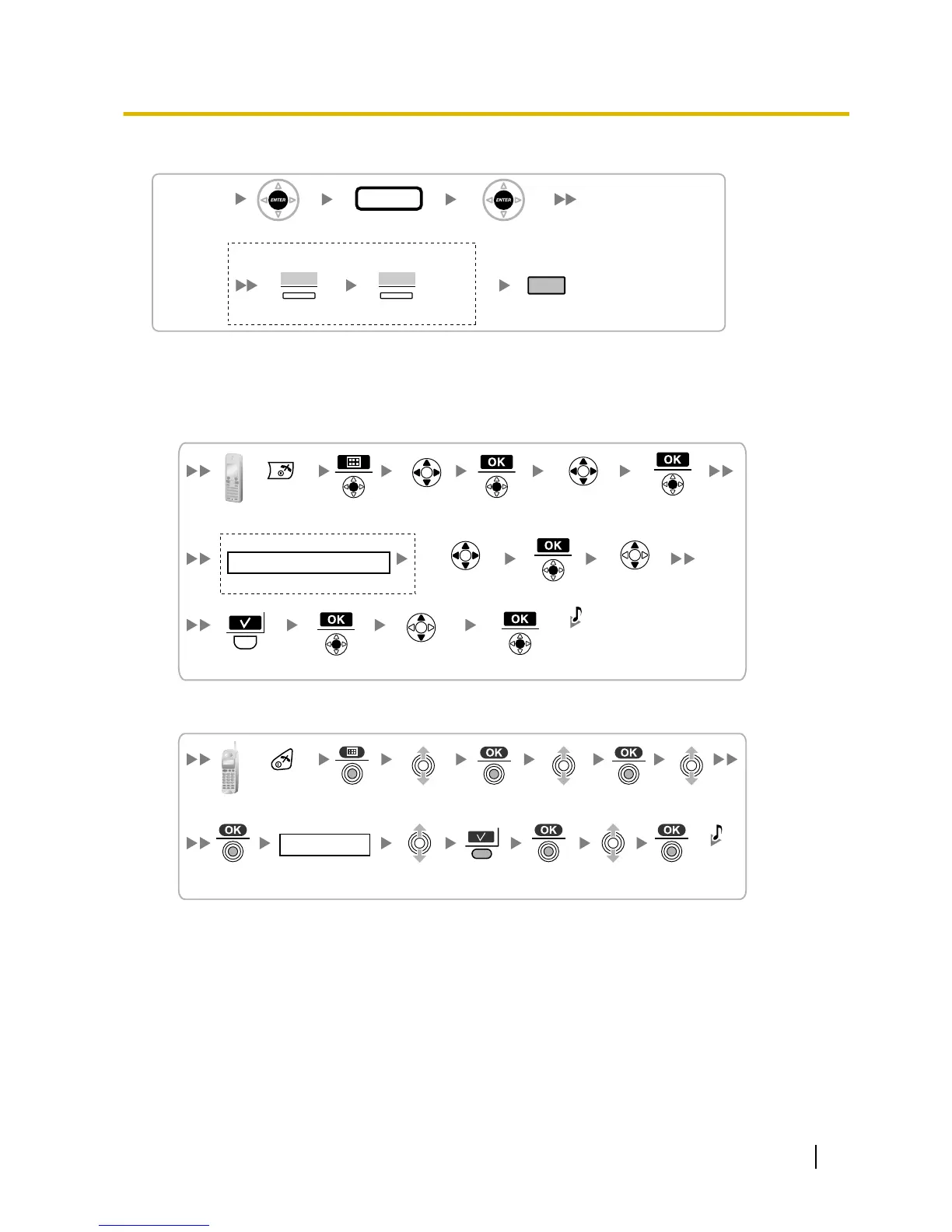
If "Rejected" or "Time out" is displayed
CLEAR YES
Press "YES".Press "CLEAR".
If "Rejected" or "Time out" is displayed
The registration information is still stored in the PS. You need to delete the registration information from
the PS.
Using the KX-TCA175/KX-TCA275
Select
"Setting Handset".
Select
"System Option".
Press POWER
for 2 seconds.
C.Tone
Select
"Yes".
Select
"Cancel Base".
If required
4 digits
System Lock Password
Select
"Base 1–4".
Using the KX-TCA155/KX-TCA255/KX-TCA256/KX-TCA355
4 digits
Handset PIN
Select
"Setting Handset".
Select
"Registration".
Select
"Base 1–4".
Press POWER
for 2 seconds.
C.Tone
Select
"YES".
Select
"Cancel Base".
Quick Installation Guide 53
7 Connecting a Cell Station to the PBX