EasyManua.ls Logo

Panasonic KX-TG1062 - User Manual

Panasonic KX-TG1062
60 pages
Print Icon
To Next Page IconTo Next Page
Loading...
Thank you for purchasing a Panasonic product.
This unit is compatible with Caller ID. You must subscribe to the appropriate service offered
by your service provider/telephone company.
Please read these operating instructions before using the unit and save them for future
reference.
For assistance, visit our website:
http://www.panasonic.com/help for customers in the U.S.A. or Puerto Rico.
Charge the batteries for about 7 hours before initial use.
Consulte “Guía Rápida Espola”, página 48.
Operating Instructions
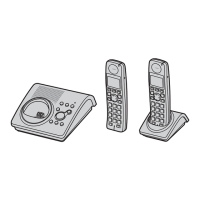
Model shown is KX-TG1061.
Expandable Digital Corded/Cordless
Answering System
Model No.
KX-TG1061
with 2 Handsets
Model No.
KX-TG1062
with 3 Handsets
Model No.
KX-TG1063
Panasonic’s environmental declaration labels
This mark is an environmental label
showing that the products are certified
as Panasonic’s Green Products.
Standby power consumption
reduced by 56%
TG106x(e).book Page 1 Friday, January 16, 2009 10:45 AM


Questions and Answers

  • P
    Patty VangSep 8, 2025
    Why is the operating time shorter after fully charging my Panasonic Answering Machine batteries?
    • J
      Jennifer GoldenSep 9, 2025
      If you fully charged the batteries on your Panasonic Answering Machine, but the operating time seems shorter, clean the battery ends (S, T) and the charge contacts with a dry cloth, then charge again.
  • K
    kclarkAug 23, 2025
    Why can't I make a call on my Panasonic KX-TG1062?
    • D
      Douglas GuzmanAug 23, 2025
      If you cannot make a call on your Panasonic Answering Machine, the dialing mode may be set incorrectly; change the setting. Also, the handset might be too far from the base unit, so move closer and try again.
  • R
    Robert FranklinAug 25, 2025
    Why can't I operate the answering system remotely on my Panasonic Answering Machine?
    • R
      Renee HuffmanAug 25, 2025
      If you cannot operate the answering system remotely on your Panasonic Answering Machine, you might be entering the wrong remote access code. If you forgot the remote access code, enter the remote access code setting to check your current code. Press each key firmly. The answering system might be turned off, so turn it on. If you are using a rotary/pulse telephone, try again using a touch-tone phone.
  • C
    Christopher DonaldsonAug 26, 2025
    Why can't I hear a dial tone on my Panasonic Answering Machine?
    • N
      Natalie BrayAug 27, 2025
      If you cannot hear a dial tone on your Panasonic Answering Machine, check that the base unit’s AC adaptor and telephone line cord are properly connected. If you are using a splitter, remove it and connect the unit directly to the wall jack to see if that resolves the issue. If the unit operates properly without the splitter, then the splitter may be the problem. Disconnect the base unit from the telephone line and connect the line to a known working telephone. If the working telephone operates properly, contact our service personnel to have the unit repaired. If the working telephone does not operate properly, contact your service provider/telephone company.
  • B
    Brittany FrazierAug 27, 2025
    How to fix a Panasonic KX-TG1062 that does not work?
    • S
      Shannon BlakeAug 27, 2025
      If the Panasonic Answering Machine unit does not work, make sure the batteries are installed correctly and fully charged. Check the connections. Unplug the base unit’s AC adaptor to reset the unit, then reconnect the adaptor and try again. The handset may not be registered to the base unit; in this case, register the handset.
  • M
    Malik JenkinsSep 22, 2025
    What to do if liquid enters my Panasonic KX-TG1062?
    • T
      Teresa JonesSep 22, 2025
      If liquid or other form of moisture has entered the base unit/handset of your Panasonic Answering Machine, disconnect the AC adaptor and telephone line cord from the base unit. Remove the batteries from the handset and leave to dry for at least 3 days. After the base unit/handset are completely dry, reconnect the AC adaptor and telephone line cord. Insert the batteries and charge fully before use. If the unit still does not work properly, contact an authorized service center.
  • M
    Michael HarrisSep 16, 2025
    Why can't I operate the answering system on my Panasonic KX-TG1062 Answering Machine?
    • J
      Janet JohnsonSep 16, 2025
      If you cannot operate the answering system of your Panasonic Answering Machine, someone might be using the unit or a caller might be leaving a message; wait for the other user or caller to finish. Also, the handset might be too far from the base unit, so move closer.
  • K
    kevin04Sep 18, 2025
    What to do if my Panasonic KX-TG1062 rings while recording a greeting or listening to messages?
    • B
      bensonericSep 18, 2025
      If, while recording a greeting message or listening to messages on your Panasonic Answering Machine, the unit rings and the operation stops, it means a call is being received. Answer the call and try again later.
  • C
    Cindy McbrideSep 7, 2025
    Why does my Panasonic KX-TG1062 still flash after fully charging the batteries?
    • J
      John MooreSep 7, 2025
      If you fully charged the batteries of your Panasonic Answering Machine, but the symbol ) still flashes or 0 is displayed, clean the charge contacts and charge again. If the problem persists, it may be time to replace the batteries.
  • J
    Jack LevineSep 4, 2025
    What to do if my Panasonic KX-TG1062 rings while programming?
    • B
      Brandon RobinsonSep 4, 2025
      If, while programming the Panasonic Answering Machine, the unit starts to ring, it means a call is being received. Answer the call and start again after hanging up.

Summary

Important Information

Safety Precautions and Warnings

Essential safety guidelines to prevent injury, electric shock, and fire hazards.

Important Safety Instructions

Basic safety precautions to follow during product usage.

Getting Started

Controls Overview

Identification and explanation of all controls on the base unit and handset.

Making;Answering Calls

Making Calls

Instructions for making calls using the base unit, handset, and speakerphone.

Answering Calls

Procedures for answering incoming calls on the base unit and handset.

Phonebook

Phonebook Management

Overview of phonebook, adding entries, and using groups.

Editing, Finding, and Erasing Entries

Procedures for editing, searching, and deleting phonebook entries.

Chain Dial and Speed Dial Functions

Using chain dial and setting up/using speed dial numbers.

Programming

Programmable Settings Overview

Introduction to customizable settings and access methods.

Programming via Direct Commands

Using feature codes to directly access and program settings.

Special Programming Features

Details on special features like Silent Mode and Alarm.

Call Blocking Features

Instructions for blocking unwanted callers and managing the block list.

Unit Registration and Deregistration

Procedures for registering and deregistering handsets.

Caller ID Service

Using Caller ID Service

Overview of Caller ID features, caller list, and group ringer tones.

Editing Caller Numbers and Auto Edit Feature

Modifying caller numbers and managing the auto edit function.

Managing Caller Information

Erasing caller information and saving it to the phonebook.

Viewing Caller List and Calling Back

How to access the caller list and initiate callbacks.

Answering System

Answering System Overview and Controls

Basic function, memory, turning system on/off, call screening, and greeting messages.

Listening to Messages and Operating via Handset

How to listen to messages and operate the system using the handset.

Remote Operation and Access Code

Instructions for operating the answering system remotely and managing the access code.

Answering System Settings

Configuring ring count and caller recording time.

Voice Mail Service

Intercom;Locator

Panasonic KX-TG1062 Specifications

General IconGeneral
Answering System TypeDigital
Caller IDYes
DisplayLCD
Number of Mailboxes1
Call Waiting Caller IDYes
Phonebook Capacity50 entries
Battery TypeNi-MH
ExpandableYes
ColorSilver
TypeCordless Phone with Answering Machine

Related product manuals