EasyManua.ls Logo

Panasonic KX-TG1611NZ - User Manual

Panasonic KX-TG1611NZ
36 pages
Print Icon
To Next Page IconTo Next Page
Loading...
Thank you for purchasing a Panasonic product.
Please read these operating instructions before using the unit and save them for
future reference.
This unit is compatible with Caller ID. You must subscribe to the appropriate service
offered by your service provider/telephone company.
Before initial use, see “Getting Started”
on page 9.
Please access our online customer survey:
http://panasonic.net/pcc/tel/q
Operating Instructions
Model No. KX-TG1611NZ
KX-TG1612NZ
KX-TG1613NZ
Digital Cordless Phone
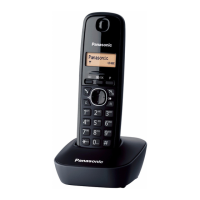
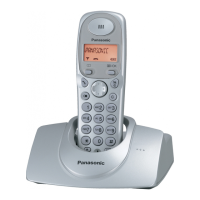
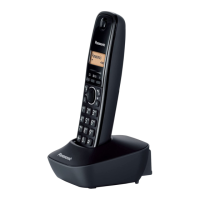
Model shown is KX-TG1611.
TG161xNZ(e).book Page 1 Monday, February 21, 2011 11:03 AM

Questions and Answers

  • D
    Dr. Robin HernandezAug 19, 2025
    Why my Panasonic KX-TG1611NZ Cordless Telephone does not work?
    • J
      Jasmine MasseyAug 19, 2025
      There are several reasons why your Panasonic Cordless Telephone might not be working. Ensure the batteries are correctly installed and fully charged. Check all connections. Try resetting the unit by unplugging the base unit’s AC adaptor, turning off the handset, reconnecting the adaptor, and then turning the handset back on. Also, try removing and reinstalling the batteries in the handset. If the handset hasn't been registered to the base unit, register it.
  • A
    Alexis CaseyAug 21, 2025
    Why does my Panasonic KX-TG1611NZ beep and/or display 8?
    • K
      Kevin YoungAug 21, 2025
      If your Panasonic Cordless Telephone handset beeps or displays '8', it indicates that the battery needs charging. Fully charge the batteries to resolve this issue.
  • A
    Adam CobbAug 25, 2025
    Why I cannot hear a dial tone on my Panasonic KX-TG1611NZ?
    • A
      Alison OchoaAug 25, 2025
      If you cannot hear a dial tone on your Panasonic Cordless Telephone, ensure you are using the supplied telephone line cord and that both the base unit’s AC adapter and telephone line cord are properly connected. If the issue persists, disconnect the base unit from the telephone line and connect the line to a known working telephone. If the working telephone operates properly, contact service personnel to have the unit repaired. If the working telephone does not operate properly, contact your service provider/telephone company.
  • N
    Nichole JonesAug 26, 2025
    Why is my Panasonic KX-TG1611NZ Cordless Telephone not ringing?
    • B
      baileymatthewAug 27, 2025
      If your Panasonic Cordless Telephone handset does not ring, the ringer volume may be turned off. Adjust the ringer volume to your desired level.
  • M
    martinvalerieAug 28, 2025
    What to do if I cannot make a call on my Panasonic KX-TG1611NZ Cordless Telephone?
    • A
      Amy SheltonAug 28, 2025
      If you cannot make a call on your Panasonic Cordless Telephone, make sure the handset is not too far from the base unit. Also, check if another unit is currently in use. If you are using a BT double adaptor, remove it and connect the unit directly to the phone wall socket. Note that the unit is not designed for rotary/pulse dialling services.
  • D
    Dustin Weaver MDAug 30, 2025
    What to do if Panasonic KX-TG1611NZ battery level does not increase after charging?
    • T
      Thomas BurnsAug 30, 2025
      If you have fully charged the batteries of your Panasonic Cordless Telephone, but the battery level does not increase or the operating time is shorter, clean the battery ends and the charge contacts with a dry cloth and charge again. If the problem persists, it may be time to replace the batteries.
  • S
    stephanie24Sep 1, 2025
    How to turn on Panasonic KX-TG1611NZ Cordless Telephone if the display is blank?
    • N
      nscottSep 1, 2025
      If the handset display of your Panasonic Cordless Telephone is blank, turn the power on.
  • A
    Alison JenningsSep 3, 2025
    How to fix shifted time on Panasonic Cordless Telephone?
    • K
      Kimberly HarrisonSep 3, 2025
      If the time on your Panasonic Cordless Telephone has shifted, set the time adjustment to “Manual” (off).
  • S
    sfisherSep 5, 2025
    Why caller information is not displayed on my Panasonic KX-TG1611NZ Cordless Telephone?
    • L
      Lisa CampbellSep 5, 2025
      If caller information is not displayed on your Panasonic Cordless Telephone, ensure that you have subscribed to a Caller ID service with your service provider/telephone company. If you have additional telephone equipment connected, remove it and plug the unit directly into the wall socket. If you use a DSL/ADSL service, contact your provider to have a DSL/ADSL Splitter installed. Other telephone equipment such as a monitored Burglar Alarm or the modem may interfere with the unit; disconnect them and try again.
  • J
    Julie YorkSep 7, 2025
    Why is caller information slow to display on my Panasonic KX-TG1611NZ Cordless Telephone?
    • A
      Anna AllenSep 8, 2025
      If caller information is slow to display on your Panasonic Cordless Telephone, depending on your service provider/telephone company, the unit may display the caller’s information at the 2nd ring or later. Also, try moving closer to the base unit.

Summary

Important Information and Safety Precautions

General Safety Precautions

Essential safety guidelines to prevent injury and property loss during product use.

Operating Safeguards

Guidelines for safe operation, cleaning, and maintenance of the unit.

Installation and Location Guidelines

Important notes and cautions regarding the installation and placement of the phone.

Important Safety Instructions Summary

Fundamental safety precautions to follow when using the product.

Technical Specifications

Detailed technical specifications including frequency range and power consumption.

Getting Started with Your Phone

Setting Up Connections

Step-by-step guide for connecting the AC adapter and telephone line cord.

Handset Battery Installation

Instructions for correctly inserting rechargeable batteries into the handset.

Battery Charging Procedure

Information and tips for charging the handset batteries effectively.

Making and Answering Calls

Making Calls and Adjusting Volume

Steps to dial numbers, use the redial list, and adjust receiver volume.

Answering Calls and Auto Talk

How to answer incoming calls and use the auto-talk feature.

Phonebook Management

Programming Phone Features

Caller ID Service

Using the Caller ID Service

How to subscribe to and utilize Caller ID features.

Intercom and Locator Functions

Useful Information and Troubleshooting

Error Messages and General Troubleshooting

List of error messages and basic troubleshooting steps for common issues.

Caller ID and Call Issues Troubleshooting

Troubleshooting problems related to Caller ID display and call making.

Warranty and Reference Information

Product Warranty Details

Information outlining the terms and conditions of the product warranty.

Panasonic KX-TG1611NZ Specifications

General IconGeneral
Number of Handsets1
Frequency1.9 GHz
Range (Outdoors)300 m
Talk Time10 hours
Standby Time120 hours
Caller IDYes
DisplayLCD
Ringtones10
Weight (Handset)120 g
GAP compatibleYes
Number of lines1
Display lines1
Redial memory10 numbers
Call WaitingYes
SpeakerphoneNo
Answering MachineNo
IntercomNo
Backlit DisplayYes
KeypadYes
Backlit KeypadNo
Power SourceAC Adapter
TypeDECT
Phonebook Capacity50 entries
Battery typeNi-MH

Related product manuals