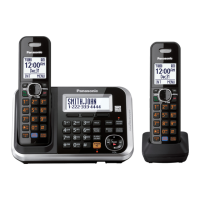
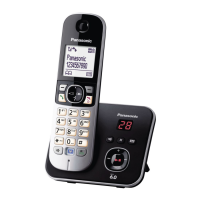
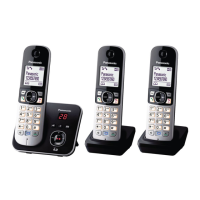
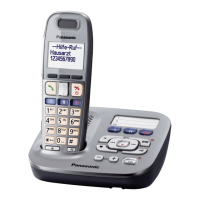
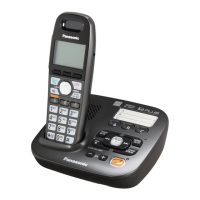
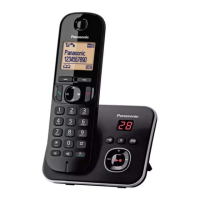
This document describes the Panasonic Digital Cordless Answering System, models KX-TG6801E, KX-TG6802E, and KX-TG6803E. This system is designed for home or small office use, offering a range of features for making and receiving calls, managing contacts, and handling messages.
Function Description
The Panasonic Digital Cordless Answering System provides a comprehensive communication solution. Its core function is a digital cordless telephone system with an integrated answering machine. The system supports multiple handsets, allowing for internal calls (intercom) and call sharing between handsets. Key features include:
- Calling: Users can make and receive calls, use a speakerphone function, and adjust receiver/speaker volume during calls. The system supports redialling from a list of the last 10 dialled numbers and includes a pause function for PBX or long-distance services.
- Answering System: An integrated digital answering system records incoming messages. Users can customize greeting messages, set the number of rings before the system answers, and adjust recording time. Remote operation allows users to listen to messages and change settings from an outside touch-tone phone using a remote access code. Call screening is available, allowing users to listen to callers leaving messages through the handset's speaker.
- Phonebook: A phonebook can store up to 120 names (16 characters max.) and phone numbers (24 digits max.). Entries are shared across all registered handsets. Users can add, edit, and erase entries, and search by first character.
- Caller ID Service: Requires subscription from a phone service provider. Displays caller information for incoming calls. Users can view a caller list, edit numbers before calling back, and erase caller information.
- Speed Dial: Allows assigning one phone number to each dial key (1 to 9) on the handset for quick dialling.
- Nuisance Call Block: Blocks unwanted calls from specific numbers, ranges of numbers, or calls with withheld numbers (requires Caller ID subscription). The unit will not ring for blocked calls and will disconnect them.
- Intercom: Enables internal calls between handsets (available for KX-TG6802/KX-TG6803 models).
- Call Transfer and Conference Calls: Allows transferring outside calls between handsets and setting up 3-way conference calls with an outside party and two handsets (available for KX-TG6802/KX-TG6803 models).
- Eco Mode: Reduces the base unit's transmission power by up to 90% in standby mode, activated with a single touch on the handset.
- Alarm: Three separate alarm times can be programmed per handset, with options for once, daily, or weekly alarms, and a snooze function.
- Key Lock: Locks the handset to prevent accidental calls or setting changes. Incoming calls can still be answered.
- Language Setting: Allows changing the display language.
- Recall/Flash: Used to access special PBX features or optional telephone services.
- Repeater Mode: Increases the range of the base unit with a DECT repeater (optional accessory).
Important Technical Specifications
- Standard: DECT (Digital Enhanced Cordless Telecommunications), GAP (Generic Access Profile).
- Frequency Range: 1.88 GHz to 1.90 GHz.
- RF Transmission Power: Approx. 10 mW (average power per channel), 250 mW (max.).
- Power Source: 220-240 V AC, 50/60 Hz.
- Power Consumption (Base Unit):
- Standby: Approx. 0.8 W
- Maximum: Approx. 3.1 W
- Power Consumption (Charger):
- Standby: Approx. 0.12 W
- Maximum: Approx. 1.8 W
- Operating Conditions: 0 °C–40 °C, 20 %–80 % relative air humidity (dry).
- Battery Type: Rechargeable Ni-MH (Nickel-Metal Hydride) AAA (R03) size. Minimum amperage of 550 mAh.
- Answering System Recording Capacity: Total recording capacity is about 30 minutes, with a maximum of 64 messages.
- Phonebook Capacity: 120 entries.
- Call Block List Capacity: 50 entries.
Usage Features
- Getting Started: Initial setup involves connecting the AC adaptor to the base unit and power outlet, connecting the telephone line cord, and installing rechargeable Ni-MH batteries in the handset. The handset display guides the user through the setup process.
- Battery Charging: Handsets require about 7 hours for a full charge. The display indicates "Charging" and "Fully charged".
- Controls: Handsets feature a display, soft keys for context-sensitive functions, a navigator key for scrolling and selection, a dial keypad, talk and speakerphone buttons, and an off/power button. The base unit has charge contacts, a speaker, a locator button, an erase button, and a message counter.
- Display Icons: Various icons on the handset display indicate signal strength, paging, speakerphone active, line in use, missed calls, ECO mode, key lock, battery level, and alarm status.
- Menu Navigation: The system can be programmed using either the menu list (scrolling through options) or direct command codes.
- Date and Time: Users can set the current date and time.
- Recording Greeting Message: Users can record their own greeting message for the answering system.
- Remote Operation: Access the answering system remotely by dialling the phone number and entering a 3-digit remote access code. Voice guidance assists with operations.
- Privacy Mode: Prevents other users from joining conversations with outside callers.
Maintenance Features
- Battery Maintenance: Use only rechargeable Ni-MH AAA (R03) batteries. Do not use Alkaline/Manganese/Ni-Cd batteries. Clean battery ends and charge contacts regularly. Replace batteries when operating time shortens.
- Cleaning: Unplug the product from power outlets before cleaning. Do not use liquid or aerosol cleaners. Regularly remove dust from the AC adaptor/power plug.
- Troubleshooting: The manual provides a comprehensive troubleshooting section for common issues such as no power, no link, no dial tone, memory full, and battery errors. It advises reconnecting the AC adaptor, checking connections, and re-registering handsets if communication is lost.
- Liquid Damage: In case of liquid entry, immediately disconnect the AC adaptor and telephone line cord, remove batteries, and allow the unit to dry for at least 3 days before reconnecting. Do not use a microwave oven for drying.
- Helpline: A dedicated helpline number is provided for U.K. and Ireland customers for further assistance.

 Need help?
 General



 To Next Page