EasyManua.ls Logo

Panasonic KX-TG7301NZ - User Manual

Panasonic KX-TG7301NZ
52 pages
Print Icon
To Next Page IconTo Next Page
Loading...
This unit is compatible with Caller ID. You must subscribe to the appropriate
service offered by your service provider/telephone company.
Please read these operating instructions before using the unit and save
them for future reference.
Charge the batteries for about 7 hours before initial use.
Operating Instructions
Model No.
KX-TG7321NZ
KX-TG7322NZ
Digital Cordless Answering System
Model No.
KX-TG7301NZ
KX-TG7302NZ
Digital Cordless Phone
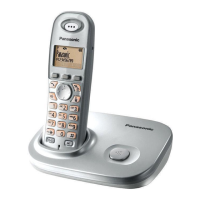
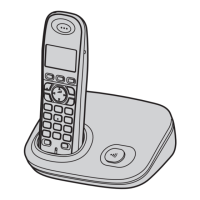
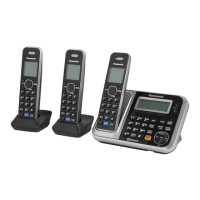
Model shown is KX-TG7301.

Questions and Answers

  • C
    carrie93Sep 13, 2025
    What to do if I fully charged the batteries, but the operating time seems shorter on my Panasonic KX-TG7301NZ Cordless Telephone?
    • V
      vwilliamsSep 13, 2025
      Clean the battery ends and the charge contacts with a dry cloth, and charge again.
  • L
    Lisa CallahanAug 25, 2025
    What to do if I cannot hear a dial tone on my Panasonic Cordless Telephone?
    • R
      Ruben MayAug 25, 2025
      Check that the base unit’s AC adaptor and telephone line cord are properly connected. If you're using a splitter, remove it and connect the unit directly to the wall socket to see if the splitter is the cause.
  • A
    Amanda HarrisAug 25, 2025
    Why does my Panasonic Cordless Telephone handset beep and/or flash 3 times?
    • A
      Angela RothAug 26, 2025
      This indicates that the battery charge is low. Fully charge the batteries.
  • D
    Dr. Karen Marquez MDSep 23, 2025
    What to do if liquid or other form of moisture has entered the handset/base unit of my Panasonic KX-TG7301NZ?
    • A
      amber34Sep 23, 2025
      Disconnect the AC adaptor and telephone line cord from the base unit. Remove the batteries from the handset and leave to dry for at least 3 days. After the handset/base unit are completely dry, reconnect the AC adaptor and telephone line cord. Insert the batteries and charge fully before use.
  • R
    Robert Vance DDSSep 14, 2025
    What to do if I cannot register a handset to a base unit of my Panasonic KX-TG7301NZ?
    • J
      james88Sep 14, 2025
      The maximum number of handsets (6) may already be registered to the base unit. Cancel unused handset registrations from the base unit. Place the handset and the base unit away from other electrical appliances.
  • A
    Alexander RileySep 23, 2025
    What to do if I cannot operate the answering system remotely on my Panasonic Cordless Telephone?
    • M
      Mr. Michael JohnsonSep 23, 2025
      You might be entering the wrong remote access code. Press each key firmly. The answering system might be turned off, so turn it on. If you are using a rotary/pulse telephone, try again using a touch-tone phone.
  • S
    Shannon PenaSep 6, 2025
    Why can't I operate the answering system remotely on my Panasonic KX-TG7301NZ?
    • P
      Patricia RobinsonSep 7, 2025
      Ensure you are entering the correct remote access code. Press each key firmly. The answering system may be turned off, so turn it on. If you are using a rotary/pulse telephone, try again using a touch-tone phone.
  • E
    Emily MooreSep 7, 2025
    What happens if liquid enters the handset/base unit of my Panasonic KX-TG7301NZ?
    • L
      Lori Estrada MDSep 7, 2025
      Disconnect the AC adaptor and telephone line cord from the base unit. Remove the batteries from the handset and leave to dry for at least 3 days. After the handset/base unit are completely dry, reconnect the AC adaptor and telephone line cord. Insert the batteries and charge fully before use.
  • W
    Wayne VincentSep 23, 2025
    What to do if while recording a greeting message or listening to messages, the unit rings and recording stops on my Panasonic Cordless Telephone?
    • E
      Erin HartSep 23, 2025
      A call is being received. Answer the call and try again later.
  • D
    Dawn CarrAug 31, 2025
    What to do if my Panasonic KX-TG7301NZ does not record new messages?
    • R
      Regina TylerAug 31, 2025
      First, ensure the answering system is turned on. If it is, the message memory might be full, so erase unnecessary messages. Also, check if the recording time is set to “Greeting Only” and change the setting if needed.

Panasonic KX-TG7301NZ Specifications

General IconGeneral
BrandPanasonic
ModelKX-TG7301NZ
TypeCordless Telephone
Answering SystemYes
SpeakerphoneYes
Caller IDYes
DisplayLCD
Battery TypeNi-MH
Talk TimeUp to 17 hours
Number of Handsets1
Call WaitingYes
IntercomYes
Power SourceAC adapter
TechnologyDECT
Phonebook Capacity50
Memory50 names and numbers
RangeUp to 300 meters outdoors

Related product manuals