EasyManua.ls Logo

Panasonic KX-TGD320E - User Manual

Panasonic KX-TGD320E
56 pages
Print Icon
To Next Page IconTo Next Page
Loading...
Operating Instructions
Digital Cordless Phone
Model No.
KX-TGD310E
KX-TGD312E
KX-TGD313E
Digital Cordless Answering System
Model No.
KX-TGD320E
KX-TGD322E
KX-TGD323E
KX-TGD324E
KX-TGD325E
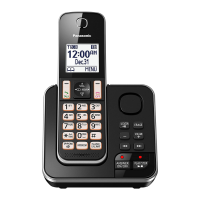
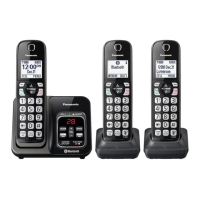
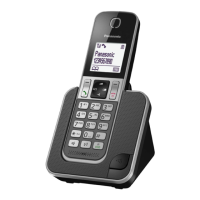
Model shown is KX-TGD310.
Before initial use, see “Getting Started”
on page 11.
Thank you for purchasing a Panasonic product.
Please read these operating instructions before using the unit and save them for
future reference.
TGD31x_32xE(en)0202_ver201.pdf 1 2015/02/02 14:00:37
Question and Answer IconNeed help?

Do you have a question about the Panasonic KX-TGD320E and is the answer not in the manual?

Summary

Operating Instructions: Model Information

Digital Cordless Phone Models

Details the available Panasonic Digital Cordless Phone models.

Digital Cordless Answering System Models

Details the available Panasonic Digital Cordless Answering System models.

Introduction

Model Composition and Accessories

Details phone models, parts, and supplied accessories.

Additional Accessories and Support Information

Information on optional parts and sales/support contacts.

Expanding System and Sales Information

Information on adding optional handsets and ordering details.

Important Information

Safety and Installation Guidance

Crucial safety instructions and proper installation advice.

Battery Care and Performance Tips

Instructions for battery use, care, and optimal performance.

Product Specifications

Technical details of the phone system and its operation.

Getting Started

Initial Setup: Connections and Battery Installation

Step-by-step guide for connecting the unit and installing batteries.

Controls and Display Icons Overview

Description of handset, base unit controls and display icons.

Basic Settings: Power, Language, Date;Time

Instructions for powering on, language, and date/time setup.

Greeting Message and Eco Mode Configuration

Recording greetings and configuring power-saving eco modes.

Making;Answering Calls

Call Operations: Making, Answering, Holding, and Speakerphone

Basic call procedures including volume and redial.

Intercom and Key Lock Functions

Making intercom calls and locking the handset.

Phonebook

Phonebook Management: Adding, Editing, and Finding Entries

Managing contacts, categories, and editing entries.

Speed Dial Setup and Management

Adding, editing, and erasing speed dial numbers.

Programming

Accessing Features: Menu List and Command Codes

Overview of accessing features through menus or direct codes.

Ringer, Do Not Disturb, and Time Settings

Settings for ringer, DND mode, and time.

Key Finder, Nuisance Call Block, and Eco Mode

Settings for key finder, blocking calls, and eco modes.

Alarm Functionality and Do Not Disturb Mode

Setting alarms and explaining the Do Not Disturb feature.

Registering a Unit

Registering a Handset to a Base Unit

Steps to register a handset to a base unit.

Base Unit and Repeater Management

Selecting units and increasing range with a DECT repeater.

Caller ID Service

Using Caller ID and Managing the Caller List

Overview of Caller ID features and managing the call list.

Answering System

Answering System Operation and Greeting Messages

Overview, turning on/off, and managing greeting messages.

Message Playback, Control, and Erasing

Playing, rewinding, fast-forwarding, and deleting recorded messages.

Message Alert Features

Audible alerts and call notifications for new messages.

Remote Operation Guide and Commands

Comprehensive guide to controlling the system remotely via phone.

Useful Information

Voicemail Service and Character Entry Guide

Explaining voicemail and how to enter text/numbers.

Error Messages and General Troubleshooting

Common error messages and general troubleshooting steps.

Troubleshooting General Use and Menu Issues

Troubleshooting common operational and menu problems.

Troubleshooting PIN, Battery, Call, and Intercom

Troubleshooting PIN, battery, call, and intercom issues.

Conditions of Guarantee

Index

Summary

Operating Instructions: Model Information

Digital Cordless Phone Models

Details the available Panasonic Digital Cordless Phone models.

Digital Cordless Answering System Models

Details the available Panasonic Digital Cordless Answering System models.

Introduction

Model Composition and Accessories

Details phone models, parts, and supplied accessories.

Additional Accessories and Support Information

Information on optional parts and sales/support contacts.

Expanding System and Sales Information

Information on adding optional handsets and ordering details.

Important Information

Safety and Installation Guidance

Crucial safety instructions and proper installation advice.

Battery Care and Performance Tips

Instructions for battery use, care, and optimal performance.

Product Specifications

Technical details of the phone system and its operation.

Getting Started

Initial Setup: Connections and Battery Installation

Step-by-step guide for connecting the unit and installing batteries.

Controls and Display Icons Overview

Description of handset, base unit controls and display icons.

Basic Settings: Power, Language, Date;Time

Instructions for powering on, language, and date/time setup.

Greeting Message and Eco Mode Configuration

Recording greetings and configuring power-saving eco modes.

Making;Answering Calls

Call Operations: Making, Answering, Holding, and Speakerphone

Basic call procedures including volume and redial.

Intercom and Key Lock Functions

Making intercom calls and locking the handset.

Phonebook

Phonebook Management: Adding, Editing, and Finding Entries

Managing contacts, categories, and editing entries.

Speed Dial Setup and Management

Adding, editing, and erasing speed dial numbers.

Programming

Accessing Features: Menu List and Command Codes

Overview of accessing features through menus or direct codes.

Ringer, Do Not Disturb, and Time Settings

Settings for ringer, DND mode, and time.

Key Finder, Nuisance Call Block, and Eco Mode

Settings for key finder, blocking calls, and eco modes.

Alarm Functionality and Do Not Disturb Mode

Setting alarms and explaining the Do Not Disturb feature.

Registering a Unit

Registering a Handset to a Base Unit

Steps to register a handset to a base unit.

Base Unit and Repeater Management

Selecting units and increasing range with a DECT repeater.

Caller ID Service

Using Caller ID and Managing the Caller List

Overview of Caller ID features and managing the call list.

Answering System

Answering System Operation and Greeting Messages

Overview, turning on/off, and managing greeting messages.

Message Playback, Control, and Erasing

Playing, rewinding, fast-forwarding, and deleting recorded messages.

Message Alert Features

Audible alerts and call notifications for new messages.

Remote Operation Guide and Commands

Comprehensive guide to controlling the system remotely via phone.

Useful Information

Voicemail Service and Character Entry Guide

Explaining voicemail and how to enter text/numbers.

Error Messages and General Troubleshooting

Common error messages and general troubleshooting steps.

Troubleshooting General Use and Menu Issues

Troubleshooting common operational and menu problems.

Troubleshooting PIN, Battery, Call, and Intercom

Troubleshooting PIN, battery, call, and intercom issues.

Conditions of Guarantee

Index

Panasonic KX-TGD320E Specifications

General IconGeneral
TypeCordless Telephone
Number of Handsets Included1
Maximum Number of Handsets Supported6
Answering MachineYes
Answering Machine Recording TimeUp to 18 minutes
Caller IDYes
Standby Time200 hours
Display1.8 inch LCD
DECT TechnologyYes
GAP compatibleYes
SpeakerphoneYes
Power Saving ModeYes
Noise ReductionYes
Frequency1.9 GHz
Conference CallYes
RedialYes
Speed DialYes
Volume ControlYes
ColorBlack
RangeUp to 300 meters outdoors, 50 meters indoors
Battery TypeNi-MH

Related product manuals