EasyManua.ls Logo

Panasonic KX-TGM430 - Page 53

Panasonic KX-TGM430
112 pages
Print Icon
To Next Page IconTo Next Page
To Previous Page IconTo Previous Page
Loading...
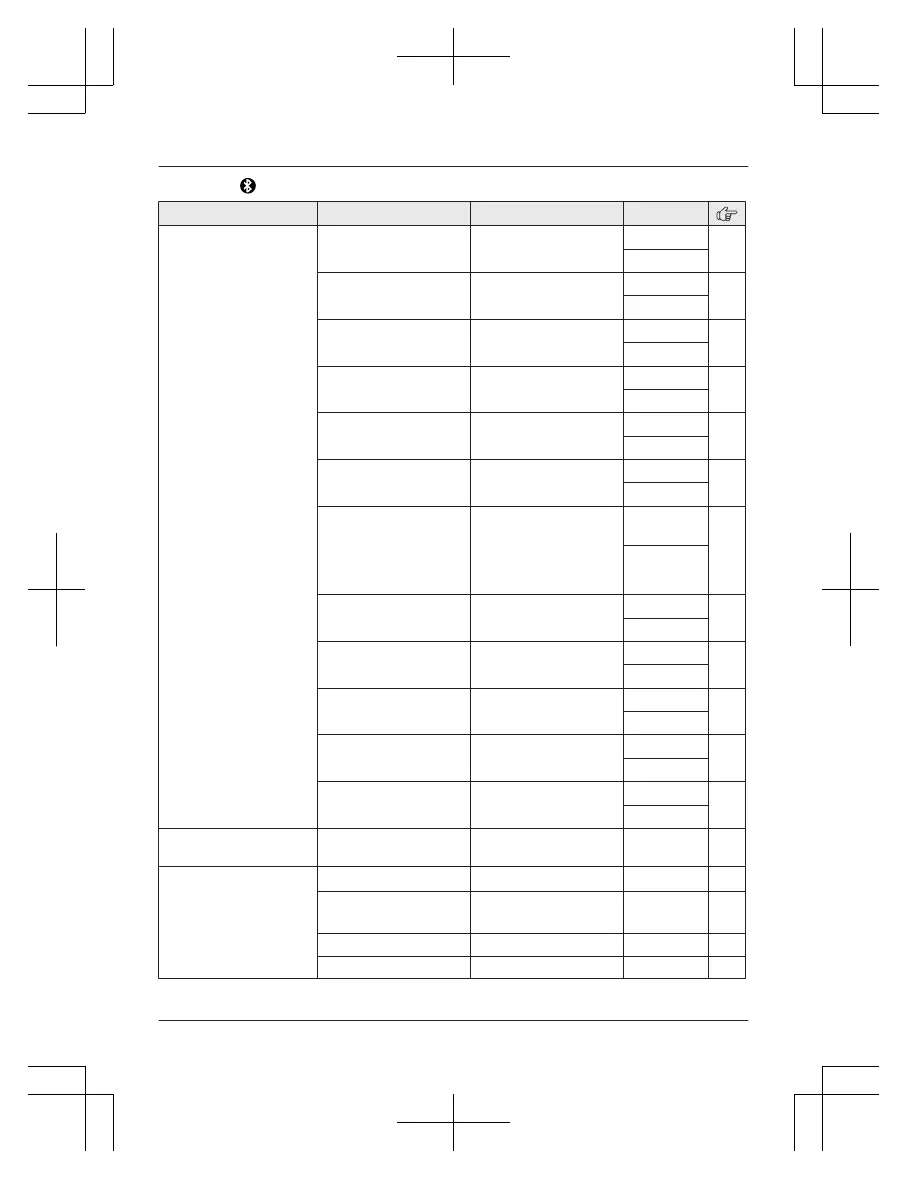
Main menu: B
luetooth
Sub-menu 1 Sub-menu 2 Settings Code
Link to cell
1
:Add new
device
*4
(for CELL 1)
2:Add new
device
*4
(for CELL 2)
Connect
*
1
/
Disconnect
*1
#6251
*
5
36
#6252
*
6
Ringer volume
H
andset
Off6 <6>
#6281
*
5
40
#6282
*
6
Ringer volume
B
ase unit
*1
Off10 <1>
#G6
281
*5
40
#G6
282
*6
Ringer tone
H
andset
*7, *8,
*9
<R
inger 2>
*5
<Ringer 4>
*6
#6291
*5
#6292
*
6
Ringer tone
B
ase unit
*1, *8,
*9
<R
inger 2>
*5
<Ringer 4>
*6
#G6291
*5
#G6
292
*6
Select unit to
r
ing
*1
<All>
Handset 1-6
#6271
*
5
35
#6272
*
6
Ring as cell
(
limited)
*1
<On (with
Talking CID)>
On (without
Talking CID)
Off
#6141
*
5
35
#6142
*
6
Alert settings
A
lert On/Off
*1
<On>
Off
#6101
*
5
68
#6102
*
6
Alert settings
V
oice alert
*1
<On>
Off
#6031
*
5
68
#6032
*
6
Alert settings
A
lert tone
<T
one 1>
*5
<Tone 2>
*6
#6041
*5
69
#6042
*
6
Pair
#6241
*
5
34
#6242
*
6
Unpair
#6111
*
5
34
#6112
*
6
Phonebook
t
ransfer
#618 66
Headset
Add new device
*
4
#621 69
Connect
*
1
/
Disconnect
*1
#622 69
Pair
#621 69
Unpair
#612 69
For assistance, please visit http://shop.panasonic.com/support
53
Programming
TGM43x(en)_0426_ver031.pdf 53 2016/04/26 10:55:19

Table of Contents

Other manuals for Panasonic KX-TGM430

Related product manuals