Using a pre-recorded
g
reeting message
The unit provides 2 pre-recorded greeting
messages:
– If you reset to pre-recorded greeting or do
not record your own greeting message, the
unit plays a pre-recorded greeting asking
callers to leave a message.
– If the message recording time (page 77)
is set to “Greeting only”, callers’
messages are not recorded and the unit
plays a different pre-recorded greeting
message asking callers to call again.
Resetting to a pre-recorded
greeting message
Use this procedure to erase your greeting
message and use a pre-recorded one.
1 MMENUN#304
2 MYESN a MOFFN
Playing back the greeting
message
1 MMENUN#303
2 To exit, press MOFFN.
Listening to messages
I
mportant:
R When using the base unit or handset to
listen to messages, the noise reduction
feature (page 41) is activated automatically
in spite of the setting (
is not
displayed).
Using the base unit
When new messages have been recorded:
– The new message/play indicator ( ) on
t
he base unit flashes.
– The message indicator on the base unit
flashes slowly if the base unit message
indicator’s “New message” setting is
enabled (page 31).
Press M N
(PLAY).
R During playback, the new message/play
indicator (
) on the base unit lights.
R I
f new messages have been recorded, the
base unit plays back new messages.
R If there are no new messages, the base
unit plays back all messages.
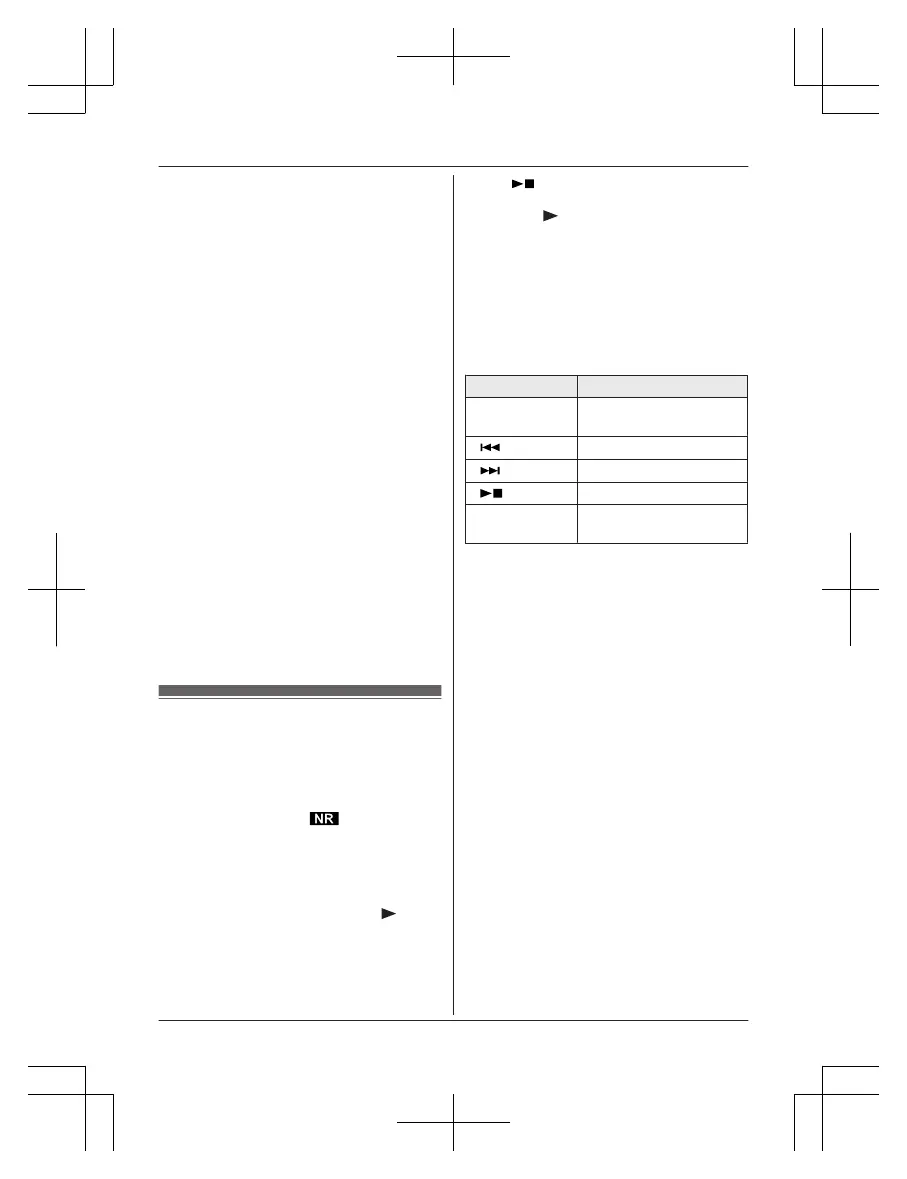
Operating the answering system
during playback
Key Operation
MjN
or MkN Adjust the speaker
volume
M
N
Repeat message
*
1
M
N Skip message
M N
(STOP) Stop playback
ME
RASE/
MUTEN
Erase currently playing
message
*1 If pressed within the first 5 seconds of a
m
essage, the previous message is
played.
Erasing all messages
Press MERASE/MUTEN 2 times while the unit
is not in use.
Using the handset
When new messages have been recorded:
– “New message” is displayed.
– The message indicator on the handset
flashes slowly if the handset message
indicator’s “New message” setting is
enabled (page 31).
1 To listen to new messages:
MMENUN#323
To listen to all messages:
MMENUN#324
2 When finished, press MOFFN.
Note:
R To switch to the receiver, press MZN.
R You can also use the MPLAYN soft key, if
displayed, to play new messages.
72
For assistance, please visit http://shop.panasonic.com/support
Answering System for Landline














 To Next Page