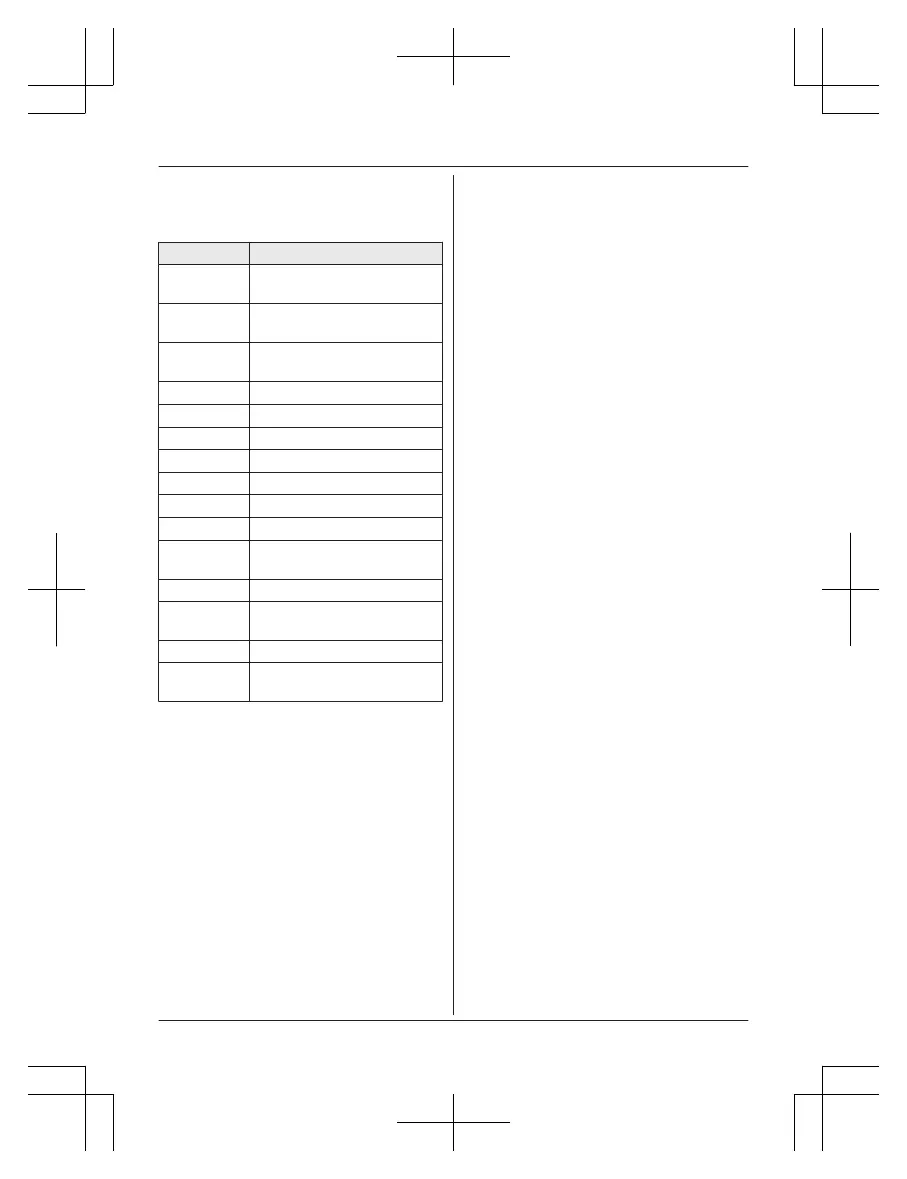
Operating the answering system
MM
ENUN a MbN: “Answering device” a
MSELECTN
Key Operation
MjN
or MkN Adjust the receiver/speaker
volume (during playback)
1
or MFN Repeat message (during
playback)
*1
2
or MEN Skip message (during
playback)
3 Enter the “S
ettings” menu
4 Play new messages
5 Play all messages
6 Play greeting message
76 Record greeting message
8 Turn answering system on
MP
AUSEN
Pause message
*
2
9
or
MSTOPN
Stop recording
Stop playback
0 Turn answering system off
*4
*
3
Erase currently playing
m
essage
*5 Erase all messages
*6 Reset to a pre-recorded
g
reeting message
*1 If pressed within the first 5 seconds of a
m
essage, the previous message is
played.
*2 To resume playback:
MbN: “Playback” a MSELECTN
*3 You can also erase as follows:
MPAUSEN a MbN: “Erase” a
MSELECTN a MbN: “Yes” a MSELECTN
Calling back (Caller ID
subscribers only)
n Using a landline:
1 Press MPAUSEN during playback.
2 MbN: “Call back” a MSELECTN
n U
sing a cellular line:
1 Press MPAUSEN during playback.
2 MbN: “Call back (Cell)” a
MSELECTN
R The unit starts dialing immediately
in the following situations.
– Only 1 cellular phone is paired.
– A specific line is set to make
cellular calls (page 37).
3 MbN: Select the desired cellular phone.
a MSELECTN
Editing the number before calling
back
n Using a landline:
1 Press MPAUSEN during playback.
2 MbN: “Edit & Call” a MSELECTN
3 Press MEDITN repeatedly until the
phone number is shown in the desired
format (page 64). a MTALKN
n Using a cellular line:
1 Press MPAUSEN during playback.
2 MbN: “Edit & Call” a MSELECTN
3 Press MEDITN repeatedly until the
phone number is shown in the desired
format (page 64).
4 MCELLN
R The unit starts dialing immediately
in the following situations.
– Only 1 cellular phone is paired.
– A specific line is set to make
cellular calls (page 37).
5 MbN: Select the desired cellular phone.
a MSELECTN
Erasing all messages
1 MMENUN#325
2 MbN: “Yes” a MSELECTN a MOFFN
For assistance, please visit http://shop.panasonic.com/support
73
Answering System for Landline














 To Next Page