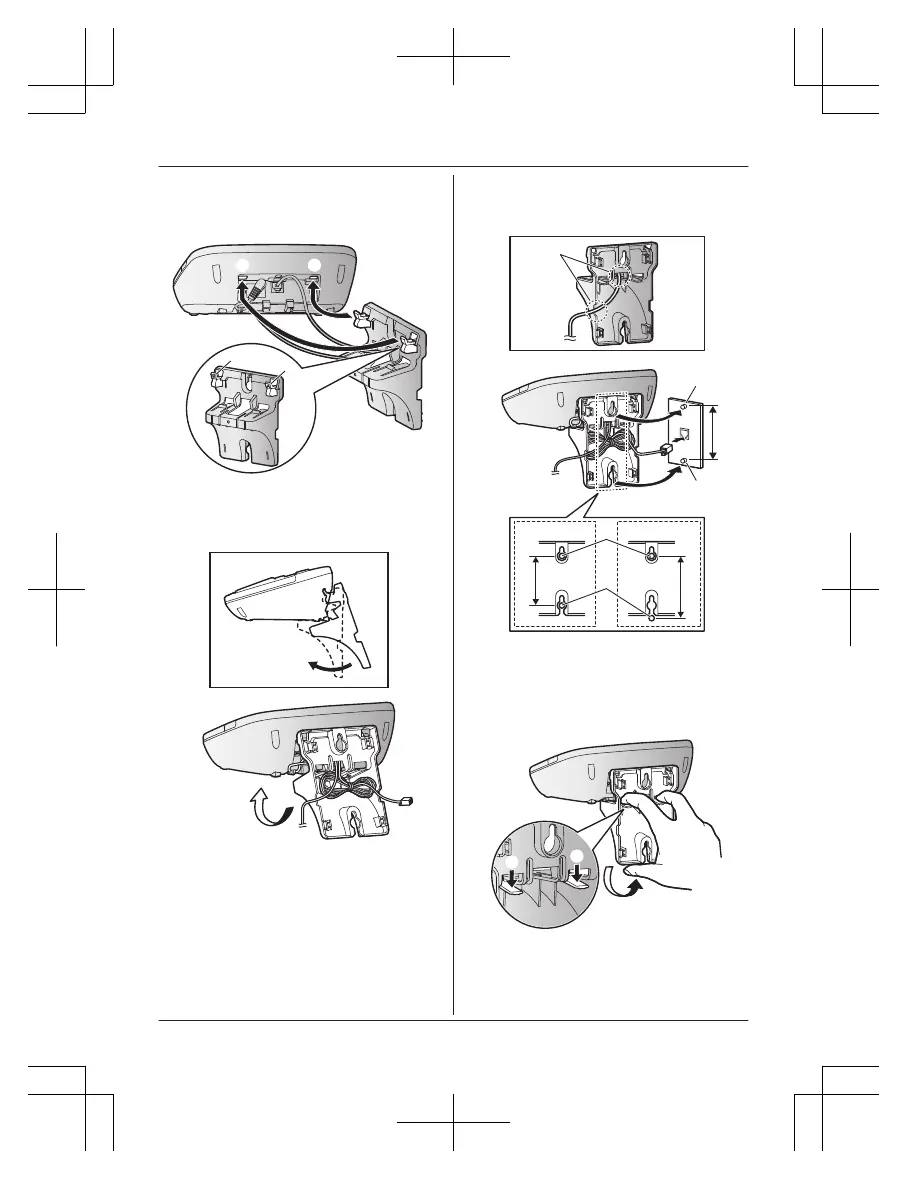
3 I
nsert the hooks on the wall mounting
adaptor into holes (
4 A
djust the adaptor to hold the base unit,
then push it in the direction of the arrow
until it clicks into place.
5 M
ount the unit on a wall then slide down
to secure in place.
AC adaptor cord
R T
his product is compliant with the
following wall phone plate sizes (2
types).
102 mm (4 inches)
Fit the slots of the unit onto the
c
orresponding wall phone plate tabs
for (
To remove the wall mounting
a
daptor
While pushing down the release levers (A),
remove the adaptor (B).
80
For assistance, please visit http://shop.panasonic.com/support
Useful Information
TGM43x(en)_0426_ver031.pdf 80 2016/04/26 10:55:20














 To Next Page