3/80
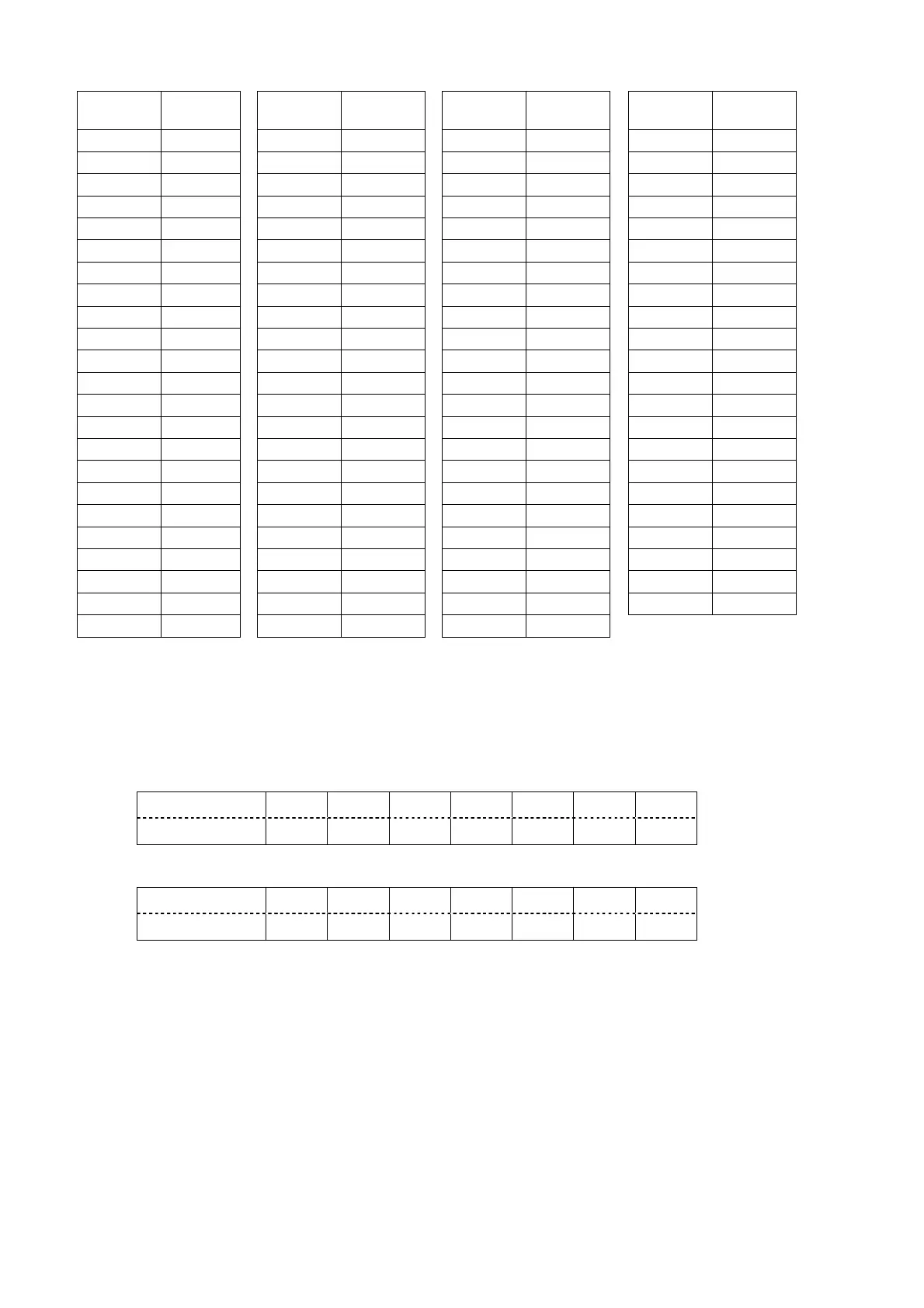
ID of the basic control command
ID 4 bytes
String
ID 4 bytes
String
ID 4 bytes
String
ID 4 bytes
String
ALL
ADZZ ID23 AD23 ID46 AD46 Group E AD0E
ID1 AD01 ID24 AD24 ID47 AD47 Group F AD0F
ID2 AD02 ID25 AD25 ID48 AD48 Group G AD0G
ID3 AD03 ID26 AD26 ID49 AD49 Group H AD0H
ID4 AD04 ID27 AD27 ID50 AD50 Group I AD0I
ID5 AD05 ID28 AD28 ID51 AD51 Group J AD0J
ID6 AD06 ID29 AD29 ID52 AD52 Group K AD0K
ID7 AD07 ID30 AD30 ID53 AD53 Group L AD0L
ID8 AD08 ID31 AD31 ID54 AD54 Group M AD0M
ID9 AD09 ID32 AD32 ID55 AD55 Group N AD0N
ID10 AD10 ID33 AD33 ID56 AD56 Group O AD0O
ID11 AD11 ID34 AD34 ID57 AD57 Group P AD0P
ID12 AD12 ID35 AD35 ID58 AD58 Group Q AD0Q
ID13 AD13 ID36 AD36 ID59 AD59 Group R AD0R
ID14 AD14 ID37 AD37 ID60 AD60 Group S AD0S
ID15 AD15 ID38 AD38 ID61 AD61 Group T AD0T
ID16 AD16 ID39 AD39 ID62 AD62 Group U AD0U
ID17 AD17 ID40 AD40 ID63 AD63 Group V AD0V
ID18 AD18 ID41 AD41 ID64 AD64 Group W AD0W
ID19 AD19 ID42 AD42 Group A AD0A Group X AD0X
ID20 AD20 ID43 AD43 Group B AD0B Group Y AD0Y
ID21 AD21 ID44 AD44 Group C AD0C Group Z AD0Z
ID22 AD22 ID45 AD45 Group D AD0D
Response (Callback) of the basic control command
In the period when the command can be accepted
Differs according to each command.
In the period when commands cannot be accepted
Hexadecimal 02h 45h 52h 34h 30h 31h 03h
Character E R 4 0 1
In case of the parameter error or REMOTE2 effective
Hexadecimal 02h 45h 52h 34h 30h 32h 03h
Character E R 4 0 2
Attention:
- No command may be sent or received for 10 to 60 seconds after the lamp starts lighting. Try sending
any command after that period has elapsed.
- When sending several commands, be sure to wait for a response from the projector, and send the next
command after 0.5 seconds or more pass.
- It might take time by the time the response returns because the command is processed in the
projector. Set the time-out to 10 seconds or longer.
Note:
- This projector will respond to the computer only in the following cases:
If the sent ID coincides with the projector ID,
RESPONSE(ID ALL) in RS232C settings of this projector is ON and the sent ID is ALL, or
If Group (A-Z) of the sent ID coincides with GROUP in RS232C settings of this projector and
RESPONSE(ID GROUP) in RS232C settings of this projector is ON.







 To Next Page