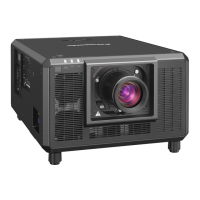
This document describes the Panasonic PT-REQ12, PT-REQ10, and PT-REQ80 DLP™ Projectors, designed for commercial use. These projectors offer high image quality, fast response, extensibility, flexible setup, long life, and high reliability.
Function Description
The Panasonic PT-REQ series projectors are designed to project image signals from imaging equipment or computers onto a screen or other surface as still or moving images. They feature a new-generation laser light source and a unique optical system that enhances color reproduction.
Key Functions:
- High Image Quality and Fast Response: Achieves high luminance (12,000 lm for PT-REQ12, 10,000 lm for PT-REQ10, and 8,000 lm for PT-REQ80) and high contrast (25,000:1). The QUAD PIXEL DRIVE technology provides realistic 4K images by shifting image pixels horizontally and vertically. A 4x speed 240 Hz drive enables smooth projection for fast-moving images.
- High Extensibility and Flexible Setup: Supports various systems through an Intel® Smart Display Module (SDM) specification slot and Art-Net function. The lens memory function and solid-state light source allow for 360° direction projection, making them suitable for a wide range of applications.
- Long Life and High Reliability: Utilizes a long-life solid-state light source and features enhanced dust resistance for the optical unit, eliminating the need for filters and reducing long-term maintenance costs. A backup function (HDMI input) ensures continuous projection even if the input signal is interrupted.
- Network Connection: The projector can be connected to a computer via LAN for web control, Smart Projector Control, Multi Monitoring & Control Software, PJLink, and Art-Net functions. This allows for remote setting, adjustment, status display, and email notifications for errors.
- Data Cloning: Settings and adjustment values can be copied to multiple projectors via LAN or USB memory.
- HDMI CEC Function: Allows operation of CEC-compatible external devices using the projector's remote control and enables power on/off link operations between the projector and CEC-compatible devices.
- Firmware Update: Firmware can be updated via LAN or USB memory.
Important Technical Specifications
Display System:
- 1-chip DLP projection system.
- Display Device:
- Size of effective display area: 20.3 mm (0.8") x 1 (aspect ratio 16:10).
- Number of pixels: 2,304,000 pixels (1,920 x 1,200 dots) when [QUAD PIXEL DRIVE] is set to [OFF]; 9,216,000 pixels (3,840 x 2,400 dots) when [QUAD PIXEL DRIVE] is set to [ON].
- Projection Lens:
- Supplied projection lens (PT-REQ12, PT-REQ10, PT-REQ80): Standard zoom lens (Zoom magnification: 1.54x, Focal length: 23.9 mm to 37.2 mm, F number: 1.84 to 2.31).
- Optional projection lenses (PT-REQ12L, PT-REQ10L, PT-REQ80L): Optional.
- Zoom, Focus, Lens Shift: Powered (Horizontal/Vertical).
- Changeable lens: Yes.
- Light Source: Laser diode.
- Screen Size: 1.78 m (70") to 17.78 m (700") or 2.54 m (100") to 25.40 m (1000") with ET-C1U100.
- Light Output:
- PT-REQ12, PT-REQ12L: 12,000 lm (NORMAL), 9,600 lm (ECO/QUIET).
- PT-REQ10, PT-REQ10L: 10,000 lm (NORMAL), 8,000 lm (ECO/QUIET).
- PT-REQ80, PT-REQ80L: 8,000 lm (NORMAL), 6,400 lm (ECO/QUIET).
- Contrast Ratio: 25,000:1 when [DYNAMIC CONTRAST] is set to [3].
- Center to Corner Zone Ratio: 90%.
- Displayable Scanning Frequency: Horizontal 27 kHz to 291.6 kHz, Vertical 24 Hz to 240.0 Hz.
- Acoustic Noise: 38 dB (NORMAL/ECO) / 35 dB (QUIET) for PT-REQ12/PT-REQ12L; 36 dB (NORMAL/ECO) / 33 dB (QUIET) for PT-REQ10/PT-REQ10L; 35 dB (NORMAL/ECO) / 32 dB (QUIET) for PT-REQ80/PT-REQ80L.
- Operating Environment: Temperature 0 °C (32 °F) to 45 °C (113 °F), Humidity 10 % to 80 % (no condensation).
- Power Requirements: 100 V - 240 V ~ (100 V - 240 V alternating current), 50 Hz/60 Hz.
- Maximum Power Consumption: 1,030 W (PT-REQ12/PT-REQ12L), 870 W (PT-REQ10/PT-REQ10L), 760 W (PT-REQ80/PT-REQ80L).
- Standby Mode Power Consumption: Approx. 12 W (NORMAL), Approx. 0.5 W (ECO).
- Dimensions: 498 mm (19-5/8") Width, 212 mm (8-3/8") Height (shortest position), 648 mm (25-1/2") Depth (including standard zoom lens).
- Weight: Approx. 28.7 kg (63.3 lbs.) (including standard zoom lens).
- Laser Classification: Class 1 (IEC/EN 60825-1:2014). Risk group 3 (IEC/EN 62471-5:2015) with ET-C1T700 lens.
Usage Features
- Installation Modes: Supports various installation modes including desk/floor projection (front/rear) and ceiling projection (front/rear). An angle sensor automatically detects the projector's attitude.
- Adjustable Feet: Allows adjustment of the projection angle and leveling on sloped surfaces.
- Projection Lens Removal/Attachment: Lenses can be easily removed and attached. For ET-C1U100, a ball point hex driver is required.
- Initial Settings: Guides users through initial setup including focus adjustment, display language, operation mode, screen format, and time zone.
- Remote Control: Features buttons for power, lens adjustments (focus, zoom, shift), menu navigation, on-screen display, input selection, function shortcuts, test patterns, CEC, and status display. Supports wired remote control for multiple projector environments.
- Control Panel: Provides essential control buttons for power, menu, input selection, lens adjustments, and shutter.
- USB Memory Usage: Supports FAT16 or FAT32 formatted USB 2.0 memory for registering user test patterns, data cloning, and firmware updates.
- Shutter Function: Temporarily turns off the image during intermissions or when not in use. Fade-in/fade-out times are adjustable.
- On-Screen Display (OSD): Allows display or hiding of menus and input terminal names. OSD position and color are adjustable.
- Test Patterns: Displays internal test patterns and user-registered patterns for checking projector conditions and image adjustments.
- Status Function: Displays projector status information including runtime, temperatures, and error messages.
- Multi Projector Sync: Synchronizes contrast and shutter operations across multiple linked projectors for seamless multi-display setups.
- RS-232C Control: Allows external control of the projector via RS-232C serial communication.
Maintenance Features
- Self-Diagnosis Display: Displays alphanumeric symbols and detailed messages for errors and warnings, along with recommended measures to take.
- Outer Case Cleaning: Wipe with a soft, dry cloth. Avoid benzene, thinner, or harsh cleaners.
- Lens Front Surface Cleaning: Wipe with a soft, clean cloth. Avoid fluffy, dusty, or oil/water-soaked cloths. Handle with care to prevent damage.
- Internal Cleaning: Recommended every 20,000 hours of usage by a dealer to prevent dust accumulation and potential fire hazards.
- Battery Replacement: Remove depleted batteries from the remote control promptly to prevent fluid leakage, overheating, or explosion.
- Firmware Updates: Ensures the projector operates with the latest features and bug fixes.
- Brightness Control Function: Internal brightness sensor automatically corrects brightness and white balance to maintain uniformity and compensate for light source aging.
- Indicator Settings: Allows configuration of indicator-off function to prevent indicators from lighting or blinking, even during standby or projection mode. Notification settings can be enabled to display error/warning occurrences.
Safety Precautions:
- Earthing: The apparatus must be earthed.
- Laser Product: Class 1 laser product. Risk group 3 when used with ET-C1T700 lens, requiring professional installation and adherence to hazard distance guidelines. Avoid looking directly into the light emitted from the lens.
- Installation: Mount above the heads of children. Use specified ceiling mount brackets. Installation should be carried out by qualified technicians. Avoid soft materials, humid/dusty places, strong vibrations, and obstructed ventilation.
- Power Cord: Use the provided power cord, ensure it is fully inserted, and do not damage it. Use an independent 15 A outlet.
- Batteries: Handle batteries properly; do not disassemble, heat, or expose to fire. Ensure correct polarity.
- Security: Implement strong passwords and secure network connections to prevent unauthorized access and data leaks.
This comprehensive overview highlights the advanced capabilities and user-friendly design of the Panasonic PT-REQ series projectors, emphasizing both performance and operational safety.

 Need help?












 To Next Page
 General