This document is an operating and functional manual for Panasonic DLP™ Projectors, specifically models PT-REZ12, PT-REZ10, and PT-REZ80, intended for commercial use.
Function Description
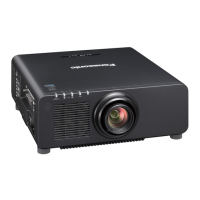
The Panasonic DLP™ Projector is designed to project image signals from imaging equipment or computers onto a screen or other surfaces, displaying both still and moving images. It offers high image quality with a new-generation laser light source and a unique optical system, enhancing color reproduction. The projector supports a wide range of usage scenarios, including all 360° direction projection, thanks to its lens memory function and the characteristics of its solid-state light source. It also features high extensibility and flexible setup by adopting the next-generation Intel® Smart Display Module slot and Art-Net function. The projector is built for long life and high reliability, with a solid-state light source and enhanced dust resistance in the optical unit, eliminating the need for filters and reducing long-term maintenance costs. A backup function for HDMI input ensures continuous projection even if the input signal is interrupted.
Important Technical Specifications
Display System:
1-chip DLP projection system.
Display Device: 20.3 mm (0.8") x 1 (aspect ratio 16:10) with 2,304,000 pixels (1,920 x 1,200 dots).
Projection Lens:
Supplied Projection Lens (PT-REZ12, PT-REZ10, PT-REZ80): Standard zoom lens with zoom magnification 1.54x, focal length 23.9 mm to 37.2 mm, and F number 1.84 to 2.31.
Optional Projection Lenses (PT-REZ12L, PT-REZ10L, PT-REZ80L): Various zoom lenses (ET-C1U100, ET-C1W300, ET-C1W400, ET-C1W500, ET-C1S600, ET-C1T700) are available.
Lens Features: Zoom, Focus, and Lens Shift are all powered. The lens is changeable.
Light Source:
Laser diode.
Screen Size:
1.78 m (70") to 17.78 m (700") for standard zoom lenses.
USB: USB connector (type A) x 1 (for Wireless Module, USB memory).
DC OUT: USB connector (type A) x 1 (DC 5 V, max 2 A).
SLOT: SLOT x 1, Intel® Smart Display Module specification.
Usage Features
Initial Setup:
Installation Mode: The projector can be set up for desk/floor projection (front/rear) or ceiling projection (front/rear). Portrait setting is also supported. The built-in angle sensor automatically detects the projector's attitude.
Projection Lens: Projection lenses are removable and attachable. It is recommended to move the lens to the home position before removal/attachment.
Function Board: Optional Function Boards (e.g., 12G-SDI Terminal Board, DIGITAL LINK Terminal Board) can be installed in the Intel® SDM slot to expand connectivity.
Power On/Off: The projector can be switched on/off using the switch and the / buttons. A quick startup function allows for faster projection.
Initial Settings: Upon first use or factory reset, a focus adjustment screen, initial setting screen (display language, operation setting, screen setting, time zone, date/time), and administrator account setting screen are displayed.
Image Adjustment:
Focus, Zoom, Lens Shift: Adjustable via remote control or control panel buttons. Lens shift allows for vertical and horizontal image position adjustment.
Focus Balance: Adjustable for center and periphery of the image, especially for certain zoom lenses.
Lens Calibration: Detects lens shift adjustment limits and performs calibration after lens attachment.
Input Signal Selection: Input signals can be switched directly using buttons on the remote control or control panel, or via an on-screen input selection menu.
Picture Mode: Various modes like [STANDARD], [CINEMA], [NATURAL], [REC709], [DICOM SIM.], [DYNAMIC], and [GRAPHIC] are available.
Contrast/Brightness/Color/Tint: Adjustable to fine-tune image appearance.
Color Temperature: Adjustable to correct white areas.
Gamma: Multiple gamma modes including [DEFAULT], [USER], [HDR ST2084-500], [HDR ST2084-1000], and [HDR HLG] are available.
System Daylight View: Corrects image vividness for bright environments.
Sharpness/Noise Reduction: Adjustable for image clarity and noise reduction.
Dynamic Contrast: Automatically adjusts light source and signals for optimal contrast.
Color Space: Sets the color space for image representation (e.g., [NATIVE], [ITU-709], [DCI-P3 emu.], [ITU-2020 emu.]).
System Selector: Manually sets the system method for unstable input signals.
Default Picture Mode: Sets the picture mode for new input signals.
Position (Aspect/Zoom/Geometry): Adjusts aspect ratio, image size, and corrects various types of distortion (keystone, corner correction, curved correction) using [FREE GRID] for finer adjustments.
Blanking: Adjusts blanking width to hide noise or image edges.
Edge Blending: Creates seamless multi-display screens by blending overlapping areas.
Raster Position: Allows arbitrary movement of the image within the displayable area when the input image is not using the whole displayable area.
Advanced Features:
Remote Control: Wireless/wired remote control unit with various function buttons, including , , , , ,
USB Memory: Supports USB 2.0 compatible memory (FAT16/FAT32) for registering user test patterns, data cloning, and firmware updates.
On-Screen Display (OSD): Customizable display position and color.
Function Button: Assigns frequently used operations as a shortcut.
Test Patterns: Displays internal test patterns and user-registered patterns for checking projector condition.
Status Function: Displays projector status information (runtime, temperature, errors, etc.).
ID Number Setting: Assigns unique ID numbers for individual or simultaneous control of multiple projectors.
HDMI CEC: Allows operation of CEC-compatible external devices and power on/off link operations using the projector remote control.
Data Cloning: Copies projector settings and adjustment values to multiple projectors via LAN or USB memory.
Firmware Update: Updates projector firmware via LAN or USB memory.
Network Connection: Supports web control, Smart Projector Control, Multi Monitoring & Control Software, PJLink, and Art-Net for remote management and control.
Security: Password protection for projector access and network control.
Maintenance Features
Light Source/Temperature Indicators: Indicators (, , ) light up or blink red to inform of internal problems, with corresponding solutions provided.
Cleaning:
Outer Case: Wipe with a soft, dry cloth. For persistent dirt, use a damp cloth. Avoid benzene, thinner, rubbing alcohol, or other solvents.
Lens Front Surface: Wipe with a soft, clean cloth. Avoid fluffy, dusty, or oil/water-soaked cloths. Handle with care as the lens is fragile.
Internal Cleaning: Ask your dealer about cleaning inside the projector every 20,000 hours of usage as an estimated duration to prevent fire due to dust accumulation.
Error Information Page: Displays alphanumeric symbols and content of errors/warnings, with recommended measures.
Self-Diagnosis Display: Shows alphanumeric symbols for errors and warnings, along with suggested actions.
Battery Replacement: Required for the remote control (AAA/R03 or AAA/LR03 battery x 2) and for the internal clock if the time goes out of alignment.
Security Password Initialization: Consult your dealer if the remote control is lost and numerical values are used for the security password.

 Need help?












 To Next Page
 General