Chapter 4 Settings — [PROJECTOR SETUP] menu
176 - ENGLISH
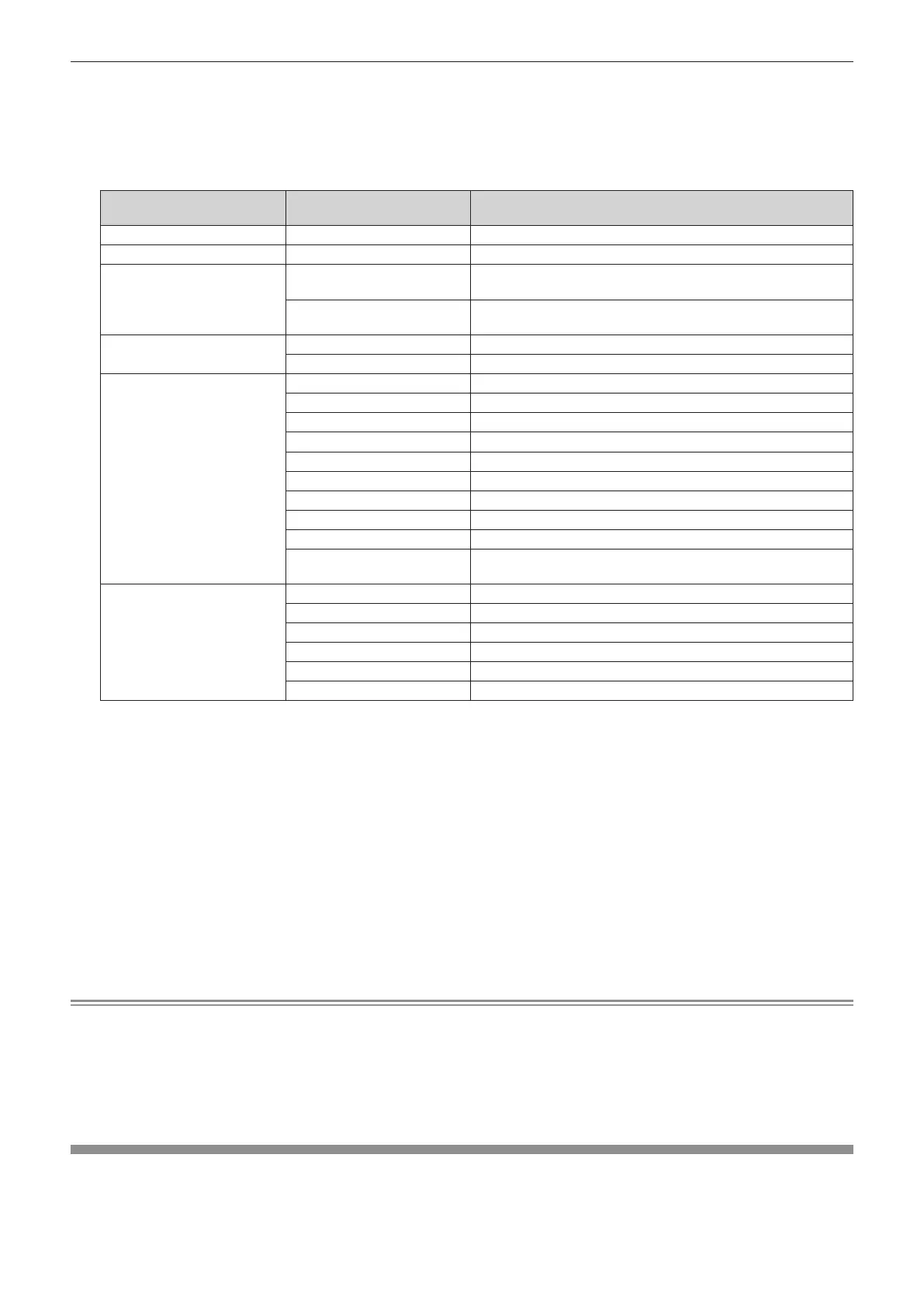
10) Press as to select a [COMMAND].
f For [COMMAND] which requires detailed settings, the items of the detailed settings will switch each time
you press qw.
f When [INPUT] is selected, press the <ENTER> button, and then press asqw to select the input to be
set.
[COMMAND]
Detailed settings of
[COMMAND]
Description
[POWER ON] ― Switches on the projector.
[STANDBY] ― Enters standby.
[QUICK STARTUP]
[ON]
Enables the function of the [PROJECTOR SETUP] menu →
[QUICK STARTUP].
[OFF]
Disables the function of the [PROJECTOR SETUP] menu →
[QUICK STARTUP].
[SHUTTER]
[OPEN] Disables the shutter function (shutter: opened).
[CLOSE] Enables the shutter function (shutter: closed).
[INPUT]
[HDMI1] Switches the input to HDMI1.
[HDMI2] Switches the input to HDMI2.
[DisplayPort] Switches the input to DisplayPort.
[SDI [SLOT]]
*1
Switches the input to SDI.
[SDI OPT1 [SLOT]]
*2
Switches the input to SDI OPT1.
[SDI OPT2 [SLOT]]
*2
Switches the input to SDI OPT2.
[DIGITAL LINK [SLOT]]
*3
Switches the input to DIGITAL LINK.
[PressIT [SLOT]]
*4
Switches the input to PressIT.
[SLOT]
*5
Switches the input to SLOT.
[INPUT1] - [INPUT10]
*6
Switches the input to DIGITAL LINK, and switches the input of the
DIGITAL LINK output supported device to the specied input.
[OPERATING MODE]
*7
[NORMAL] Prioritizes brightness.
[ECO] Prioritizes the life of the light source.
[QUIET] Prioritizes the operation with low noise.
[USER1] Controls the power with the setting set to [USER1].
[USER2] Controls the power with the setting set to [USER2].
[USER3] Controls the power with the setting set to [USER3].
*1 This item can be selected when the optional 12G-SDI Terminal Board (Model No.: TY-SB01QS) is installed in <SLOT>.
*2 This item can be selected when the optional Function Board for 12G-SDI Optical (Model No.: TY-SB01FB) is installed in <SLOT>.
*3 This item can be selected when the optional DIGITAL LINK Terminal Board (Model No.: TY-SB01DL) is installed in <SLOT>.
*4 This item can be selected when the optional Wireless Presentation System Receiver Board (Model No.: TY-SB01WP) is installed in <SLOT>.
*5 This item can be selected when the Function Board by other manufacturers is installed in <SLOT>.
*6 When the optional DIGITAL LINK output supported device (Model No.: ET-YFB100G, ET-YFB200G) is connected to the <DIGITAL LINK IN/
LAN> terminal of the optional DIGITAL LINK Terminal Board (Model No.: TY-SB01DL) installed in <SLOT>, its input name is automatically
reected from [INPUT1] to [INPUT10]. When an item that does not reect the input name is selected, it will be disabled.
*7 If you change the settings while using the projector, the duration until the luminance decreases by half may shorten or the luminance may
decrease.
11) Press the <ENTER> button.
f The command is xed and n is displayed at the left of the selected command.
f After the command is xed, press the <MENU> button to close the detailed setting screen.
12) Press asqw to select [STORE], and press the <ENTER> button.
Note
f To delete a command that has been already set, press the <DEFAULT> button on the remote control while the screen in Step 5) is
displayed, or select [DELETE] at the screen in Step 6) and press the <ENTER> button.
f If multiple commands have been set for the same time, they are executed in chronological order starting from the smallest command
number.
f The operating time will be the local time. (x page 174)
f If an operation is executed with the remote control or control panel of the projector or with a control command before the command set in
[SCHEDULE] is executed, the command set with the schedule function may not be executed.
[MULTI PROJECTOR SYNC]
Set the contrast synchronization function and the shutter synchronization function.



 To Next Page