22 - ENGLISH
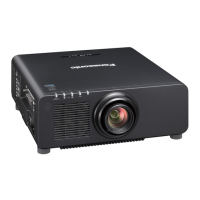
Features of the Projector
High image quality
▶ With a new-generation laser light source
and a unique optical system enhancing
the color reproduction, high luminance of
12 000 lm
*1
and high contrast of 25 000:1
*2
are achieved.
*1 When [OPERATING MODE] is set to [NORMAL]
A value for PT-REZ12.
A value for PT-REZ10 is 10 000 lm and for PT-REZ80 is
8 000 lm.
*2 When [DYNAMIC CONTRAST] is set to [3]
High extensibility and exible setup
▶ Flexibly supports various systems for the
customers by adopting the next-generation
slot specication Intel
®
Smart Display
Module and the Art-Net function. With the
lens memory function and utilizing the
characteristics of solid-state light source,
application to wide range of usage is
possible with support of all 360° direction
projection.
Long life and high reliability
▶ In addition to adopting the solid-state light
source with long life, the projector has
enhanced the dust resistance property of
the optical unit. By eliminating the lter, the
maintenance cost for long-term operation
is reduced. Also, it will contribute to the
stable operation by adopting the backup
function (HDMI input) that will continue the
projection even when the input signal is
discontinued.
Quick Steps
For details, refer to the corresponding pages.
1. Set up the projector.
(x page 42)
2. Attach the projection lens.
(x page 51)
3. Connect with external devices.
(x page 59)
4. Connect the power cord.
(x page 68)
5. Switch on the projector.
(x page 70)
6. Make initial settings.
(x page 71)
f Take this step when you switch on the
power for the rst time after purchasing the
projector.
7. Select the input signal.
(x page 80)
8. Adjust the image.
(x page 82)














 To Next Page